Quick Answer
CX workflows for revenue acceleration are automated, channel-agnostic processes designed to optimize every touchpoint across the customer journey, accelerate deals, boost expansion, and reduce churn by linking CX actions to financial outcomes through AI and workflow automation.
Revenue pressure is real. Many CX teams feel they are stuck defending budgets rather than showing growth impact. Too often, contact centers and support teams are seen as cost centers, not growth engines.
In my experience, the real issue is that revenue and CX cycles are siloed. Sales, marketing, and support don’t flow together. Without a shared workflow or unified process, revenue leaks happen at every stage.
The right approach—revenue-focused, omnichannel CX workflows, powered by automation—changes outcomes. This guide shares practical frameworks and blueprints to help you tie CX to bottom-line growth, with insights you can implement, measure, and scale.
Why CX Workflows for Revenue Acceleration Matter
CX workflows for revenue acceleration unite process automation, omnichannel engagement, and real-time data to turn customer experience into a measurable driver of business growth.
For many organizations, legacy systems split sales, support, and marketing into different teams and tools. This creates gaps: missed follow-ups, slow responses, and inconsistent handoffs that stall revenue.
When CX workflows align across silos, tie actions to metrics, and push every customer touch into one data flow, the result is not just efficiency. It’s pipeline acceleration, lower churn, and more revenue per account. A CX workflow becomes “revenue-centric” when it is mapped directly to acquisition, expansion, or retention stages—with metrics that show business impact, not just activity.
The Anatomy of CX Workflows for Revenue Acceleration
A revenue acceleration workflow in CX automation is a structured set of actions—often automated and triggered by customer or business events—that improve how fast and how well your company moves prospects and customers toward higher value outcomes.
The secret is connecting data, automation, real-time triggers, and, most importantly, people. I have seen the biggest jumps in revenue when teams build cross-functional workflows that work the same way across channels.
| Revenue Stage | Example Workflow | Key Automation | Responsible Teams |
|---|---|---|---|
| Acquisition | Lead capture, missed-call recapture | AI triage, SMS/Email follow-up | SDR, Marketing, Support |
| Expansion | Cross-sell/upsell offers at the right time | Triggered campaigns, intent detection | Customer Success, Sales |
| Retention | Proactive churn-risk follow-up | Renewal reminder, post-support follow-up | Support, Success |
Types of CX Workflows Driving Revenue Outcomes
Understanding where CX workflows fit in the revenue cycle helps you target the right process for the right outcome. Below are the most critical categories, with practical examples from real operations.
Acquisition and Onboarding Flows
Acquisition remains one of the most fragile points for revenue—where speed and context matter most. In my POV, the missed-contact problem hurts conversion rates, especially when inbound calls or web inquiries go unanswered.
- Automated lead qualification with AI agents that ask discovery questions and route hot leads to sales.
- Missed-call or chat recovery: Workflow that triggers an immediate SMS or email follow-up with a booking link or contextual message.
- Onboarding sequences: Welcome emails, tailored support triggers, and chat/SMS nudges for new customers.
What I’ve seen: Adding a missed-call recapture workflow can lift lead-to-meeting rates by 14% or more, especially in high-velocity B2B SaaS or healthcare settings.
Cross-Sell, Upsell, and Expansion Automation
For many companies, expansion is the lowest-hanging fruit—but only if you act at the right moment, in the right channel, with the right message.
- Triggered cross-sell/upsell offers based on recent support interactions or NPS scores.
- Proactive outreach sent by AI when “expansion intent” is detected—for example, a customer asking about features they do not have yet.
- Automated meeting invites or demos for high-value accounts flagged by sales intent signals.
From my years in CX, the difference between a generic upsell email and an AI-powered, intent-triggered outreach is often the difference between 2% and 15% conversion.
Retention and Win-Back Journeys
Retention is where most leaders underestimate revenue impact. I have seen CX teams reduce monthly churn by double digits—without spending more on sales—by deploying targeted retention flows.
- Churn-risk alerts: Workflow detects negative sentiment, account health drops, or repeated support contacts, triggering early intervention.
- Automated post-support follow-up, collecting CSAT, and offering quick escalation to high-risk customers.
- Automated renewal reminders timed to customer value or contract dates.
The fastest way to lose revenue is to “forget” unhappy accounts until it’s too late. A well-tuned retention workflow prevents silent churn.
Real-World Vertical Use Cases
Every industry needs its own workflow playbook. Here’s what works based on sector:
- B2B SaaS: Outbound SDR sequence where AI agents pre-qualify, followed by human-assisted meeting booking. Missed-call auto-SMS drives re-engagement for high-intent leads.
- Healthcare: Appointment triage workflow routes patients based on urgency, uses AI voice for FAQs, and kicks off SMS reminders after missed calls to fill empty slots.
Each workflow is mapped directly to a revenue stage, driving measurable results you can report to leadership.
Crafting Omnichannel, Automated CX Workflows
Automating across channels isn’t just about speed—it’s about closing the gaps where revenue slips through. The real win comes from unifying all channels into one experience, with automation triggers and conversation management that never lose context.
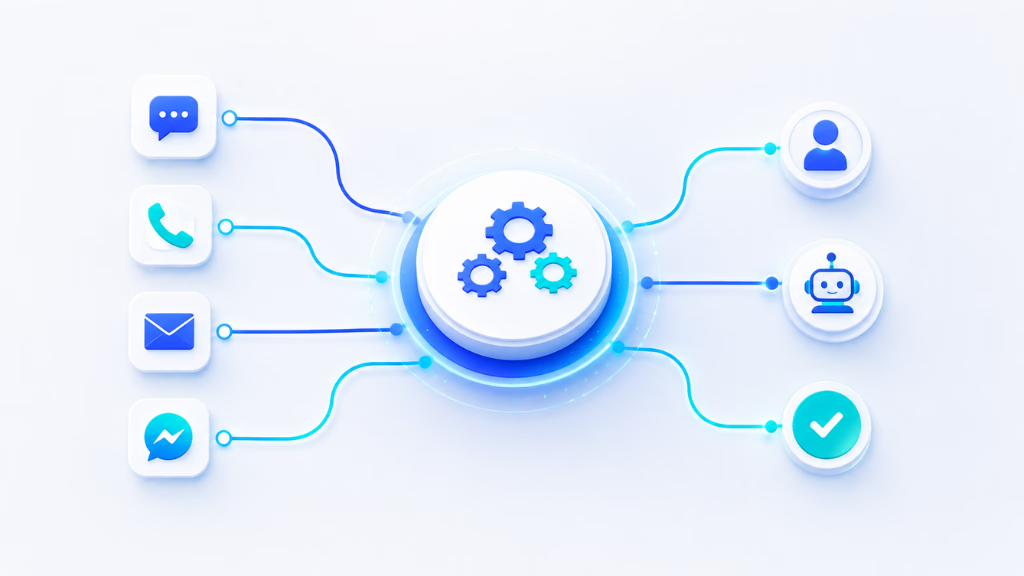
A blueprint example:
- An inbound voice call is missed.
- Workflow automation triggers: an SMS with a callback option is sent instantly, and a notification posts in the unified inbox.
- If the customer replies, an AI agent triages intent and can escalate to a team member if needed.
- Conversation continues in chat, SMS, or email—always in one unified inbox, preserving the context.
- The workflow ends when the lead connects or is routed to another journey.
In my experience, unified conversation management is where most companies struggle. When every channel feeds into one place, with AI automation routing and escalating as needed, you eliminate the manual handoff chaos.
Benefits I’ve documented:
- Faster pipeline movement.
- Fewer lost leads from missed contacts.
- Quicker issue resolution for higher CSAT.
- Revenue expansion because context is never lost.
Measuring the Impact: Linking CX Workflows to Revenue Metrics
Linking every workflow to a financial result is now non-negotiable. In my work with CX teams, the best operators measure:
- Pipeline velocity: How quickly leads go from first touch to close.
- Customer lifetime value (CLTV): How much each retained customer is worth.
- Net revenue retention (NRR): Are upsells/cross-sells outpacing churn?
- Conversion rates: At each handoff or automated step.
- CSAT and sentiment: As leading indicators for future revenue
A strong workflow impact dashboard shows not just what was automated, but what moved revenue. It combines operational data (AI handled vs. human, response times) with business numbers (new revenue, close rates, NRR).
The best practice is journey-based measurement—tagging every workflow by stage and tracking downstream outcomes. Continuous improvement loops then use this data to fine-tune triggers, messaging, and handoff timing for maximum business benefit.
Critical Success Factors and Mistakes to Avoid
Not every automated CX workflow accelerates revenue. The difference is in the design, alignment, and measurement.
Common pitfalls include:
- Over-automation that ignores customer context or skips the right human touch.
- Siloed data, so handoffs lose critical information.
- Missing escalation logic—no clear owner when AI workflows need help.
- Lack of cross-team buy-in, so metrics aren’t shared or meaningful.
Checklist for success:
- Map one workflow per revenue stage before scale.
- Validate each with a cross-functional team.
- Set clear, shared revenue metrics.
- Pilot—measure—iterate. Don’t automate everything at once.
Bringing It Together: How Unified Workflow Automation Platforms Drive Revenue Acceleration
CX automation platforms like Commplify remove the excuses for siloed, slow, or inconsistent workflows. A visual, no-code workflow builder means non-technical teams can map, test, and deploy across channels fast.
With a unified conversation inbox, every touchpoint—voice, chat, SMS, email, WhatsApp—feeds into a single thread. I’ve seen this stop the problem of leads or support tickets getting lost between tools, boosting both revenue and customer trust.
A practical snapshot:
- Missed-call recovery: When a call is missed, an AI agent triggers an SMS follow-up with a booking link.
- AI agent orchestration: Initial triage and qualification are run by configurable AI, but critical conversations escalate instantly to a person.
- Unified measurement: Dashboards show how much revenue is generated or saved by workflow automation at every stage.
For any enterprise or BPO seeking to turn CX workflows into a true growth lever, this unified, automated approach is how you get measurable, repeatable results.
Conclusion
CX workflows for revenue acceleration are not an IT project—they are a business growth strategy. The companies seeing the largest gains start by auditing their current flows, prioritize the highest-impact journeys (acquisition, expansion, retention), and bring in automation for what slows them down.
Platforms like Commplify make this real by connecting every conversation, every team, and every process through one workflow automation layer. Revenue acceleration becomes a habit, not a hope.
In my experience, the difference shows up in both the numbers and in team trust. When you can show not just better CSAT, but faster deals and less churn, the CX function earns its seat at the revenue table.
Looking forward, AI-driven CX will only raise the bar. Now is the time to make workflow-led change part of your growth DNA.
FAQs
What are CX workflows for revenue acceleration?
They are automated, omnichannel processes that align customer experience actions with revenue targets, using data and AI to optimize acquisition, expansion, and retention for measurable financial impact.
How do customer experience processes increase sales and revenue?
By reducing friction across touchpoints, automating follow-ups, and acting on intent signals, CX processes move prospects faster, increase expansion, and prevent churn, all driving higher revenue.
What types of CX workflows are most effective for revenue growth?
Acquisition/onboarding flows, cross-sell/upsell automation, and retention/win-back journeys are the most effective for linking CX actions to revenue growth.
What metrics should link CX workflows to financial outcomes?
Key metrics include pipeline velocity, customer lifetime value (CLTV), net revenue retention (NRR), conversion rates, and CSAT scores tied to revenue performance.
How does AI or workflow automation drive revenue from CX?
AI and automation speed up responses, personalize outreach, recover missed opportunities, and trigger next-best actions, converting more leads and keeping customers engaged longer.
What is the difference between revenue acceleration and revenue operations?
Revenue acceleration is about increasing the speed and outcome of revenue generation, while revenue operations focus on aligning people, processes, and tools across the entire revenue cycle.
What are best practices for building CX workflows that drive revenue?
Start with one workflow per revenue stage, involve all teams, set clear revenue metrics, automate with human backup, and iterate based on measured results.
How can businesses get started with omnichannel workflow automation?
Map the key customer journeys, choose a platform with workflow and inbox unification, automate low-risk steps, and measure impact before scaling.
How do unified conversation inboxes help improve revenue outcomes?
They prevent dropped leads and lost context, enable fast human or AI response, and allow teams to track every interaction’s revenue impact across all channels.
What are common mistakes when building CX workflows for revenue impact?
Common mistakes include over-automation, missing human escalation, data silos, weak measurement frameworks, and lack of cross-team alignment on shared KPIs.
This page was last edited on 25 June 2026, at 4:39 am