
To set up a knowledge base for your help desk, define goals, pick a future-proof platform, organize and secure content, create clear articles, enable smart search, integrate into support workflows, and maintain regular updates with feedback and analytics.
Support leaders know the pain of endless repetitive tickets and slow response times. Every scaling business faces the same wall: agents wasting time answering what’s already been solved.
I have seen help desks turn chaotic without a system to capture and serve knowledge where it’s needed. The right knowledge base is essential, not optional.
This guide delivers proven frameworks for how to set up a knowledge base for help desk, modern best practices, and tactical steps from real-world CX leaders. You’ll walk away with the confidence to build a knowledge base that empowers agents, deflects tickets, boosts customer satisfaction, and drives measurable results.
Why Setting Up a Knowledge Base for Help Desk Changes Support
A knowledge base is a structured library of answers, guides, and process documentation. In help desk operations, it’s the backbone for accurate, self-service support for both customers and agents.
In my experience, a well-built knowledge base delivers control and speed — allowing teams to scale without burning out staff. It routes simple questions away from agents and becomes the single source of truth. Businesses see lower ticket volumes, higher CSAT, and more consistency across every support channel.
Benefits to expect:
- Cuts down repetitive work and ticket floods.
- Gives instant answers to agents and customers.
- Helps scale support without growing headcount.
- Supports better onboarding for new team members.
- Lowers customer effort, boosting satisfaction and loyalty.
How to Set Up a Knowledge Base for Help Desk: Step-by-Step Process
Setting up a help desk knowledge base takes planning and the right tools. I have helped teams build these from scratch. Getting it right at the start avoids pain later. Here’s exactly how you do it.
Prerequisites, Planning, and Preparation
Every successful knowledge base begins with a solid plan. Knowing your audience and main goals will shape your KB for long-term value.
Clarify these before building:
- Is your KB for agents, customers, or both?
- Do you need it for self-service, onboarding, or speeding up ticket handling?
- Will it be public (for all users), internal (for staff only), or both?
This clarity shapes your structure and permissions. In my POV, skipping this step sets up future chaos.
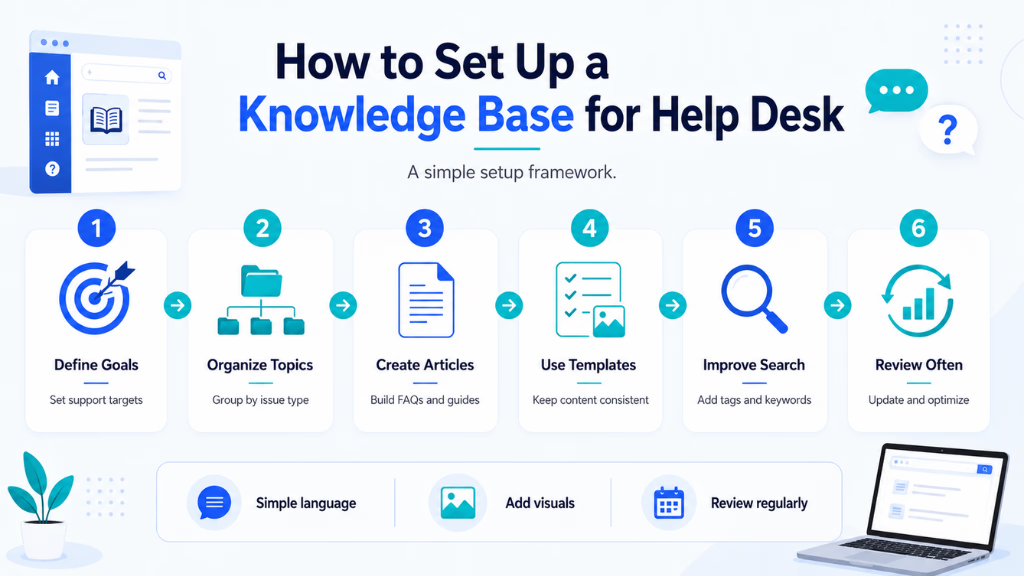
Step 1: Choose the Right Knowledge Base Platform
Platform choice determines not only what your KB can do today, but how future-proof it is.
Key features to look for:
- Permissions and role-based access
- Smart search (AI, semantic, keyword)
- Easy integrations with your help desk and ITSM tools
- Workflow automation
- Analytics and feedback tools
From what I have seen, AI-native tools offer a major jump in usability. For example, Commplify’s dual-mode knowledge base enables classic article lookup and also context-aware semantic search. This means both human agents and AI can pull answers quickly and accurately, improving support at scale.
Step 2: Structure Your Knowledge Base for Findability and Impact
Good structure is what separates a usable KB from a dumping ground. Clear categories, tagging, and role-specific access prevent confusion and error.
Start with clear categories such as:
- FAQ
- Troubleshooting
- Policies
- Process guides
Every article template should contain a purpose, step-by-step actions, and a clear outcome. Sensitive or internal-only material must be secured by granular permissions.
A better approach is to use a split knowledge base — one area for agent/internal use, another for public-facing content. Systems like Commplify support this dual model so you can manage both with confidence.
Step 3: Populate and Optimize Content
Effective KBs cover the top 50–100 real issues first. Gather data from ticket logs, CRM, or agent walk-throughs.
In my experience, the most usable articles are:
- Clear, with simple steps
- Supported by visuals (screenshots, short videos)
- Refined by regular feedback and analytics
Some teams neglect search optimization. Adding relevant keywords and synonyms, plus connecting related articles, means users find answers faster — whether they’re searching or using an AI assistant.
Using built-in analytics, like Commplify’s, lets you identify which articles are most viewed, which questions remain unanswered, and where updates are most needed. This forms the basis for continuous KB improvement.
Step 4: Deliver Knowledge Across All Support Channels
Modern support is channel-agnostic. Your KB should serve up answers via chat, voice, email, SMS, WhatsApp, or any other channel your customers use.
What you want is instant knowledge delivery, wherever people reach out. This is where omnichannel conversation management matters. Platforms like Commplify enable knowledge to surface through every channel, binding the KB to AI agents, human agents, and self-service bots. This means users — and your support teams — never waste time or context.
Step 5: Maintain, Govern, and Measure Knowledge Base Success
Your KB is never “done.” Momentum comes from clear review cadences, content aging alerts, and established ownership for updates.
Use analytics to measure:
- Search success vs. failure rates
- Article usage and helpfulness
- Ticket deflection from KB entry points
- Content gaps and high-traffic areas
Automation helps here — for example, triggering update requests when users rate an article as unhelpful. Commplify’s Knowledge Intelligence pairs analytics with workflow tools to close feedback loops, helping you build a knowledge base that gets better over time.
Common Mistakes and Key Considerations When Building Your Knowledge Base
I have seen a knowledge base fail when teams view it as a one-time project instead of a living system. Other common pitfalls include over-complicating the structure, ignoring permissions, or not tracking if the content is even helping.
Watch out for these mistakes:
- Neglecting content reviews and updates
- Building a complicated category/tag hierarchy that confuses users
- Failing to enable omnichannel or self-service access
- Not collecting feedback or measuring KB impact
- Forgetting permissions for internal vs. external content
The Modern Help Desk Knowledge Base: Why Platform Choice Matters
A modern knowledge base must do more than serve as a web portal; it needs to drive value on every support channel and work for both AI and human agents.
Platforms like Commplify solve these needs with dual knowledge modes — traditional article injection or smart semantic search — so both agents and AI always find the right answer. Bound knowledge bases mean the same trusted content is available in chat, voice, email, SMS, or WhatsApp, all tracked and measured in one place.
With omnichannel access and unified analytics, help desks can finally break information silos, provide faster resolutions, and measure what works — without shifting between disconnected tools or manual monitoring.
Conclusion
Building a world-class knowledge base for your help desk is not just about documentation. It is about building the foundation for efficient, scalable, and satisfying customer support.
When you plan your structure, pick a platform that enables omnichannel access, and maintain continuous improvement cycles, your support team gains control and agility. Customers and agents both get more accurate, faster answers, reducing ticket volume and agent fatigue.
Tools that offer Knowledge Intelligence, like Commplify, tighten this loop further — letting knowledge flow instantly wherever needed and spotlighting real impact through analytics. As support channels continue to multiply and customer expectations rise, the right knowledge base will be the support backbone your team needs.
Lead the shift toward smarter, more responsive CX by investing in a knowledge base that grows and adapts as you do.
FAQs
What is a knowledge base in help desk support?
A knowledge base is a central library of answers, guides, FAQs, and documentation used by support agents and customers to solve common issues efficiently.
Why does my help desk need a knowledge base?
A knowledge base reduces repetitive tickets, improves response speed, enables customer self-service, and keeps support information consistent and up to date.
Should I build an internal or customer-facing knowledge base (or both)?
Build internal for agents and processes, customer-facing for end-users. Many teams need both, with clear permissions and structures to avoid confusion.
Which platform is best for creating a knowledge base for help desks?
The best platform matches your needs for access control, AI-powered search, multi-channel delivery, integration, and analytics. AI-native options like Commplify excel for modern needs.
How should I organize and structure my knowledge base for easy navigation?
Use clear categories (FAQs, troubleshooting, policies), tags, and role-based access. Split internal and external content, and use consistent templates for all articles.
What are best practices for writing knowledge base articles?
Keep articles short, actionable, and clear. Use visuals where possible. Start with common issues, and refine articles using feedback and usage data.
How do I keep my knowledge base up to date?
Schedule regular reviews. Set up content aging alerts. Use feedback and analytics to identify articles needing updates or rewrites.
How can I measure if my knowledge base is actually helping?
Track search effectiveness, article usage rates, ticket deflection, and user feedback. Use analytics dashboards to spot patterns and gaps.
How do I integrate my knowledge base into my support workflows?
Choose tools that allow your knowledge base to connect with ticketing, chat, voice, and email — so agents and customers can access answers natively.
What common mistakes should I avoid when setting up a help desk knowledge base?
Don’t skip planning or permissions. Avoid over-complicated structures. Update content often. Collect feedback, and don’t ignore omnichannel and self-service access.
This page was last edited on 31 July 2026, at 5:06 am