To train an AI support agent on company-specific knowledge, prepare and organize key documents, upload them using a smart CX platform, configure agent access and persona, test on live scenarios, and set up regular knowledge updates with analytics monitoring.
Support leaders know the risk of letting generic AI handle nuanced customer questions. One wrong answer can erode trust, risk compliance, or create more manual escalations than it solves.
I have seen many teams struggle to align out-of-the-box AI with real, evolving business needs—especially across multiple channels or departments. Getting it “brand-right” is a real challenge.
This guide walks you through how to train an AI support agent on company-specific knowledge, in practical steps. You‘ll leave with a proven playbook that makes your agent as reliable, confident, and current as your best human rep.
What Does It Mean to Train an AI Support Agent on Company-Specific Knowledge?
Training an AI support agent on company-specific knowledge means teaching an AI-powered support system to understand and use your business information, including products, services, policies, workflows, and customer interactions. This allows the AI agent to provide accurate, relevant, and personalized responses based on your company’s own data instead of relying only on general AI knowledge.
Unlike a standard chatbot that provides generic answers, a trained AI support agent can access your knowledge base, understand customer intent, follow your support guidelines, and resolve questions based on your actual business processes.
For example, an online store can train its AI support agent with product details, shipping rules, and return policies, while a SaaS company can provide software documentation, troubleshooting guides, and account management processes.
How to Train Your AI Support Agent on Company-Specific Knowledge
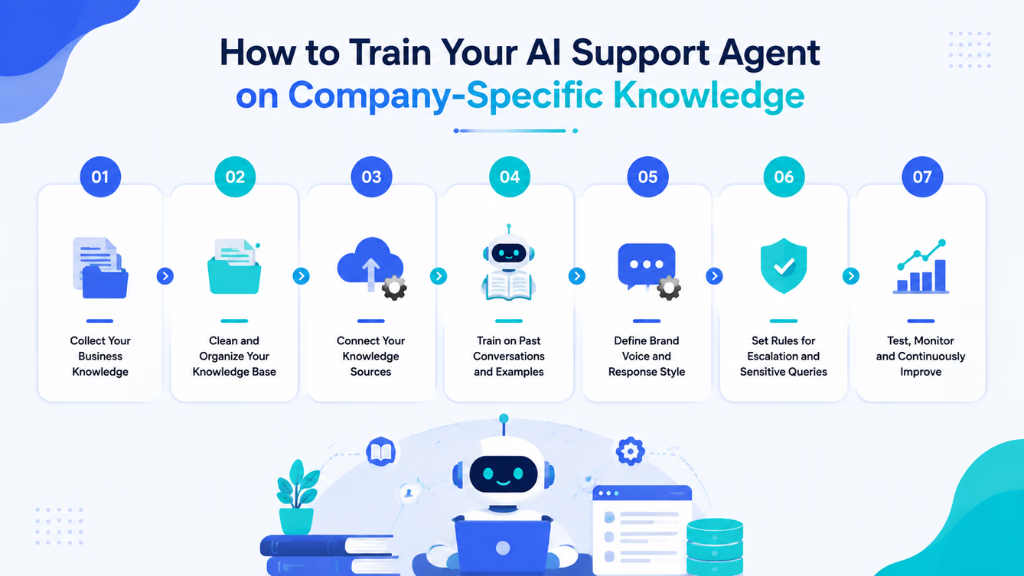
Adapting AI to your company’s voice and policies requires more than copy-pasting FAQs into a chatbot. As a CX advisor, I have seen the best outcomes when teams follow a clear, repeatable method that includes knowledge preparation, secure ingestion, persona setup, testing, and ongoing refinement.
Prerequisites and Requirements
Start by getting the right groundwork in place. You will need:
- Up-to-date internal documents (policies, SOPs, product manuals, escalation workflows)
- Subject matter experts (SMEs) who own this knowledge
- IT or platform access to manage uploads
- Approval to handle role-based permissions and data governance
Before you train your agent, clarify who will review knowledge, who updates it, and how you handle sensitive or regulated information.
Step 1: Gather and Structure Company Knowledge
Pull together all documentation your AI agent will need. In my experience, this step is where most projects underperform.
Include:
- Policies (returns, privacy, compliance)
- Product documentation and feature lists
- Process workflows (ordering, onboarding, escalation)
- Existing FAQs and help articles
Organize documents with clear titles and logical folder structures. Add version and owner details for each file. Prepare sensitive content with role-based access tags, so the AI only sees what it should per department or channel.
Step 2: Ingest and Upload Knowledge to Your AI Platform (Knowledge Intelligence)
Now, upload and ingest your knowledge into the AI platform. You have options:
- Bulk upload of PDFs, docs, or articles
- Knowledge base sync (if you use systems like Confluence, Zendesk)
- API import for live data
Advanced systems like Commplify let you choose between direct context injection (AI reads the articles every time) or smart vector search (AI finds the most relevant snippet as needed). Always tag documents by topic, team, or product line and use version control so you can roll back updates if needed.
Step 3: Configure Agent Persona, Access, and Instructions (AI Agent Configuration)
This step customizes your agent’s “voice” and what it knows.
Set up:
- Tone and language (formal, friendly, localized)
- Escalation triggers and fallback rules
- Which knowledge each agent can access (e.g., sales vs. support, voice vs. chat)
- Multi-agent configs: assign specific instructions and knowledge for each channel or use case
A better approach, especially for enterprise teams, is mapping knowledge by both agent and channel. For instance, healthcare agents answering on voice may need stricter compliance responses than those handling social chat.
Step 4: Test, Validate, and Improve AI Knowledge Responses
Before going live, run scenario-based tests. Use real customer queries and try to “trick” the AI with edge cases. I have seen teams miss this step and suffer public knowledge failures.
Key points:
- Have SMEs roleplay real conversations
- Log ambiguous or “hallucinated” AI responses
- Check for missed escalation triggers and compliance flags
Test across all channels: voice, email, chat, SMS, and WhatsApp. Not every customer asks questions the same way everywhere.
Step 5: Establish Ongoing Maintenance and Knowledge Updates
AI knowledge must keep pace with your business. Set up a regular update and review process:
- Assign owners (often SMEs) for each knowledge topic
- Run scheduled reviews and version audits
- Collect feedback from real conversations
- Monitor analytics for gaps—did AI escalate too often, or miss a new process?
Continuous improvement means your AI stays brand-right, correct, and trustworthy as your company evolves.
You now have a trained, business-ready AI support agent—equipped to handle your company’s specific workflows, policies, and language.
How Does AI Learn Company-Specific Knowledge?
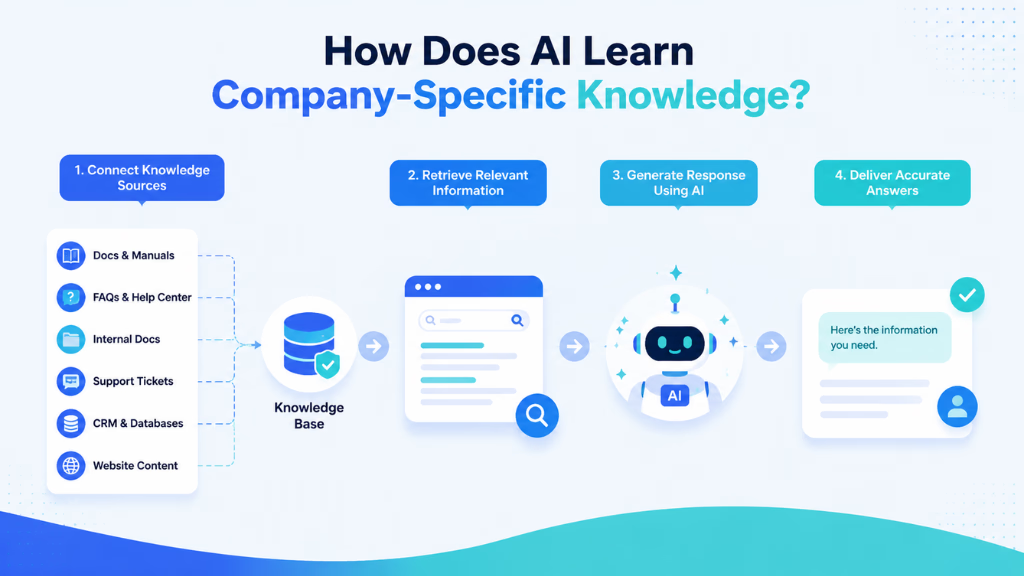
AI support agents learn company-specific knowledge by connecting with a business’s existing information sources and using them to generate more accurate and relevant responses. Instead of manually training an AI model from scratch, most modern AI support systems use techniques like retrieval-augmented generation (RAG), knowledge base integration, and workflow training to understand company information.
The process usually involves three key steps:
1. Connecting AI With Business Knowledge Sources
The AI agent first accesses company information from trusted sources, such as:
- Website pages
- Help center articles
- Product documentation
- FAQs
- Internal documents
- CRM records
- Support tickets
- Policy guidelines
These sources act as the AI agent’s knowledge base. When a customer asks a question, the AI searches this information to find relevant details before creating a response.
For example, if a customer asks, “Can I change my subscription plan?” the AI agent can look up the company’s pricing rules, upgrade process, and account policies to provide an accurate answer.
2. Using Retrieval-Augmented Generation (RAG)
Most AI support agents do not permanently store every company detail inside the AI model. Instead, they use retrieval-augmented generation (RAG) to retrieve the right information at the right time.
With RAG, the AI agent:
- Understands the customer’s question
- Searches the connected knowledge sources
- Retrieves the most relevant information
- Generates a response based on that information
This approach helps reduce AI hallucinations because the agent responds using verified company data instead of making assumptions.
It also makes updates easier. When a company changes its refund policy or launches a new product, teams can update the knowledge base without rebuilding the entire AI system.
3. Teaching AI Support Workflows and Business Rules
Company knowledge is not only about information; it is also about how tasks should be completed.
Businesses can train AI agents with specific workflows, such as:
- How to handle customer complaints
- When to offer refunds or replacements
- How to qualify sales leads
- When to transfer conversations to human agents
- What information to collect before solving an issue
For example, a healthcare company may train its AI support agent to answer appointment-related questions, collect patient details, and escalate medical concerns to staff members instead of providing unsupported advice.
4. Improving AI Through Real Customer Interactions
AI support agents become more effective when businesses analyze real customer conversations and continuously improve their knowledge.
Teams can review:
- Frequently asked questions
- Unresolved conversations
- Customer feedback
- Common mistakes
- Successful support responses
These insights help identify knowledge gaps and improve the AI agent’s ability to handle future conversations.
By combining company data, retrieval systems, business rules, and continuous optimization, AI support agents can become highly specialized assistants that understand a company’s products, customers, and support processes.
Common Mistakes and Pitfalls When Training AI Support Agents
Many organizations stumble by treating AI knowledge training as a one-time job. The most common mistakes I have seen in support operations include:
- Relying on incomplete or outdated documentation
- Uploading files without structure, making retrieval unreliable
- Allowing knowledge bases to go stale
- Overlooking multi-channel nuances (e.g., escalation for voice calls vs. chat)
- Ignoring analytics, so performance and errors go unseen
Avoiding these can save weeks of troubleshooting and rebuilds.
How Commplify Supports AI Training on Company-Specific Knowledge
In my POV, platforms like Commplify make this whole process smoother for enterprise CX teams. Commplify’s Knowledge Intelligence lets you ingest all company documentation—policy manuals, product FAQs, escalation workflows—and update them as your business grows.
With its AI Agent Configuration, each agent gets assigned the right knowledge, persona, and reply instructions for each support channel. Testing tools let you check how responses perform in live-like scenarios. Real-time analytics surface where AI gets it right and where a human should step in.
Commplify helps your agents stay accurate, consistent, and ready for any customer touchpoint.
Conclusion
Training an AI support agent on company-specific knowledge isn’t just a checklist—it’s how you turn automation into real brand value and operational control. By blending structured documentation, secure ingest, smart configuration, and continuous improvement, you set your AI agent up to truly speak for your business.
In my experience, teams that get this right see fewer escalations, higher customer satisfaction, and less busywork for human reps. Solutions with built-in Knowledge Intelligence, like Commplify, make the ongoing work of updating and auditing knowledge much simpler for busy support operations.
As AI in CX keeps evolving, companies with a disciplined approach to knowledge training will have a clear edge. Your AI agent is only as good as the knowledge you give it—so make every answer count.
FAQs
What does ‘company-specific knowledge’ mean for an AI support agent?
It means all the unique policies, processes, workflows, and product details only your company uses, not public web or general business info.
How do I upload my company’s policies or product info into the AI agent?
Upload documents or sync your knowledge base using supported formats like PDF, DOCX, or APIs inside your AI platform’s admin panel.
What formats should internal documents or knowledge bases be in?
Most AI platforms accept PDF, DOCX, TXT, HTML, or link-based knowledge bases. Use structured, clearly labeled files for best results.
How do I update the AI’s knowledge as our company changes?
Use your AI platform’s knowledge update function to upload new materials or sync fresh versions. Schedule regular SME reviews to keep answers current.
How can I tell if the AI understands and applies the information correctly?
Test with real-world queries and scenario walkthroughs. Use analytics to check AI accuracy, escalation rates, and feedback from live support sessions.
Is it possible to give different knowledge to different AI agents or departments?
Yes, advanced platforms let you assign knowledge sets and instructions by agent, department, or support channel for full control.
Do I have to retrain the AI every time we change a process or FAQ?
No. With retrieval-based systems, just update or replace the relevant documents—the AI pulls the newest info for each request.
How do data privacy and compliance concerns impact training an AI support agent?
You must limit access to sensitive knowledge, use role-based permissions, and comply with data handling rules during both upload and delivery.
What are best practices for ongoing maintenance and improvement?
Assign knowledge owners, set a regular review schedule, monitor analytics, respond to feedback, and keep version control on all updates.
What tools/platforms can help automate this process for enterprise teams?
Platforms like Commplify automate knowledge ingestion, updating, agent assignment, testing, and analytics at scale for enterprise support operations.
This page was last edited on 2 September 2026, at 4:37 am