Integrating AI agents for outbound calls with Salesforce automates call workflows, logs data, enables real-time analytics, and synchronizes sales activity across platforms—improving outbound efficiency, conversation intelligence, and CRM data accuracy.
Operations teams are under pressure to scale outbound efforts without drowning reps in admin work or risking CRM chaos. Manual call logging, fragmented follow-ups, and spotty analytics hold back sales and CX leaders aiming for predictable growth. In my experience, these silos quietly erode both pipeline momentum and customer experience.
The AI agent for outbound calls integration with Salesforce promises a real shift: from scattered activity to integrated, insight-rich engagement. But most teams I’ve worked with struggle to bring these platforms together into one smooth outbound workflow.
This guide explains the practical steps, caveats, and business outcomes of modern AI outbound calling integrations. You’ll gain an operator’s perspective on tying together your sales stack—plus actionable, future-ready options for your team.
What Is an AI Agent for Outbound Calls With Salesforce Integration?
An AI agent for outbound calls with Salesforce integration is a voice AI system that can automatically call leads or customers while using Salesforce CRM data to guide the conversation.
Instead of uploading a contact list into a separate dialer and manually entering the results afterward, the AI agent connects directly with Salesforce. It can pull information about a lead before placing the call, have a natural voice conversation, qualify the prospect, schedule a meeting, and then update the relevant Salesforce record automatically.
For example, when a new qualified lead enters Salesforce, the workflow can look like this:
New Salesforce lead → AI call triggered → CRM data retrieved → AI speaks with lead → lead qualified → meeting booked → Salesforce updated → sales rep notified
Modern integrations increasingly work in both directions. The AI agent reads Salesforce data before or during the conversation and writes call outcomes, notes, tasks, dispositions, and other information back to the CRM afterward. Retell, for example, documents support for Salesforce Leads, Contacts, Accounts, Opportunities, Cases, and custom objects, while Salesforce itself allows automated outbound voice calls to be initiated through Flow.
This makes the AI voice agent part of the sales workflow rather than another disconnected calling application.
How Does an AI Outbound Calling Agent Integrate With Salesforce?
The integration typically combines Salesforce automation, CRM data, telephony, conversational AI, and post-call workflow automation.
1. Salesforce Identifies Who Should Be Called
The process normally begins with a Salesforce event or predefined condition.
For example, an outbound call can be triggered when:
- A new lead is created
- A lead reaches a specific score
- Someone submits a demo request
- An opportunity becomes inactive
- A prospect has not responded to previous outreach
- A trial is about to expire
- A customer reaches a renewal date
- An appointment requires confirmation
- A previous call requires follow-up
Salesforce Flow can automatically initiate outbound workflows when these conditions are met. Salesforce’s own Voice capabilities now support automated outbound calls initiated directly from Flow.
2. The AI Agent Retrieves Salesforce Context
Before dialing, the AI agent can retrieve information that will make the conversation more relevant.
Depending on the integration, this may include:
- Lead or contact name
- Company
- Job title
- Lead source
- Account information
- Opportunity stage
- Product interest
- Previous call activity
- Last contact date
- Assigned sales representative
- Campaign source
- Existing cases
- Custom Salesforce fields
This is one of the biggest differences between a basic automated dialer and a Salesforce-connected AI agent.
Instead of beginning every call with a generic script, the AI can understand who it is calling and why.
For instance:
“Hi Sarah, I’m calling regarding the demo request you submitted for our enterprise plan.”
is considerably more relevant than:
“Hi, I’m calling to see whether you’re interested in our services.”
3. The AI Places and Handles the Call
Once the record is retrieved, the system initiates the outbound call through its telephony infrastructure.
Modern voice agents combine:
- Speech recognition
- Large language models
- Text-to-speech
- Conversation logic
- Knowledge bases
- CRM information
- Business rules
This allows the conversation to adapt rather than follow one rigid recorded script.
Depending on the use case, the agent could:
- Introduce the company
- Verify the prospect
- Ask qualification questions
- Explain a product or service
- Answer common questions
- Handle predefined objections
- Check interest
- collect additional information
- Schedule an appointment
- Transfer a high-intent prospect
- Create a follow-up request
4. Salesforce Is Updated Automatically
The integration should then return structured information to Salesforce.
Common write-back data includes:
| AI Call Data | Salesforce Destination |
|---|---|
| Call outcome | Activity/Task |
| Qualification status | Lead Status |
| Prospect information | Lead/Contact |
| Conversation summary | Activity/Note |
| Full transcript | Activity or custom object |
| Meeting booked | Event |
| Lead score | Standard/custom field |
| Follow-up date | Task |
| Interest level | Custom field |
| Opportunity information | Opportunity |
| Call recording URL | Task/custom field |
The important feature here is bidirectional synchronization. Salesforce should not simply send contacts to the calling platform; the voice platform should return useful conversation data to Salesforce as well.
5. Salesforce Triggers the Next Action
Once the call is completed, the result can start another Salesforce workflow.
For example:
- Interested lead → assign to SDR → create follow-up task → send Slack/email notification
- Meeting booked → create Salesforce Event → update Lead Status → notify account owner
- Not interested → update disposition → remove from sequence
- Call me next month → create future task → suppress calls until follow-up date
- Do not call → update suppression field → exclude from future campaigns
This closed-loop automation is where Salesforce integration becomes especially valuable.
Best AI Agents for Outbound Calls That Integrate With Salesforce
There is no single platform that fits every Salesforce environment. Some are designed for fully autonomous AI conversations, while others focus more heavily on enterprise contact-center workflows or AI-assisted human calling.
Here are several leading options currently offering Salesforce-related calling capabilities.
1. Commplify: Best for Omnichannel AI Outbound Calling and Salesforce Workflows
Commplify is a strong option for businesses that want Salesforce-connected AI calling to work as part of a broader customer journey rather than as a standalone voice bot.
The platform connects with Salesforce and other enterprise systems while bringing calls, chat, email, SMS, and other customer interactions into an AI-driven orchestration layer. This makes it useful when an outbound call needs to trigger additional actions across multiple channels or move seamlessly from AI to a human sales or support representative.
For example, a Salesforce lead could enter an automated workflow, receive an AI-powered outbound call, have its intent or qualification status captured, and then move into a follow-up workflow involving a human representative or another communication channel.
Key strengths:
- Salesforce and enterprise CRM integrations
- AI-powered voice interactions
- Automated lead qualification
- Omnichannel workflow orchestration
- AI-to-human handoff
- Intent and context detection
- Post-interaction automation
- Integration with existing business systems
Commplify is particularly relevant for organizations that want to connect outbound AI calls with the wider sales and customer experience workflow instead of managing voice automation in isolation.
2. Salesforce Agentforce Voice
Best for: Companies already deeply invested in Salesforce
Agentforce Voice is Salesforce’s native conversational voice AI offering. Because it operates within the Salesforce ecosystem, it can use Salesforce CRM information and take actions such as updating records, triggering workflows, creating cases, or connecting with external APIs.
Salesforce also supports automated outbound voice calls initiated through Flow, allowing businesses to build proactive calling workflows for scenarios such as reminders, notifications, service updates, and AI-led conversations.
Key strengths:
- Native Salesforce environment
- Salesforce Flow automation
- Real-time CRM context
- CRM record updates
- Workflow execution
- Native or partner telephony options
- Easier governance for Salesforce-centric enterprises
Agentforce Voice makes the most sense when Salesforce is already the operational center of the sales or service infrastructure.
3. Synthflow AI
Best for: No-code or low-code Salesforce voice automation
Synthflow provides a Salesforce integration specifically designed to connect AI voice agents with CRM workflows.
Businesses can install its Salesforce app, trigger AI-powered calls through Salesforce Flows, and use custom actions to interact with Salesforce APIs. Synthflow also supports separate Production and Sandbox connections for testing before deployment.
The platform is particularly relevant for outbound use cases such as dormant lead reactivation, automated qualification, appointment scheduling, and follow-up campaigns.
Key strengths:
- Salesforce Flow-triggered AI calls
- Automated outbound conversations
- Contact and field updates
- Salesforce API actions
- Sandbox testing
- Low-code deployment
4. Retell AI
Best for: Teams requiring flexible APIs and custom AI voice workflows
Retell AI offers a native Salesforce integration that allows its voice agents to access CRM information before conversations and write results back afterward.
Its documented Salesforce integration can work with:
- Contacts
- Leads
- Accounts
- Opportunities
- Cases
- Custom objects
It can also write call dispositions, summaries, Tasks, and Notes into Salesforce.
This makes Retell particularly suitable for technical teams that want more control over the outbound calling workflow while still maintaining Salesforce as the system of record.
Key strengths:
- Native Salesforce connector
- Bidirectional data synchronization
- Standard and custom Salesforce objects
- API-first architecture
- Custom field mapping
- Workflow automation
- Strong developer flexibility
5. JustCall AI Voice Agent
Best for: Sales teams combining AI calling with business telephony
JustCall’s AI Voice Agent connects with Salesforce and supports both sales and service automation.
Its Salesforce integration can synchronize AI call information, create or update CRM records, log activities, attach recordings, and trigger workflows based on conversation outcomes. JustCall also specifically supports AI-driven outbound calls for lead qualification and categorization.
Key strengths:
- Native Salesforce integration
- Outbound AI lead qualification
- Automatic call logging
- Call summaries and transcripts
- CRM workflow triggers
- Scheduling and call transfers
- Sales telephony in the same platform
JustCall can be especially useful for teams that want human calling and AI voice automation within a broader phone system.
6. Regal
Best for: Enterprise outbound customer engagement
Regal combines calling, messaging, customer journeys, and AI agents.
Its Salesforce integration synchronizes contacts, leads, accounts, opportunities, and events between the platforms. Changes in Salesforce can also be used to trigger outreach through Regal, while call and messaging information is sent back to Salesforce.
Regal additionally provides dedicated routing for outbound calls handled by AI agents.
Key strengths:
- Salesforce-triggered outreach
- AI voice agents
- Journey-based automation
- Lead and opportunity synchronization
- Outbound call routing
- Calls and SMS
- Enterprise-oriented workflows
| Platform | Best For | Salesforce Integration | Autonomous AI Calls |
|---|---|---|---|
| Commplify | Omnichannel outbound AI + Salesforce workflows | Salesforce + enterprise integrations | Yes |
| Salesforce Agentforce Voice | Salesforce-first organizations | Native Salesforce | Yes |
| Synthflow | No-code AI voice automation | Salesforce app + Flow/API | Yes |
| Retell AI | API-driven/custom voice agents | Native connector + API | Yes |
| JustCall | Sales calling + AI automation | Native integration | Yes |
| Regal | Enterprise customer engagement | Native Salesforce sync | Yes |
A traditional AI dialer such as Orum is another option when the goal is to increase human SDR calling productivity rather than let an autonomous agent conduct the entire conversation. Orum can pull Salesforce reports for dialing and sync activity back into Salesforce, but its core dialer is primarily designed to connect human representatives with live prospects.
Common Outbound Calling Use Cases in Salesforce
Salesforce-connected AI outbound calling can support much more than basic sales prospecting. Businesses can use it to automate lead follow-up, qualification, appointment booking, reactivation, renewals, reminders, and other repetitive calling workflows while keeping customer data and call outcomes synchronized with the CRM.
Speed-to-Lead Calling
A high-intent lead submits a form and enters Salesforce.
Instead of waiting for an SDR to notice the record, Salesforce immediately triggers the AI voice agent.
The AI can:
- Call the prospect
- Confirm their request
- Ask qualifying questions
- Schedule a demo
- Update Salesforce
- Assign the qualified opportunity to a representative
This can be particularly useful for businesses generating large numbers of inbound leads.
Automated Lead Qualification
Sales teams often spend significant time determining whether leads are worth pursuing.
An AI agent can handle the first qualification conversation by asking questions about:
- Business requirements
- Company size
- Location
- Use case
- Budget range
- Purchasing timeline
- Existing solution
- Decision-making process
The answers can then update Salesforce fields or lead scores.
Human SDRs can concentrate on leads that meet predefined qualification criteria.
Dormant Lead Reactivation
Many Salesforce databases contain thousands of older leads that received only limited follow-up.
Instead of assigning SDRs to manually work through the entire list, Salesforce can identify eligible dormant prospects and send them into an AI calling workflow.
The agent can determine whether the prospect is still interested, update outdated information, schedule a conversation, or classify the record appropriately.
Synthflow, for example, specifically positions Salesforce-triggered outbound voice agents for reviving dormant leads.
Appointment and Demo Booking
The AI can check calendar availability during a call and schedule a meeting when the prospect agrees.
The booking can then:
- Create a Salesforce Event
- Associate it with the Contact or Lead
- Assign the meeting owner
- Update the Lead Status
- Send confirmation
- Trigger reminder workflows
Renewal and Customer Follow-Up
Outbound AI calling does not need to be limited to prospecting.
Businesses can also trigger calls based on existing Salesforce customer records for:
- Renewal reminders
- Subscription expiration
- Appointment confirmation
- Service follow-up
- Customer onboarding
- Payment notifications
- Customer satisfaction checks
No-Show Recovery
If a prospect misses a scheduled appointment, Salesforce can trigger an outbound AI call.
The agent can ask whether they want to reschedule, check calendar availability, book another time, and update the Salesforce record without requiring an SDR to chase every no-show.
Benefits of Integrating AI Outbound Calling With Salesforce
Connecting the AI calling agent directly with Salesforce provides substantially more value than running the two systems independently. This becomes more useful when the AI calling platform also supports intelligent handoff.
For example, Commplify combines intent detection with AI-to-human routing, so a high-value Salesforce lead can move from an automated interaction to the appropriate representative when human involvement is needed.
Faster Lead Follow-Up
Salesforce events can start calls automatically instead of waiting for a representative to review a queue manually.
Less Manual CRM Work
Call logging, notes, lead status changes, follow-up tasks, and other routine updates can happen automatically after each conversation.
More Personalized Conversations
The AI can use Salesforce fields and customer history to adjust the conversation to the individual prospect rather than reading the same generic pitch to everyone.
Consistent Qualification
Every lead can be asked the same required qualification questions, making Salesforce data more structured and easier to compare.
Scalable Outbound Campaigns
A business can increase outbound calling capacity without increasing its SDR team at the same rate.
Better Salesforce Data Quality
Rather than relying on representatives to remember and manually enter every conversation detail, structured information can be written into the CRM automatically.
Faster Human Follow-Up
When an AI agent identifies a high-intent prospect, Salesforce can instantly create a task or notify the appropriate sales representative.
Features to Look for in a Salesforce AI Outbound Calling Agent
Not every platform advertising a “Salesforce integration” provides the same level of integration.
Before selecting a platform, check whether it supports the following.
Bidirectional Salesforce Sync
The system should both retrieve and update Salesforce information.
One-way integrations that simply upload a call recording after the conversation offer much less automation.
Salesforce Flow Triggers
Ideally, a Salesforce Flow or CRM event should be able to initiate an AI call automatically.
Standard and Custom Object Support
Verify support for the Salesforce objects your organization actually uses, such as:
- Leads
- Contacts
- Accounts
- Opportunities
- Tasks
- Events
- Cases
- Campaigns
- Custom objects
Custom Field Mapping
Enterprise Salesforce environments often contain many custom fields.
The integration should allow AI-collected information to be mapped into those fields instead of forcing everything into generic call notes.
Real-Time CRM Lookup
The agent should ideally retrieve important Salesforce information immediately before or during the conversation.
Automatic Call Summaries
A concise AI-generated summary allows the next representative to understand the conversation without listening to the entire recording.
Call Transcripts and Recordings
Transcripts and recordings can help with quality assurance, coaching, dispute investigation, and compliance processes where legally appropriate.
Appointment Scheduling
If meeting generation is the objective, make sure the agent can access the appropriate calendars and create meetings without requiring manual intervention.
Human Transfer
The AI should recognize situations where a sales representative should take over.
For example:
High purchase intent detected → transfer to account executive
Sandbox Testing
For larger Salesforce environments, sandbox support is particularly important.
It allows the RevOps or Salesforce team to test field mappings, Flow triggers, permissions, and write-back behavior without affecting live customer records.
Both Synthflow and Regal recommend or support Salesforce sandbox testing in their integration documentation.
How to Set Up an AI Outbound Calling Agent with Salesforce
Although implementation differs between providers, most Salesforce integrations follow a similar process.
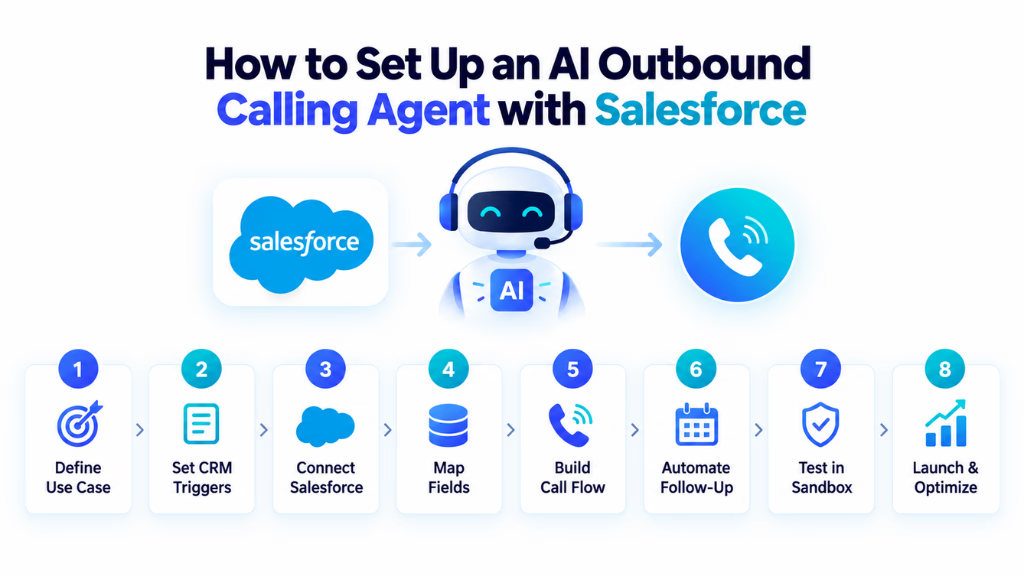
Step 1: Define the Outbound Use Case
Avoid beginning with “we want AI calling.”
Define one measurable workflow first.
For example:
Call inbound demo leads within five minutes, qualify them using four questions, book qualified leads with an AE, and update Salesforce automatically.
This makes the integration easier to design and measure.
Step 2: Identify Salesforce Trigger Conditions
Determine exactly what should cause a call.
Examples include:
Lead Status = New
Lead Score > 70
Demo Requested = True
Last Activity > 60 Days
Renewal Date = 30 Days Away
Clear trigger conditions prevent inappropriate or unnecessary calling.
Step 3: Connect Salesforce Securely
Most modern integrations use OAuth-based authentication.
Configure only the Salesforce permissions the AI platform actually needs and determine which objects and fields the integration can access.
Step 4: Map Salesforce Fields
Create a clear mapping between Salesforce and the voice agent.
For example:
Before the call
- FirstName → Prospect name
- Company → Company name
- Product_Interest__c → Product
- LeadSource → Acquisition source
After the call
- Qualification_Result → Lead Status
- Call_Summary → Activity
- Interest_Level → Custom field
- Next_Follow_Up → Task
- Meeting_Time → Event
Step 5: Build the Conversation Logic
Define:
- Opening
- AI identification where required
- Qualification questions
- Knowledge the agent can use
- Objection rules
- Actions the AI can execute
- Restricted topics
- Human escalation conditions
- Call-ending conditions
- Opt-out handling
Do not attempt to make the agent capable of answering absolutely everything. Clear operational boundaries usually produce more reliable conversations.
Step 6: Configure Post-Call Automation
Determine what Salesforce should do for each disposition.
For example:
| Outcome | Salesforce Action |
|---|---|
| Qualified | Update status + create AE task |
| Meeting booked | Create Event + notify owner |
| Follow up later | Create future Task |
| Wrong number | Update phone status |
| Not interested | Update disposition |
| Do not call | Add to suppression process |
| Needs human | Assign immediately |
Step 7: Test in a Salesforce Sandbox
Test different scenarios, not just successful calls.
Check what happens when:
- The prospect answers
- Voicemail answers
- The number is invalid
- The prospect refuses
- The lead asks an unexpected question
- Salesforce contains incomplete data
- A custom field is missing
- The calendar is unavailable
- The prospect requests a human
- The prospect asks not to be called again
Step 8: Launch Gradually
Start with a limited campaign or qualified segment rather than immediately enabling the AI across the entire Salesforce database.
Review the first batch of calls and improve prompts, qualification rules, field mappings, and Salesforce automations before expanding the campaign.
Track These KPIs Inside Salesforce
Call volume alone does not indicate whether an AI outbound program is successful.
Sales and RevOps teams should monitor metrics such as:
- Calls attempted
- Answer rate
- Conversation rate
- Qualification rate
- Meeting booking rate
- Qualified opportunities generated
- Human transfer rate
- Follow-up completion rate
- Opt-out rate
- Calls per qualified opportunity
- Cost per qualified lead
- Opportunity conversion rate
- Pipeline generated
- Revenue influenced
Because the call results are synchronized with Salesforce, these metrics can be connected with downstream opportunity and revenue data rather than measured only inside the AI calling platform.
That allows teams to answer the more important question:
Are AI outbound calls actually creating qualified pipeline?
Salesforce AI Outbound Calling Compliance and Security
Compliance should be designed into the workflow before outbound AI calling begins.
Requirements vary according to the country, call type, recipient, industry, and technology being used.
For U.S. consumer calls, this is particularly important. The FCC has ruled that AI-generated voices fall within the TCPA’s treatment of artificial or prerecorded voices, meaning applicable consent requirements continue to apply to AI-generated calls.
The FTC’s Telemarketing Sales Rule also includes requirements involving Do Not Call requests, calling hours, Caller ID, prerecorded telemarketing calls, opt-outs, and recordkeeping.
A Salesforce-based outbound workflow should therefore be capable of enforcing controls such as:
- Consent status
- Do Not Call status
- Campaign eligibility
- Geographic restrictions
- Calling windows
- Suppression lists
- Opt-out requests
- Audit history
For global campaigns, businesses should evaluate the telemarketing, privacy, recording, and AI disclosure rules of every jurisdiction in which they operate rather than assuming one configuration applies everywhere.
Security matters as well. Use least-privilege Salesforce permissions, OAuth where supported, controlled API access, appropriate data-retention settings, and sandbox testing before exposing production CRM data.
AI Outbound Agent vs. Traditional Salesforce Dialer
The two technologies solve different problems.
| Traditional Salesforce Dialer | AI Outbound Calling Agent |
|---|---|
| Human rep conducts conversation | AI can conduct conversation |
| Automates dialing | Automates dialing and interaction |
| Rep qualifies the prospect | AI can qualify automatically |
| Rep may enter notes | Notes can be generated automatically |
| Human books appointment | AI can book automatically |
| One rep handles one live conversation | AI agents can automate more conversations |
| Mainly improves rep productivity | Can automate part of the outbound workflow |
A traditional or AI-assisted dialer may still be better for complex enterprise sales where a human should conduct the first conversation.
An autonomous AI voice agent is better suited to repetitive, high-volume interactions such as qualification, reminders, reactivation, scheduling, and structured follow-up.
When Should You Use an AI Agent for Salesforce Outbound Calls?
An AI outbound calling agent is most valuable when your Salesforce database contains a large number of contacts requiring predictable, repeatable conversations.
Strong use cases include:
- High inbound lead volume
- Slow speed-to-lead
- Large dormant lead databases
- Repetitive qualification calls
- Appointment-based sales processes
- Renewal campaigns
- High no-show rates
- Large follow-up queues
- Significant manual CRM administration
However, AI should not automatically replace every outbound sales call.
High-value enterprise opportunities, complex negotiations, sensitive customer situations, unusual objections, and strategic account conversations will usually benefit from human involvement.
The stronger model is often:
AI handles repetitive outreach → Salesforce identifies intent → human reps handle high-value conversations.
With the right Salesforce integration, the AI agent becomes an automated first layer of the outbound sales operation—using CRM context to make calls, capturing structured information from every conversation, and routing the best opportunities to the sales team without creating another disconnected system.
Conclusion
Integrating AI agents for outbound calls integration with Salesforce puts your outbound process on solid ground. The hard-won lesson from many projects is this: Real ROI isn’t in AI replacing a rep, but in connecting automation, analytics, and CRM systems without silos or manual patchwork.
When workflow and data pipeline run end to end, you get better insight, faster action, and more reliable customer records. From my POV, this is what sets high-performing teams apart.
Platforms like Commplify offer a next logical step by bringing outbound voice and SMS, workflow automation, and unified inboxes into a single layer—raising both efficiency and experience.
The future of outbound CX is all about intelligence, seamless data, and clear human control over every touchpoint. Teams who invest here are equipped for smarter, scalable growth.
FAQs
What is an AI agent for outbound sales calls?
An AI agent for outbound sales calls is software that automatically places calls, interacts using natural speech, captures call data, and follows workflows without a human dialing each number.
How do I connect an AI dialer with Outreach, Gong, and Salesforce?
Connect each platform via API, set up field mapping, configure webhooks for call events, and ensure data syncs from the AI dialer to Gong for analytics, Outreach for follow-up, and Salesforce as CRM.
What post-call data can be captured and synced automatically across these platforms?
Platforms can sync call transcripts, summaries, disposition status, follow-up actions, sentiment, and call outcomes to Salesforce activity records.
Is it possible to automate follow-ups and CRM updates after every call?
Yes, with proper integration and workflow automation, follow-ups and CRM updates can trigger automatically after each AI-handled call, reducing manual tasks.
What are the typical challenges with integrating these sales technologies?
Challenges include API limitations, data field mismatches, duplicates, incomplete workflows, compliance risks, and ongoing data hygiene to keep CRM accurate.
How can compliance and privacy be ensured with AI outbound calling?
Ensure call recording settings align with regulations, log customer consent, control user access, and audit all outbound activity across systems for traceability.
What are leading platforms or approaches for unified outbound and CRM workflow automation?
Leading platforms combine AI outbound calling, workflow automation, and CRM integration—examples include Commplify and advanced omnichannel customer experience platforms.
This page was last edited on 7 September 2026, at 5:13 am