Quick Answer
AI orchestration means coordinating AI models, agents, data, tools, and workflows so they complete complex tasks together, reliably and at scale. It determines how AI is triggered, routes decisions, manages context, monitors, and escalates across business systems.
Enterprise AI isn’t just about building smarter tools. The bigger challenge is connecting those tools, models, channels, and teams so work happens without chaos. Disconnected chatbots, voice bots, and manual handoffs don’t scale and leave gaps in customer experience.
I see this firsthand with CX teams: support systems get tangled, context slips through, and AI experiments stall because nobody coordinates the moving parts. The real issue is not having a reliable “conductor” for it all.
This guide will break down what AI orchestration actually means. You’ll see how it works, why it matters, which mistakes to avoid, and how this approach can shape your own digital operations, with practical business examples throughout.
Why AI Orchestration Matters
AI orchestration matters because AI is no longer just a single solution or analytics tool. Now, AI systems must connect agents, LLMs, APIs, workflow automation, and dozens of business applications across every customer channel. In my experience, it’s no longer possible to manage this web manually and still deliver consistent service, security, or scale.
AI orchestration gives you a way to monitor, route, and connect each part of your AI workflow from voice and chat to data and knowledge with rules, context, and reliable outcomes. Without it, even good AI creates chaos: customers get routed wrong, context is lost, handoffs break, and governance is nearly impossible.
Orchestration is more than making AI do tasks. It’s about managing the whole system so models, tools, data, workflows, and humans all play their parts, in the right order, for every interaction.
What Is AI Orchestration?
AI orchestration is the process of coordinating AI models, agents, data sources, tools, workflows, and infrastructure so they work together as a reliable system. It manages how AI tasks are triggered, routed, executed, monitored, and escalated across applications, taking AI from isolated bots to connected business workflows.
Think of an orchestration layer as the conductor of an orchestra. Each AI model, agent, database, or tool may be talented on its own, but without direction, they clash or fall silent at the wrong moment. Orchestration keeps each system in sync: deciding who plays, when, and with what context, so the customer experience sounds like music rather than noise.
I’ve seen too many businesses collect dozens of “smart” tools like voice bots, chatbots, and routing engines, only to find that without orchestration, the tools undermine each other. Orchestration fixes this by controlling flow, logic, and state, ensuring that outcomes are coordinated and monitored.
How AI Orchestration Works
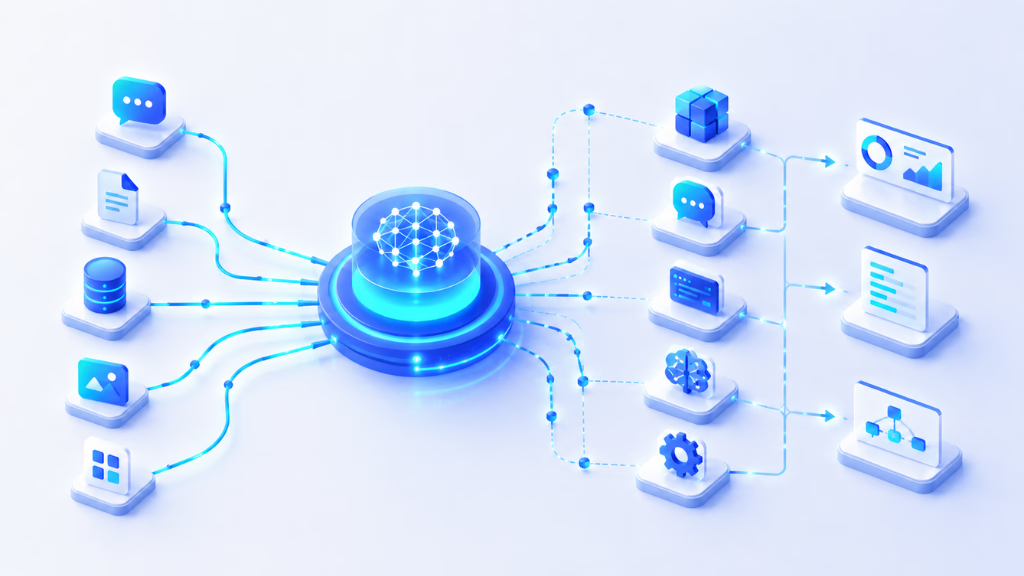
AI orchestration connects triggers, decision logic, and action execution across your AI agents, models, channels, and humans. It’s the invisible framework that makes everything work in context. AI adoption rose sharply in 2024, with 78% of organizations reporting AI use, compared to 55% in 2023.
Here’s how it comes together in practice.
Workflow triggers start the process
Every orchestrated workflow starts with a trigger. This could be a customer message, phone call, support ticket, system alert, CRM update, or even a scheduled event. In my experience, consistent triggers are essential; if your triggers aren’t tightly defined, chaos ensues.
The orchestrator interprets intent and context
Once triggered, the orchestration layer analyzes what’s needed. It detects intent (like “want refund”), sentiment (frustrated or happy), and urgency, and pulls in relevant context, customer history, known issues, knowledge base articles, and business rules. The real value here is setting the right path from the start.
The right model, agent, or tool is selected
Based on that context, the system routes the task: maybe a voice agent for inbound calls, a ticketing agent for escalations, a summarization model for transcripts, or an external tool (CRM, scheduling, or payments). In my POV, misrouting is a top complaint from operations leaders, so fine-tuned routing is crucial.
Data and knowledge are retrieved
Now the orchestration engine retrieves the right information. This could use retrieval-augmented generation (RAG), vector or semantic search for documents, CRM and database lookups, or pulling from policies and FAQs. I’ve seen businesses cut error rates and resolution times by focusing on context-aware retrieval here.
Actions are executed across systems
The right agent, workflow, or tool executes the required action: sending messages, updating records, booking meetings, creating support tickets, or delivering answers to customers, often across multiple platforms and channels.
Results are monitored, logged, and escalated
Finally, orchestration tracks every step: logs actions, monitors for errors, retries if a step fails, and automatically escalates to a human when needed for compliance, risk, or complexity. Robust monitoring and auditability are vital, especially in regulated industries or support teams handling sensitive data.
Core Components of AI Orchestration
Effective AI orchestration depends on multiple components working in sync. From my experience, overlooking even one area creates gaps that show up in customer experience, compliance, or performance.
AI models and large language models
These drive reasoning, content generation, summarization, classification, and decision support. They are the “brains” but need orchestration to stay on track.
AI agents
Task-focused AI agents have their own instructions, goals, memory, and tools. Some act independently; some work as supervisors, routing tasks to specialists or human agents for oversight.
APIs, tools, and business systems
APIs connect to CRMs, ticketing, payment, scheduling, messaging, databases, and more. Orchestration ensures these are called in the right order with the right data, avoiding context loss.
Knowledge bases and retrieval systems
Knowledge keeps answers consistent and trusted. Orchestration must manage knowledge binding, retrieval, and version control; without this, I’ve seen support bots give wild or hallucinated responses.
Workflow automation and decision logic
Automation powers triggers, branches, conditional logic, multi-step executions, and human approvals. The quality of this layer determines whether orchestration feels “smart” or rigid to customers and reps.
Human-in-the-loop controls
AI must know when to stop and escalate. Sensitive workflows, high-value customers, or unclear cases should go to people, not bots. Getting this right preserves trust.
Observability, analytics, and governance
Good orchestration includes complete monitoring, error logs, audit trails, access control, compliance checks, and cost tracking. Incomplete logging or missing analytics is the fastest path to governance trouble later.
AI Orchestration vs Related Concepts
Many teams confuse orchestration with automation, agents, or MLOps. The table below breaks down the difference.
| Concept | What It Manages | Scope | Example |
|---|---|---|---|
| AI automation | AI-assisted task execution | Task-level | Summarizing a support ticket |
| Workflow automation | Process steps, rules, and actions | Process-level | Creating CRM lead after a form submission |
| AI orchestration | AI, tools, data, agents, workflows, humans | System-level | Resolving a support request across chat, CRM, knowledge, escalation |
| AI agent orchestration | Multiple AI agents | Agent-specific | Supervisor agent assigning tasks to specialists |
| ML orchestration | Model lifecycle and pipelines | ML technical | Training, validation, deployment |
| LLM orchestration | LLM prompts, retrieval, tool use, memory | LLM app-level | RAG chatbot retrieving docs, calling APIs |
The mistake I see often is thinking that workflow automation alone solves for AI complexity. But automation follows pre-set rules, while orchestration adapts to context, makes routing decisions, and bridges tools, models, and humans for dynamic work.
Types of AI Orchestration
Different orchestration patterns exist to match business needs and technical architectures. I’ve implemented several for varying levels of complexity and control.
Centralized orchestration
Everything routes through a single orchestrator. This is best for strong control, simpler debugging, and clear audit trails, but can create a bottleneck at scale.
Decentralized orchestration
Tasks are routed between clusters or micro-orchestrators. This works well when agents need autonomy or specific workflows must operate independently.
Hierarchical orchestration
Supervisor agents or workflow managers assign tasks to lower-level agents or bots, then collect results. I see this often in organizations with mixed AI and human teams.
Event-driven orchestration
Orchestration responds to system events or customer actions. This is effective for real-time operations, such as missed-call recovery or alert-driven workflows.
Human-in-the-loop orchestration
Human intervention occurs at key points, such as approvals, compliance checks, or high-touch support. This sets a guardrail for sensitive cases, reducing the risk of poor automation.
Examples of AI Orchestration
The benefit of orchestration is clearest in real workflows. Here are typical enterprise scenarios I’ve worked with or seen succeed.
Customer support and contact centers
AI chatbots handle first-level queries, escalate to voice or human agents, update tickets, send SMS follow-ups, sync with the CRM, and trigger CSAT collection, all without losing context.
Sales and lead qualification
After a lead form, AI qualifies the lead, triggers an outbound call or email, updates the CRM, handles simple objections, and books a meeting if qualified.
Healthcare appointment scheduling
Patients message or call, AI triages symptoms, books appointments, sends reminders, shares intake forms, escalates urgent cases to staff, and logs all communication.
Financial services onboarding
AI checks identity, explains policies, requests documents, flags compliance risks, escalates complex queries to licensed staff, and maintains audit trails for every step.
Ecommerce order support
Customers inquire about orders over chat or voice; AI retrieves order info, sends delivery updates, processes returns, detects frustration, and escalates complaints for resolution.
IT operations and incident response
When alerts hit, AI orchestrates root-cause analysis, creates support tickets, runs basic remediations, requests human approval for big changes, and then tracks status and logs the event.
Example: AI Orchestration in Customer Experience
Customer experience (CX) workflows span channels like voice, chat, SMS, email, and WhatsApp. Orchestration is key, so customers never feel the complexity behind the scenes.
Picture this: A customer calls about a missed delivery. Here’s what happens in an orchestrated CX workflow:
- The voice system answers and transcribes the call.
- AI detects the intent (delivery status) and urgency.
- The orchestration layer retrieves the customer’s order via API and reviews their history.
- AI responds with a spoken update, then sends an SMS link to tracking.
- Workflow automation logs the conversation, updates the CRM, and triggers a CSAT survey after the call.
- If the customer is upset or delayed past a threshold, the system escalates to a human agent.
- Analytics record resolution outcome, intent, and sentiment for every interaction.
In my experience, orchestrated CX is the difference between a patchwork of bots and a business that feels responsive and “present” on every channel.
Platforms like Commplify are built specifically for this pattern, coordinating voice, chat, SMS, email, WhatsApp, knowledge base, workflow automation, analytics, and human escalation in one environment. This orchestration is what makes omnichannel support practical, even at scale.
Benefits of AI Orchestration
- Greater scalability and reliability: systems can grow without constant rewiring.
- Faster responses and smoother escalation: customers aren’t left waiting.
- Reduced manual workload: support staff focuses on complex cases, not data entry.
- More consistent experience: answers match across every channel and touchpoint.
- Improved governance and compliance: actions are logged, and errors are flagged fast.
- Better use of data: enterprise knowledge gets used the right way, every time.
- Analytics that drive improvement: see what AI handles, where it escalates, and why.
The quick verdict: Orchestration pays off in lower costs, higher CSAT, and fewer operational headaches.
Challenges of AI Orchestration
- Context loss when passing between tools or channels is the #1 source of customer complaints I hear.
- Poor agent coordination leads to loops or dead ends.
- Hallucinated answers or wrong actions due to bad retrieval or weak guardrails.
- Data mismatches or outdated knowledge.
- Latency spikes and rising compute costs as workflow complexity grows.
- Security, privacy, and compliance risk from weak access control.
- Escalations that fail or miss the window.
- Missing audit logs or analytics makes post-mortems painful.
- Vendor lock-in if orchestration relies too much on one closed system.
- Over-automation removes the human safety net that customers still need.
I always recommend building for observability, human-in-the-loop, and regular process review to manage these risks.
How to Choose an AI Orchestration Platform
- Integration capabilities: APIs, webhooks, CRM, ticketing, calendar, and messaging support.
- Flexibility with models and agents: Can you use multiple LLMs? Define custom agents? Route to the right specialist?
- Knowledge retrieval quality: Support for vector search, FAQ, policies, and agent-specific retrieval.
- Workflow builder: Triggers, conditional logic, cross-channel actions, approvals, and error handling, ideally with a simple interface.
- Human handoff and escalation logic: Transfers based on urgency, sentiment, risk, or value must be seamless.
- Observability and analytics: Clear dashboards on AI performance, escalation rates, CSAT, intent, and sentiment trends.
- Security and governance: Access control, data isolation, auditability, and compliance readiness are non-negotiable.
- Voice and omnichannel coverage: If you handle real customers, voice, SMS, WhatsApp, and unified inboxes matter.
- Cost visibility and control to manage the budget as workflows expand.
When vetting platforms, I always advise running a small live test. Complicated demos are no substitute for a real workflow that mimics your top customer use case.
AI Orchestration Readiness Checklist
- Clear use case and success metrics.
- Defined triggers and mapped the customer journey.
- Reliable, updated knowledge sources and operational data.
- Connected systems and available APIs.
- Tested routing rules and error handling.
- Human approval and escalation paths defined.
- Monitoring, observability, and analytics in place.
- Security, compliance, and audit trail requirements documented.
- Process for keeping automation boundaries updated as your team learns.
Smooth orchestration depends more on clarity and accountability upfront than advanced AI “smarts.”
Common Mistakes in AI Orchestration
Too many organizations go wrong by confusing orchestration with simple automation. Or they set up dozens of bots and workflows without one place to manage context, handoffs, or escalation.
- Treating AI orchestration as a “set it and forget it” project.
- Over-automating every possible case, leading to customer frustration.
- Failing to build in human-in-the-loop controls, so small errors escalate to major pains.
- Skipping analytics makes optimization impossible.
- Building fragmentation into automation, every new channel or tool creates another silo.
- Relying on one vendor and getting stuck when needs change.
The better approach is to see orchestration as an ongoing practice, with regular reviews, clear handoff logic, and continuous improvement.
Where Commplify Naturally Solves the Orchestration Problem
For teams managing modern customer conversations, orchestrating AI across voice, chat, SMS, email, WhatsApp, and knowledge is essential. Commplify, in my experience, enables exactly this: configure AI agents, automate repetitive workflows, manage omnichannel inboxes, and escalate seamlessly to humans, all without losing track of the customer journey.
You can design complex flows, voice to chat to email, trigger actions, escalate by intent or sentiment, and keep full analytics for governance. That’s orchestration, applied to real CX and support operations.
Conclusion
AI orchestration is the hidden layer powering reliable, adaptive business workflows, especially in customer experience, support, operations, and sales. When you coordinate models, agents, workflows, tools, knowledge, and human decision points, your AI goes from “promising” to truly production-ready.
In my experience, businesses that build with orchestration avoid context loss, fragmented journeys, slow escalations, and out-of-control costs. The advantage grows as customer expectations, compliance demands, and technical complexity increase.
The core business lesson: AI tools will keep multiplying, but only orchestration brings them together for real results. For CX teams and support leaders, the path to unified, omnichannel operations starts with strong orchestration across every channel and every workflow.
Platforms like Commplify offer this orchestration for real customer conversations, bringing workflow automation, human handoff, knowledge, and analytics together in one environment. That’s not hype, just what I see work.
I expect that as agentic AI matures, orchestration will become a default business discipline, not a hidden IT problem. Smart, transparent coordination will separate the businesses customers trust from those they avoid.
FAQs
What is AI orchestration in simple terms?
AI orchestration is coordinating AI, tools, data, and workflows so they work together as one system to complete business tasks reliably.
What is an AI orchestrator?
An AI orchestrator is the software or framework that manages how AI agents, models, workflows, and systems interact and execute tasks together.
How does AI orchestration work?
AI orchestration works by triggering workflows, analyzing context, routing tasks to the right agents or tools, retrieving data, executing actions, and handling monitoring and escalation.
What is an example of AI orchestration?
An example is a support request routed from chatbot to voice agent, retrieving data from the CRM, escalating to a human, triggering follow-up SMS, and logging analytics, all in one flow.
What is the difference between AI orchestration and AI automation?
AI automation performs a specific task with AI. AI orchestration coordinates multiple tasks, agents, data, and workflows to solve end-to-end business problems.
What is the difference between AI orchestration and workflow automation?
Workflow automation follows preset rules to automate steps. AI orchestration goes further, adapting to context, selecting the right AI models, and coordinating tools, data, and humans.
What is the difference between AI orchestration and AI agents?
AI agents are focused on specific tasks. AI orchestration coordinates one or more agents, data, workflows, and tools for system-level outcomes.
What is the difference between AI orchestration and AI agent orchestration?
AI agent orchestration manages multiple AI agents’ collaboration. AI orchestration covers all components, agents, data, workflows, and humans across the business system.
What is the difference between AI orchestration and ML orchestration?
ML orchestration manages machine learning model lifecycles and pipelines. AI orchestration handles live coordination of agents, tools, data, and workflows during business operations.
What tools are used for AI orchestration?
Common tools include agent frameworks (LangChain, AutoGen), workflow platforms (Zapier, Airflow), LLM orchestration tools, and CX orchestration platforms like Commplify.
Why is AI orchestration important for customer experience?
AI orchestration ensures customer interactions are consistent, context-aware, and unified across every channel, with proper escalation and analytics for ongoing improvement.
How do businesses get started with AI orchestration?
Start by defining clear business workflows, mapping triggers, connecting your systems and data, setting up orchestration tools or platforms, and monitoring performance with governance in mind.
This page was last edited on 16 June 2026, at 5:26 am