
Quick Answer
Automated customer service workflows for CX use AI and rules to route, resolve, and escalate support requests across all channels. This boosts efficiency, reduces costs, and delivers faster, more consistent customer experiences—without adding manual workload.
Customer expectations keep rising, but budgets and headcounts rarely keep pace. Leaders in CX face a hard truth: traditional support models buckle under 24/7 demand, channel sprawl, and pressure to improve metrics without inflating cost.
I have seen support teams burn out trying to juggle channels and manual tasks. Tasks slip through cracks, and customers notice. Slow resolution and fragmented journeys erode trust.
Automation changes the math. In this guide, I’ll show you how automated customer service workflows can untangle the complexity, unify conversations, and free agents to focus on what matters—delivering experiences that actually build loyalty.
Why Automated Customer Service Workflows for CX Matter
Automated customer service workflows connect every piece of the support journey: routing, responding, escalating, and resolving—across all channels—using defined triggers, actions, and AI. They turn complicated manual operations into repeatable, scalable processes.
In my experience, automation brings structure where chaos used to reign. Enterprises now contend with fragmented channels, overnight volume spikes, growing compliance burdens, and relentless demands for speed. The right approach to automation tackles all this at once:
- It lets you handle large volumes without burning out teams.
- Customer inquiries are routed and resolved faster, regardless of channel.
- You get immediate access to data for measuring service quality and refining operations.
Done right, workflow automation is about amplifying agents—not replacing them—and delivering a consistently higher quality of service.
How Automated Customer Service Workflows Work
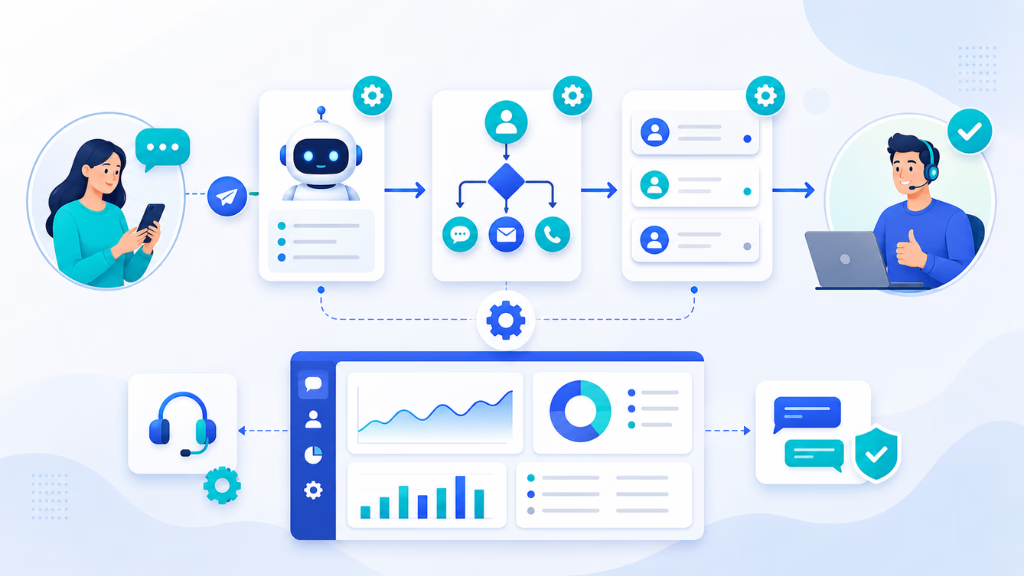
Automated workflows in customer service are the engine behind efficient, consistent, and scalable CX operations. The shift is not just about using a chatbot, but about mapping out the entire customer journey—then automating key decision points, actions, and escalations across every channel.
The global chatbot market was valued at approximately USD 9.6 billion in 2025 and is expected to increase from USD 11.8 billion in 2026 to USD 41.2 billion by 2033, registering a compound annual growth rate (CAGR) of 19.6% during the forecast period of 2026–2033.
Workflow Basics: Beyond Chatbots
A workflow is a mapped sequence of customer events, triggers, decisions, and actions. Recent trends show that mature programs do far more than automate a single reply:
- They start when a customer reaches out by phone, chat, SMS, email, or WhatsApp.
- The workflow detects intent, pulls context, consults the knowledge base, and prompts the right next step.
- Automated decisions drive the process—answering simple questions, routing, or escalating as needed.
Triggers, Actions, and Conditions
I have seen workflows gain real power by using:
- Triggers (e.g., new message, missed call, form submission)
- Actions (e.g., send reply, route ticket, update CRM)
- Conditions (e.g., customer type, sentiment, inquiry topic)
- Escalations (e.g., hand off to human if detected urgency or negative sentiment)
This is where many teams struggle early on—they automate replies, but not the underlying process. The real improvements come from automating the full journey.
Omnichannel Orchestration
Unifying voice, chat, SMS, email, and WhatsApp is now table stakes for any enterprise. Each channel is a unique entry point, yet every conversation should land in one place. Modern workflow automation ensures:
- No channel silos. Every conversation links to the full customer history.
- Escalations and triggers work the same, whatever channel starts the interaction.
- Agents and AI pass context back and forth so nothing is lost.
AI and Knowledge Integration
AI does more than answer FAQs. I have seen AI agents equipped with a smart knowledge base resolve over 60 percent of routine queries without escalation. Key elements:
- Automatic retrieval of the right article or policy—no guessing or “hunt and peck.”
- Sentiment detection and intent capture ensure personalized, context-aware automations.
Human Handoffs and Escalation
There’s always a point where empathy or expertise is needed. In my POV, the best workflows keep humans in the loop:
- Cases escalate to agents with full conversation history attached.
- Agents can override, annotate, and resolve—recording why an automation failed for improvement later.
Key Types of Customer Service Workflows to Automate
Many CX leaders ask, “Where do I start?” The high-value candidates are clear:
- Automated ticketing and routing: Route by topic, sentiment, or customer segment. Improve First Contact Resolution (FCR).
- Self-service FAQs and appointment scheduling: Empower customers to help themselves.
- Proactive notifications and follow-ups: Reduce repeat inbound contacts (e.g., shipping updates, reminders).
- Complaint escalation and resolution: Detect frustration and escalate early.
- Missed call recovery and outbound engagement: Re-engage opportunities before they’re lost.
Real-World CX Workflow Examples
| Use Case | Triggers | Actions | Outcomes |
|---|---|---|---|
| E-commerce order tracking | Inbound chat, SMS | Auto-check order system, auto-reply | 70% resolved in-chat |
| Healthcare appointment triage | Call, online form | AI gathers info, books slot, alerts team | Cuts scheduling load |
| Financial onboarding | New app inquiry | ID check, docs request, escalate for review | 2x faster onboarding |
| B2B SaaS lead qualification | Missed call, web chat | AI asks qualifying questions, books demo | 30% increase in meetings |
Building Effective Workflow Automations: Step-by-Step
From what I have seen, results depend on a clear plan:
- Identify candidates: Map frequent, repeatable tasks that bottleneck teams.
- Design & diagram: Sketch cross-channel flows, flag escalations, visualize integration points.
- Integrate: Connect to CRM, knowledge base, analytics, and support systems.
- Test & optimize: Run pilots. Measure against baseline. Fine-tune triggers, actions, and escalation logic.
- Govern & empower: Assign clear ownership. Set up audit trails, agent override, and compliance checks. Bring your support team into the process early—avoid change resistance.
Analytics and Optimization in Automated CX Workflows
Workflow automation is only as strong as its analytics loop. I have seen too many teams “set and forget,” then miss both wins and warning signs.
Essential metrics to track include:
- Containment rate (percent resolved by automation)
- First contact resolution (FCR)
- CSAT (customer satisfaction)
- Escalation rate
- Sentiment analysis
- Cost per contact
A unified analytics dashboard lets you see every channel, every trigger, every agent handoff in one place. In platforms like Commplify, you can monitor real-time performance, compliance, and customer sentiment—and then adjust automations right from the dashboard. That’s how teams keep automation relevant as their business, products, and customers evolve.
Key Considerations and Common Mistakes in CX Workflow Automation
Automating customer service workflows brings huge upside, but common mistakes weaken outcomes. The real issue is moving too fast, automating everything, or skipping governance. These are the traps I see most:
- Over-automation fragments the journey. Human context is lost, and CX scores dip.
- Channel silos persist if flows aren’t unified.
- Missing—or delayed—escalation frustrates customers.
- If you skip measuring real world metrics, blind spots multiply.
- Compliance (PII, consent, audit logs) can’t be bolted on later.
To avoid these pitfalls:
- Start with high-volume, low-risk processes.
- Always give agents a clear path to step in.
- Train staff and communicate the “why”—not just the “how.”
- Review workflows for privacy and compliance at every step.
Seamless Omnichannel CX Automation With Commplify
A modern workflow automation platform, such as Commplify, makes true omnichannel orchestration possible. In my experience, platforms that combine a visual no-code builder with unified conversation management have real impact:
- You can automate voice, chat, SMS, email, and WhatsApp—all flowing into a single conversation inbox.
- Set triggers (missed calls, customer replies, new tickets) and build real-world workflows fast, without waiting on IT.
- Human-in-the-loop design ensures agents take over complex or regulated cases.
- Analytics dashboards close the loop—every interaction, resolution, and escalation is tracked for continuous improvement.
Commplify is one example of how workflow automation can unite channels, empower agents, and keep your CX agile—even as customer needs keep changing.
Conclusion
Automated customer service workflows for CX are now essential for modern support operations. They let you handle more volume, deliver better consistency, and boost satisfaction rates—without sacrificing agent control or empathy.
The real payoff is clarity and control. Every channel, every workflow, every agent and AI interaction builds into a smarter, more adaptable service operation.
Platforms with advanced workflow automation, like Commplify, bring all parts together: omnichannel routing, human handoff, knowledge-powered AI, and a clear analytics loop. They enable you to design service on your terms, not around channel or tech silos.
As AI matures, expect workflow automation to become even more proactive, predictive, and personalized. The organizations that map, govern, and optimize workflows now will set the pace for CX in the years to come.
FAQs
What is an automated customer service workflow?
An automated customer service workflow is a structured process that uses triggers, rules, and AI to route, resolve, and escalate support requests—across any channel—without manual intervention.
Why do enterprises implement automated workflows for CX?
Enterprises automate workflows to manage high volumes, respond faster, improve CSAT, reduce costs, unify channels, and support agents—all while scaling support operations.
Which customer service workflows are most valuable to automate?
The most valuable workflows include ticket routing, self-service FAQs, appointment scheduling, proactive status updates, complaint escalation, and missed call follow-up.
How does workflow automation improve CSAT and other CX metrics?
Workflow automation reduces wait times, ensures consistent handling, prevents missed cases, and empowers agents to focus on complex issues—which together raise CSAT and FCR.
What tools are used for automating customer service workflows?
Organizations use omnichannel platforms with workflow builders, unified inboxes, AI agents, knowledge base integration, and analytics—like Commplify and similar solutions.
How do you design and implement a customer service workflow automation?
Identify repeatable tasks, design mapped workflows, integrate with backend systems, test and optimize flows, ensure agent oversight, and monitor performance against KPIs.
What are the risks and best practices for customer service workflow automation?
Risks include over-automation, poor escalation, and weak compliance. Best practices are to start small, keep humans in the loop, measure impact, and build in compliance controls.
Will automated workflows replace human agents in customer service?
No—automated workflows handle routine tasks and boost efficiency, but human agents remain critical for empathy, complex cases, relationship management, and continuous workflow improvement.
This page was last edited on 22 June 2026, at 1:40 am