
A call center staffing calculator uses real-time occupancy data and AI handoff metrics to set ideal agent levels for voice, chat, SMS, email, and WhatsApp. This helps leaders adjust staffing fast as demand or AI routing shifts.
Agent scheduling is harder than ever. Omnichannel support, digital-first journeys, and AI handoffs all add new pressure. In my experience, the real issue is that old staffing models just cannot keep up.
Every CX leader I talk with is worried about overwhelmed agents, missed SLAs, or wasted spend on idle time. But traditional calculators ignore live data and AI handoff rates—the real drivers in blended teams.
This guide walks you through how real-time occupancy and AI metrics give you control. You’ll see what to track, how to respond in the moment, and the steps to smarter, agent-friendly staffing.
What Is a Call Center Staffing Calculator?
A call center staffing calculator is a workforce planning tool used to estimate how many agents a call center needs to handle a specific volume of customer interactions while maintaining the desired service level.
Instead of guessing how many agents should be scheduled, a staffing calculator uses operational data such as:
- Expected call volume
- Average Handle Time (AHT)
- Target service level
- Average Speed of Answer (ASA)
- Agent occupancy
- Shrinkage
- Operating hours
- Peak-hour demand
The result helps call center managers determine the number of agents required during a specific hour, shift, day, or forecasting period.
For inbound call centers, staffing calculations often use the Erlang C model, which estimates staffing requirements based on incoming workload and the probability that customers will have to wait for an available agent.
Why Accurate Call Center Staffing Matters
Staffing directly affects both operational costs and customer experience.
When a call center is understaffed, customers may experience longer wait times, abandoned calls, overloaded agents, and lower satisfaction.
On the other hand, overstaffing increases labor costs while leaving agents underutilized.
Accurate staffing helps organizations create a balance between these two situations.
With proper workforce calculations, call centers can:
- Reduce unnecessary labor expenses
- Maintain service-level targets
- Reduce customer wait times
- Improve agent productivity
- Manage peak call periods
- Reduce agent burnout
- Improve workforce scheduling
- Prepare for seasonal changes in demand
The objective is not simply to schedule more agents. It is to schedule the right number of agents at the right time.
Key Metrics You Need for a Call Center Staffing Calculator
Before calculating staffing requirements, you need several important contact center metrics.
1. Call Volume
Call volume refers to the number of inbound calls expected during a specific period.
For example:
500 calls between 9:00 AM and 10:00 AM
Hourly or 30-minute interval data is usually more useful than daily totals because call demand often changes significantly throughout the day.
Historical call center data can help you identify:
- Peak calling periods
- Slow periods
- Day-of-week patterns
- Seasonal demand
- Promotional spikes
- Holiday fluctuations
Accurate call volume forecasting is one of the most important parts of workforce planning.
2. Average Handle Time (AHT)
Average Handle Time measures how long an agent typically spends handling one customer interaction.
AHT normally includes:
Talk Time + Hold Time + After-Call Work
For example:
- Average talk time: 5 minutes
- Average hold time: 30 seconds
- After-call work: 1 minute
Average Handle Time would be approximately:
6 minutes 30 seconds
The longer the AHT, the more agents you generally need to handle the same number of calls.
3. Service Level Target
Service level measures the percentage of calls you want agents to answer within a particular period.
A commonly used target might be:
80% of calls answered within 20 seconds
However, there is no universal service-level target for every contact center.
Your ideal target depends on factors such as:
- Customer expectations
- Industry
- Cost structure
- Call complexity
- Customer priority
- SLA requirements
Higher service-level targets usually require additional staffing.
4. Agent Occupancy
Occupancy measures the percentage of an agent’s logged-in time spent actively handling customer interactions.
It can include:
- Talking with customers
- Placing customers on hold
- Completing after-call work
For example, an 85% occupancy rate means agents spend approximately 85% of their available working time handling customer-related activities.
Extremely high occupancy can create continuous workloads and increase the risk of agent fatigue.
Staffing plans should therefore balance productivity with a sustainable workload.
5. Shrinkage
Shrinkage represents the percentage of paid agent time when agents are unavailable to handle customer interactions.
Common causes include:
- Breaks
- Meetings
- Coaching
- Training
- Absenteeism
- Vacation
- Administrative tasks
- System issues
For example, if you require 40 agents actively handling calls and your shrinkage rate is 25%, you cannot simply schedule 40 employees.
You need additional scheduled staff to account for unavailable time.
A basic shrinkage adjustment can be calculated as:
Scheduled Agents = Required Agents ÷ (1 − Shrinkage Rate)
If you need 40 active agents with 25% shrinkage:
40 ÷ (1 − 0.25) = 53.3
You would therefore need approximately 54 scheduled agents.
How to Calculate Call Center Staffing Requirements
A basic call center staffing calculation can be completed in several stages.
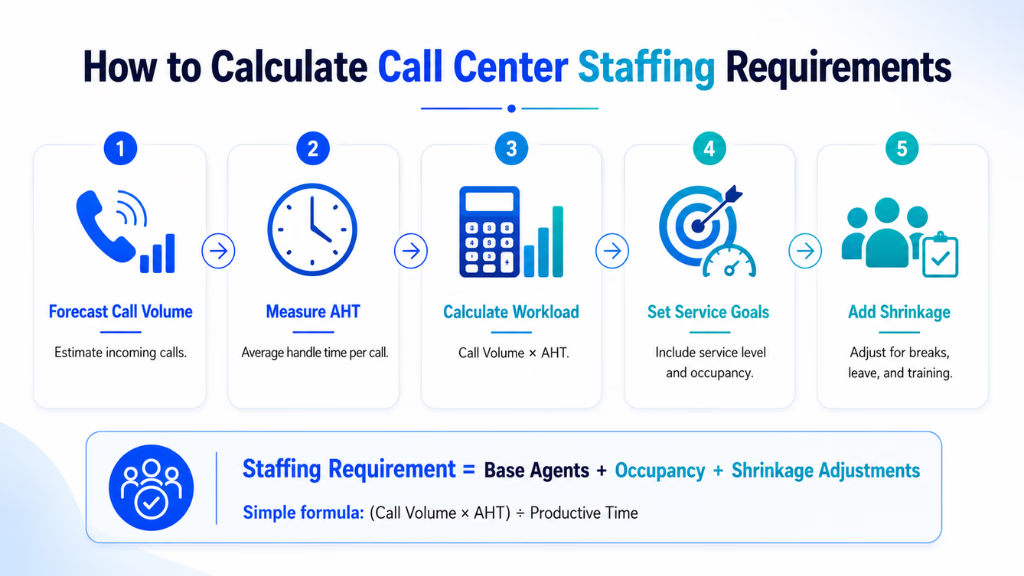
Step 1: Determine Expected Call Volume
Start by estimating the number of calls expected during the calculation period.
Suppose your contact center receives:
600 calls per hour
For more accurate workforce planning, calculate volume using 15-minute, 30-minute, or hourly intervals rather than using one daily average.
Step 2: Determine Average Handle Time
Assume your Average Handle Time is:
6 minutes
Convert this into hours:
6 ÷ 60 = 0.1 hours
Step 3: Calculate the Basic Workload
Multiply call volume by Average Handle Time.
Workload = Call Volume × AHT
Using the example:
600 × 0.1 = 60 agent-hours
This means the call center receives approximately 60 hours of customer-handling workload during that one-hour interval.
However, this does not mean exactly 60 agents will be enough.
Calls do not arrive evenly throughout the hour, and agents may already be busy when another customer calls.
That is why call centers typically apply queueing calculations such as Erlang C.
Using Erlang C for Call Center Staffing
The Erlang C formula is commonly used in contact center workforce management to estimate how many agents are needed to achieve a particular service level.
It considers factors such as:
- Number of incoming calls
- Average Handle Time
- Number of available agents
- Desired waiting time
- Service-level target
For example, a contact center may want to determine how many agents are required to achieve:
- 800 calls per hour
- 5-minute AHT
- 80% service level
- 20-second answer target
An Erlang C-based staffing calculator can analyze the workload and determine the number of agents required to meet that target.
This produces a more realistic estimate than simply dividing workload by the number of available hours.
Call Center Staffing Calculation Example
Consider the following contact center.
| Metric | Example |
|---|---|
| Calls per hour | 300 |
| Average Handle Time | 6 minutes |
| Service level | 80% |
| Answer target | 20 seconds |
| Shrinkage | 25% |
| Target occupancy | 85% |
First, calculate workload:
300 × 6 = 1,800 minutes
Convert the workload into hours:
1,800 ÷ 60 = 30 agent-hours
This represents the basic workload.
However, scheduling exactly 30 agents would leave virtually no buffer for simultaneous calls, waiting-time targets, agent availability, or shrinkage.
An Erlang C calculator should therefore be used to determine the base agent requirement for the desired service level.
Suppose the model determines that approximately 36 active agents are needed.
Now account for 25% shrinkage:
36 ÷ (1 − 0.25) = 48
The call center would need approximately:
48 scheduled agents
This example demonstrates why simply calculating workload is not enough for accurate staffing.
Simple Call Center Staffing Calculator Formula
For a quick estimate, you can use:
Basic Agents Required = (Call Volume × Average Handle Time) ÷ Available Working Time
Then adjust for shrinkage:
Scheduled Agents = Basic Agents Required ÷ (1 − Shrinkage Rate)
For example:
- 400 calls
- 5-minute AHT
- 60-minute period
- 20% shrinkage
Basic agents:
(400 × 5) ÷ 60 = 33.33
Approximately 34 active agents would be needed based purely on workload.
After adjusting for 20% shrinkage:
34 ÷ 0.80 = 42.5
Approximately 43 agents would need to be scheduled.
Remember that this is only a simplified calculation. It does not fully account for queue behavior or your service-level target.
For more precise inbound call center staffing, Erlang C or workforce management software should be used.
Factors That Can Change Your Staffing Requirements
Even a well-designed call center staffing calculator provides an estimate based on the information entered into it.
Actual requirements can change because of several operational factors.
Call Arrival Patterns
Calls rarely arrive at perfectly consistent intervals.
You might receive 100 calls during one part of an hour and significantly more during another.
Using shorter forecasting intervals can improve scheduling accuracy.
Seasonal Demand
Some organizations experience major increases in customer interactions during:
- Holidays
- Product launches
- Sales campaigns
- Billing periods
- Tax season
- Enrollment periods
Historical demand should therefore be included in forecasting.
Agent Skill Levels
Experienced agents may handle calls faster than newly hired agents.
If your team includes a large number of new employees, Average Handle Time may temporarily increase.
Multiple Contact Channels
Modern contact centers often manage more than phone calls.
Agents may also handle:
- Live chat
- SMS
- Social media
- Messaging apps
- AI-to-human escalations
Staffing calculations should account for the workload created by every channel agents are expected to manage.
Call Complexity
Not every call requires the same amount of effort.
Password resets may take two minutes, while technical support or financial inquiries could take much longer.
Segmenting interactions by type can improve workforce forecasts.
Absenteeism
Unexpected absences can significantly affect a carefully planned schedule.
Historical absence rates should therefore be incorporated into shrinkage calculations.
Call Center Staffing Calculator vs. Workforce Management Software
A staffing calculator is useful for estimating the number of agents required for a particular workload.
However, larger contact centers often require more comprehensive workforce management capabilities.
A basic staffing calculator typically helps calculate:
- Agent requirements
- Workload
- Shrinkage-adjusted staffing
- Service-level requirements
A workforce management system can go further by supporting:
- Demand forecasting
- Shift scheduling
- Real-time adherence
- Intraday workforce adjustments
- Skill-based scheduling
- Historical performance analysis
A calculator can therefore be an effective starting point, while workforce management software becomes more valuable as operational complexity increases.
How AI Can Improve Call Center Staffing
Traditional staffing calculations depend heavily on historical averages.
AI-powered workforce planning can analyze larger volumes of operational data to identify patterns that may be difficult to detect manually.
AI can help forecast demand using information such as:
- Historical call volume
- Seasonal trends
- Day-of-week patterns
- Average Handle Time
- Agent availability
- Customer behavior
- Previous campaign performance
- Real-time queue conditions
For example, instead of scheduling the same number of agents every Monday, AI forecasting may identify that demand consistently increases between 10:00 AM and 1:00 PM.
Managers can then allocate additional agents specifically during those periods.
AI can also help contact centers make intraday adjustments when actual call volume differs from forecasts.
Can AI Agents Reduce Human Staffing Requirements?
AI customer service agents can automate some repetitive customer interactions before they reach human agents.
Common use cases include:
- Answering frequently asked questions
- Appointment scheduling
- Order-status inquiries
- Basic troubleshooting
- Customer authentication
- Information collection
- Routing customers to the correct department
When automation resolves routine requests, human agents can focus on conversations that require judgment, empathy, negotiation, or specialized expertise.
However, organizations should not simply subtract automated interactions from their staffing numbers.
They should monitor how automation affects:
- Human call volume
- Escalation rates
- Average Handle Time
- Interaction complexity
- Service levels
- Peak demand
For example, automation may reduce total call volume while increasing the complexity of the conversations that reach human agents.
Your staffing model should therefore be updated continuously as automation changes the workload.
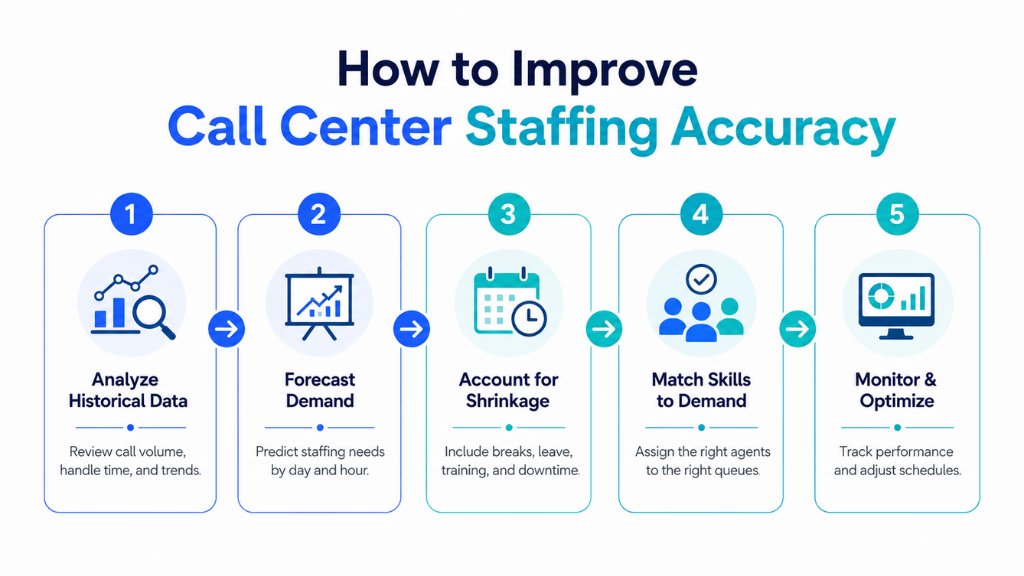
How to Improve Call Center Staffing Accuracy
A staffing calculator becomes more effective when the input data is reliable.
To improve staffing accuracy:
Use Interval-Level Forecasting
Avoid using only daily averages.
Analyze demand in 15-minute, 30-minute, or hourly intervals to identify peak periods.
Review Historical Data
Compare several weeks or months of data rather than relying on a single period.
Look for recurring trends and unusual events.
Update Average Handle Time
AHT changes as products, processes, technology, and customer needs change.
Regularly update your calculations using current performance data.
Track Shrinkage Separately
Monitor planned and unplanned shrinkage.
Planned shrinkage can include meetings and training, while unplanned shrinkage may include absenteeism or technical problems.
Monitor Forecast Accuracy
Compare predicted call volumes with actual results.
If forecasts are consistently too high or too low, adjust your forecasting method.
Recalculate After Introducing Automation
If you introduce AI agents, self-service systems, or new routing technology, recalculate staffing needs based on the new customer journey.
Common Call Center Staffing Mistakes
Several workforce planning mistakes can reduce the accuracy of a staffing calculator.
Using Daily Call Volume Only
Daily averages hide the periods when customer demand is highest.
Use interval-level data whenever possible.
Ignoring Shrinkage
Scheduling only the number of agents required to answer calls can lead to understaffing when employees attend meetings, take breaks, or are absent.
Targeting 100% Occupancy
Continuous 100% occupancy is generally not sustainable and provides little capacity for sudden increases in demand.
Using Outdated AHT Data
If Average Handle Time has changed, your staffing requirement will also change.
Ignoring Channel Mix
Customers increasingly use multiple communication channels.
Phone staffing should be considered alongside chat, email, messaging, and other channels where agents may share workload.
Failing to Reforecast
Forecasts should not remain static throughout the day.
Comparing actual demand against predictions allows managers to adjust schedules before service levels deteriorate.
Call Center Staffing Calculator Checklist
Before estimating your staffing requirements, collect the following information:
- Expected interaction volume
- Average Handle Time
- Forecast interval
- Service-level goal
- Answer-time target
- Occupancy target
- Shrinkage percentage
- Number of operating hours
- Historical call patterns
- Peak-demand periods
- Agent skill groups
- Expected absenteeism
- Automated interaction volume
Using accurate data for each factor will make your staffing calculation significantly more useful.
Final Formula to Remember
For a quick workload estimate:
Workload = Call Volume × Average Handle Time
Then estimate base staffing:
Base Staffing = Total Workload ÷ Available Time
Finally, adjust for shrinkage:
Scheduled Staffing = Required Active Agents ÷ (1 − Shrinkage)
These formulas work well for rough workforce planning.
For operational scheduling where service level, waiting time, queue probability, and simultaneous calls matter, use an Erlang C-based call center staffing calculator or a dedicated workforce management platform.
Ultimately, effective call center staffing is about balancing three things: customer demand, agent capacity, and service expectations. When these factors are calculated accurately, call centers can control labor costs while maintaining a better experience for both customers and agents.
How Platforms Like Commplify Transform Real-Time Staffing Optimization
Unified analytics make it possible to track occupancy and handoff rates across all channels—not just calls. In my experience, this unified view exposes hidden coverage gaps or overloads.
Here’s a real scenario: When chat volume surges during a promo, Commplify’s dashboard shows occupancy topping 90% and AI handoff rate climbing. Workflow automation triggers alerts and reassigns agents from email to chat before SLAs are missed.
By connecting analytics and automated workflows, platforms like Commplify help teams respond to live changes, not lag behind. This keeps both agents and customers better served.
Conclusion—Getting Ahead with Data-Driven Staffing
Modern contact centers need staffing models fit for an omnichannel, AI-powered world. Real-time occupancy data and AI handoff metrics are now essential, not “nice to have.”
Balancing analytics with workflow automation—such as what Commplify enables—means your team can adapt to spikes, maintain CX standards, and keep agent workloads fair. I have seen how this reduces burnout and supports healthier, more agile teams.
If you want to move beyond reactive firefighting and into proactive, data-driven staffing, this is where to start. As AI gets smarter and channel mix grows, only real-time, unified analytics deliver the control modern CX leaders need.
FAQs
What is call center occupancy and why does it matter for staffing?
Occupancy is the percent of time agents spend on live customer tasks. It shows real workload. High or low occupancy signals whether to adjust staffing.
How does a call center staffing calculator work with real-time data?
It combines live occupancy and channel data to suggest agent counts for each channel, updating as volume and handoff rates change throughout the day.
What are AI handoff metrics and how do they impact staffing needs?
AI handoff metrics show how often bots escalate to humans. High rates mean more agents must be ready for complex or sensitive customer needs.
How can occupancy data be used for real-time intraday adjustments?
Managers can shift breaks or reassign agents when live dashboards show occupancy or queues rising, avoiding both idle time and overload.
What’s the difference between traditional and AI-powered staffing models?
Traditional models use set formulas and forecasts. AI-powered models use real-time data and automation to match agent levels to channel needs minute by minute.
How do you calculate shrinkage for accurate headcount?
Add up lost time from breaks, training, illness, and personal time, then adjust projected staffing upwards to ensure full coverage.
What tools help integrate omnichannel occupancy and AI handoff metrics?
Platforms like Commplify offer unified dashboards and automation to track occupancy and handoffs across all channels in real time.
How do you avoid agent burnout while using these advanced staffing techniques?
Monitor occupancy ceilings, schedule regular breaks, listen to agent feedback, and use automation to prevent overloads before they happen.
This page was last edited on 5 August 2026, at 7:09 am