To choose a CX automation solution, match your business goals with platforms that offer unified omnichannel support, strong workflow automation, easy integration, and adaptability. Always test real use cases and review flexibility before buying.
Choosing a CX automation solution is more than checking boxes. In my experience, every support leader has faced pressure to deliver more with less, juggling rising volumes and higher customer expectations.
The real issue is not just picking a tool with the latest AI buzzwords, but finding a platform that fits your processes, integrates with your ecosystem, and flexes as your business evolves.
This guide outlines how to choose a CX automation solution, what to test, mistakes to avoid, and how true omnichannel communication and workflow automation set leading platforms apart.
Why Choosing the Right CX Automation Solution Matters
The stakes in CX automation are high. Customers no longer tolerate dropped conversations, inconsistent service, or long waits. When a solution fits, you cut costs, reduce manual work, lift CSAT, and open new revenue streams.
But a poor fit adds complexity, increases workload, or, worse, damages customer trust. I’ve seen teams struggle for months trying to adapt rigid tools or recover from over-automating core journeys.
Choosing the right CX automation solution helps you keep pace with the shift toward unified, AI-native, omnichannel engagement. It means connecting every channel and workflow into a service your customers remember for the right reasons.
How to Choose a CX Automation Solution: Step-by-Step Guide
Getting this choice right requires a thoughtful process that links technology to real business needs. Here’s what I recommend, based on lessons from the field.
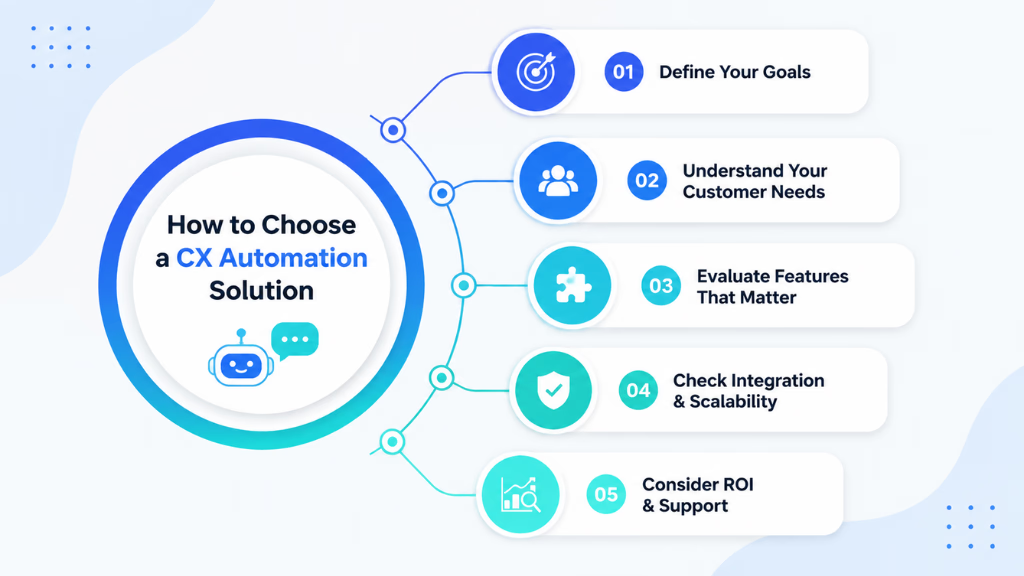
What You’ll Need
- Clear business goals/metrics (CSAT targets, cost per contact, SLA reduction, etc.)
- Process maps of key customer journeys
- A cross-functional team (CX, ops, IT)
- Pilot use cases for testing
- Vendor shortlist
Pinpoint Your Current and Future CX Needs
Start by mapping how customers contact you and where your team feels friction. In my POV, too many companies skip this step.
- Channels used most (voice, chat, SMS, email, WhatsApp)
- Peak demand periods or pain points (missed calls, chat abandonment)
- Internal bottlenecks or manual hand-offs
Also, look ahead—will you expand to new markets, add products, or face new compliance needs? The right platform should grow with you.
Define Must-Have Features and Capabilities
Once you know where the problems are, list the must-haves, not just nice-to-haves.
- Unified omnichannel support: One inbox for all interactions. No more platform-hopping or silos.
- Configurable AI agents: Assign personas, escalate when needed, bind knowledge for smarter responses.
- Workflow automation: Visualized process builders allow non-technical staff to create and update automated flows.
- Voice intelligence: Includes AI-powered voice features ideal for regulated sectors (think healthcare, finance).
- Secure integration: Syncs with your CRM, calendar, WFM or other live customer data.
Don’t be wowed by features that look good in demos but rarely solve day-to-day problems for your team.
Evaluate Platform Flexibility and Adaptability
A CX platform should move as fast as your business. I have seen deployments stall when vendors force months of coding for simple process tweaks.
- No-code or low-code workflow editing
- Ability to test changes before going live
- Easy escalation policy updates
- Fast onboarding for new channels or products
Ask vendors: Can you adapt flows during a pilot? How quickly can you roll out fixes or enhancements?
Test Real-World Scenarios
Do not skip hands-on testing. Demo scripts should simulate your actual CX challenges.
- Run customer queries across all channels (voice to WhatsApp)—does the same conversation follow the customer?
- Trigger escalation: How is context passed to human agents? Are missed calls or after-hours contacts managed well?
- Check handoff accuracy and notes transfer
- Update a policy or workflow mid-test and see how the platform adapts
In my experience, real-world edge cases expose platform gaps fast.
Score Platforms Using a Practical Evaluation Checklist
Build a core capability matrix to compare options side by side. Key scoring areas:
- Omnichannel unification (voice, chat, SMS, email, WhatsApp in one place)
- AI agent customization depth (personas, knowledge, escalation, safety controls)
- Workflow automation (ease of use, flexibility, testing, visual flow)
- Analytics (CSAT, intent, agent performance, missed opportunity capture)
- Integration and openness (data portability, APIs, ease of connecting to your stack)
- Ongoing support and roadmap transparency
Grade each solution using real demo findings, not just vendor claims.
Key Considerations and Common Mistakes in CX Automation Selection
Most failures I’ve seen come back to five things: over-automation, neglecting channels, buying for features over fit, ignoring integration, and failing to plan for change.
- Automating complex journeys that need human touch, hurting CSAT
- Relying only on chat or email, then scrambling when voice or WhatsApp explodes in use
- Choosing a static, one-size-fits-all tool that can’t adapt post-launch
- Overlooking deep integration and analytics, leaving data in silos
- Failing to set up feedback loops for continuous improvement
How Commplify Simplifies CX Automation Selection
Platforms like Commplify help by unifying voice, chat, SMS, email, and WhatsApp into a single conversation history. This reduces lost information during customer transfers and simplifies reporting.
Configurable AI agents handle and escalate cases based on rich context, while the visual workflow builder means process changes take minutes, not weeks. In my experience, that saves real time during busy campaigns or policy shifts.
If your support team manages high volumes across channels—or must adapt workflows often—features like these are worth prioritizing.
Conclusion
Selecting the right CX automation solution comes down to knowing your needs, demanding true omnichannel support, and testing for real-world adaptability. You create the best outcomes when your platform grows with you, not against you.
Strong workflow automation and unified inboxes, like those in Commplify, allow your team to deliver better experiences without losing control or flexibility.
Focus on real customer journeys, evaluate platforms in action, and keep continuous improvement front and center. The future of CX is adaptive, automated, and more customer-driven than ever—choose tools that help you lead that future.
FAQs
What is CX automation and why is it important?
CX automation uses AI and workflows to handle common customer interactions across channels, cut manual work, and improve support quality at scale.
What features should I look for in a CX automation solution?
Look for omnichannel support, configurable AI agents, workflow automation, integration with existing tools, analytics, and adaptability for process changes.
How do I compare and test different CX automation platforms?
Map key needs, run real use case demos across all channels, assess workflow editing and escalation, and grade with a capability matrix.
What are the benefits of choosing an omnichannel CX automation solution?
You unify all customer conversations, reduce silos, increase CSAT, improve analytics, and make it easier for agents to manage every inquiry.
How can I calculate ROI on a CX automation project?
Track reduced manual work, faster response times, higher CSAT, fewer missed contacts, and any lift in revenue from better engagement.
What are common challenges and pitfalls to avoid when selecting CX automation software?
Avoid over-automation, neglecting key channels, limited integration, lack of flexibility, and not testing solutions in real scenarios.
How do I ensure my CX automation solution remains flexible as my business changes?
Pick platforms with no-code workflow editing, quick change support, strong feedback loops, and open integration options.
Are there specific considerations for CX automation in industries like healthcare or financial services?
Yes. Prioritize platforms with secure voice, compliance handling, and data privacy features suited for regulated environments.
What’s the difference between a legacy and an AI-native CX solution?
AI-native tools offer unified channels, real-time AI agents, dynamic workflows, and easier adaptability than older, siloed, or scripted platforms.
How do workflow automation and conversation management improve the customer journey?
They route and resolve queries faster, ensure context follows the customer, and automate follow-ups or escalations without losing quality.
This page was last edited on 9 July 2026, at 1:44 am