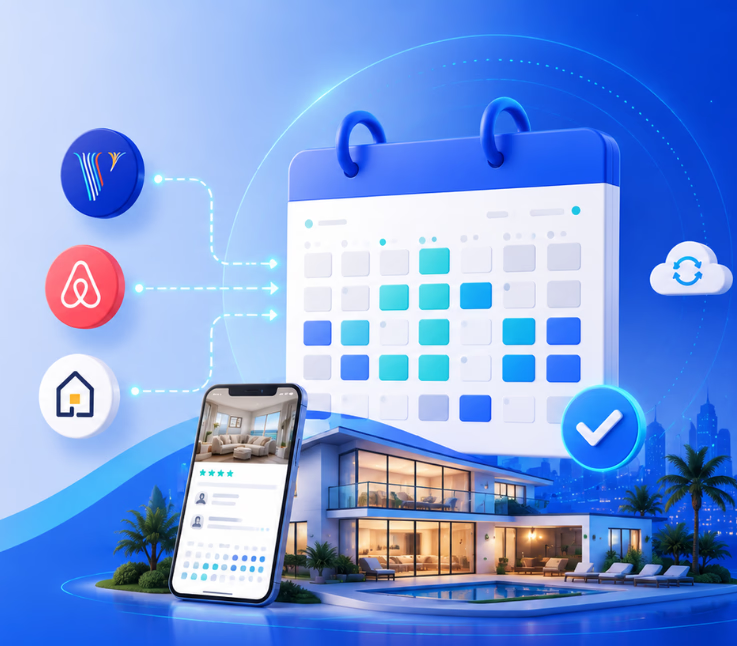
To integrate Vrbo, Airbnb, and Hospitable calendars, connect each platform using iCal or API sync, configure booking rules, and set a primary calendar. Workflow automation prevents double bookings and instantly alerts staff if sync errors occur.
Running short-term rentals across Airbnb, Vrbo, and other sites can feel like juggling with no margin for error. I have seen property managers lose thousands due to double bookings or calendar sync mistakes.
Manual updates create risk and stress. Sync delays or mismatched calendars often result in unhappy guests, disputes, or lost revenue. The real issue is operational reliability, not technology alone.
In this practical guide, I’ll show you how to master Vrbo, Airbnb, and Hospitable calendar and booking integration. You’ll learn time-tested steps, common pitfalls, and how to use workflow automation for failsafe booking ops.
How Does the Vrbo, Airbnb, and Hospitable Calendar Integration Work?
Managing the same vacation rental on Airbnb and Vrbo can increase visibility and booking opportunities. However, it also creates a major operational challenge: keeping availability accurate across multiple platforms.
A Vrbo–Airbnb–Hospitable calendar availability booking integration connects the listings for the same physical rental inside Hospitable. Once correctly connected and merged, Hospitable treats the channel listings as one property and coordinates reservations, blocked dates, pricing, and minimum-stay settings from a centralized calendar.
For example, when a guest books the property through Airbnb, Hospitable receives the reservation and blocks the corresponding dates on the connected Vrbo listing. The same process works in reverse when a reservation originates from Vrbo. This reservation synchronization is designed to reduce manual calendar updates and minimize the risk of double bookings.
API Integration vs. iCal Calendar Sync
Airbnb and Vrbo calendars can be connected in two main ways: through direct API integrations or through iCal calendar links.
Direct API integration
An API connection allows booking platforms and property management software to exchange information directly. Hospitable offers official integrations with Airbnb and the Vrbo Partner Connection, allowing reservation and calendar changes to move between the platforms automatically.
With an API connection, hosts may be able to synchronize:
- New, changed, and cancelled reservations
- Available and unavailable dates
- Nightly rates
- Minimum-night requirements
- Listing information
- Guest communication and operational workflows
Most reservation events from API-connected Airbnb and Vrbo listings reach Hospitable within minutes. After Hospitable receives a new reservation, it sends a block to the other listings connected to the property.
iCal calendar sync
An iCal connection exchanges calendar information through an .ics URL. Hosts export the calendar link from one booking platform and import it into another.
Airbnb allows hosts to export their listing calendar and import external .ics calendars. Vrbo provides similar import and export options through its calendar-sync settings.
However, iCal primarily communicates reserved or blocked dates. It generally does not provide the broader functionality of a direct PMS integration, such as synchronized prices, guest messages, listing details, or operational automations.
It can also have a longer refresh delay. Hospitable states that new iCal reservations may take up to approximately 20 minutes to import, while cancellations or reservation changes may require a later polling cycle. Because that delay creates a small booking-risk window, API connections are preferable wherever they are available.
Why Connect Airbnb and Vrbo to Hospitable?
The main purpose of the integration is to create a more reliable availability-management process.
Centralized availability management
Instead of opening Airbnb and Vrbo separately, a host can review reservations, open dates, blocked dates, and calendar rules through Hospitable. Listings representing the same rental are grouped under one property, creating a unified calendar view.
This helps hosts understand:
- Which platform generated each booking
- Which dates are unavailable
- Where manual blocks have been added
- Whether a reservation has synchronized successfully
- When channel connections were last updated
Reduced double-booking risk
Double bookings commonly happen when one platform accepts a reservation before another platform has been updated.
Hospitable’s Reservation Sync blocks booked dates on the other listings associated with the same property. If an Airbnb booking is accepted, the matching Vrbo dates are blocked. If the reservation is cancelled, those dates can be reopened according to the synchronization process.
The protection only works correctly when the Airbnb and Vrbo listings are connected and merged as the same property. Until they are merged, Hospitable treats them as separate rentals and does not synchronize reservations between them.
Consistent booking restrictions
Hosts often apply booking rules such as:
- Minimum stays
- Advance-booking limits
- Preparation time between guests
- Restricted arrival or departure days
- Manually blocked maintenance dates
Managing these rules from a central system can make availability more consistent. It also reduces the possibility of accidentally offering a date on one channel that has been restricted on another.
Easier multi-channel operations
Calendar integration affects more than availability. Once reservations flow into one management system, hosts can connect them to automated messages, cleaning tasks, team notifications, guest instructions, and other operational workflows.
This is especially valuable for hosts managing several properties or receiving bookings from multiple channels.
How to Set Up the Airbnb, Vrbo, and Hospitable Integration
The exact options available can depend on the account, listing type, and Vrbo connection method. The general setup process follows these steps.
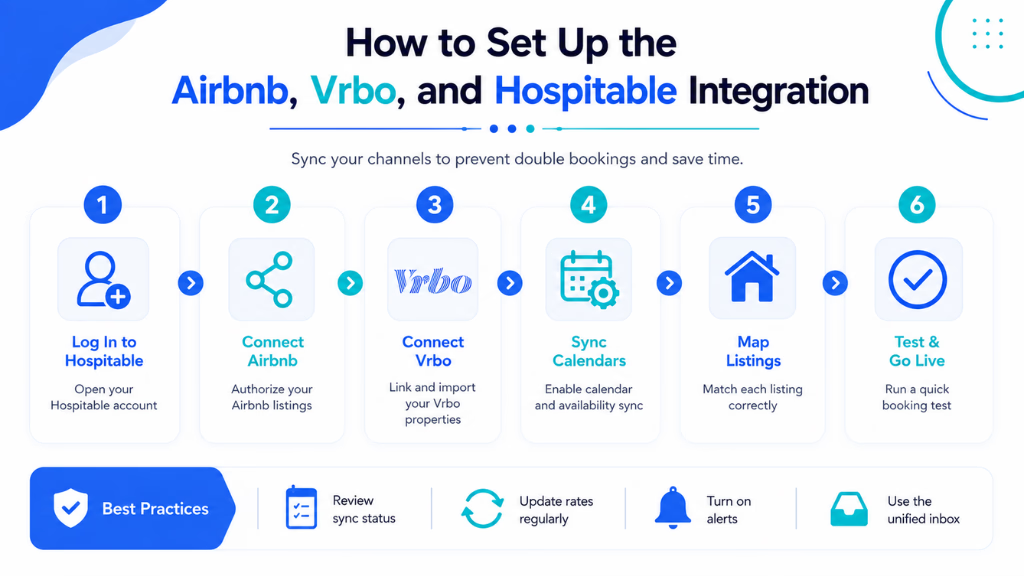
1. Connect the Airbnb account
In Hospitable, navigate to the channel-connections area and select the Airbnb connection option. Sign in to Airbnb and authorize Hospitable to access the account.
Hospitable’s official Airbnb integration can import listings and manage calendar, reservation, messaging, and listing information. Before connecting, hosts should confirm that another property management system is not already connected to the Airbnb account.
After authorization, review the imported properties and confirm that the expected listings are present.
2. Connect the Vrbo account
Next, connect the Vrbo account through Hospitable’s channel settings. Where available, the Vrbo Partner Connection should be used because it is the official API-based connection between the two platforms.
The Partner Connection allows Hospitable to function as the property management system and source of truth for supported Vrbo listing data, settings, and calendar information. Older or legacy Vrbo connection methods may offer more limited functionality.
Review the imported Vrbo listings before proceeding.
3. Merge matching listings
After connecting both accounts, Hospitable may initially display the Airbnb and Vrbo versions as separate properties. Hosts must merge the listings that represent the same physical rental.
To merge them:
- Open the Properties section in Hospitable.
- Select the matching Airbnb and Vrbo listings.
- Choose the merge option.
- Confirm that both listings represent the same physical unit.
- Review the resulting unified property and calendar.
Listings should only be merged when they represent the exact same rental unit. Two apartments in the same building should not be merged because a reservation for one would incorrectly block the other. Hospitable also checks factors such as matching addresses and property types before allowing certain listings to be merged.
4. Review synchronization settings
Open Hospitable’s synchronization preferences and verify that the required settings are enabled. Depending on the connection structure, these may include:
- Reservation synchronization
- Availability synchronization
- Pricing synchronization
- Minimum-night synchronization
Reservation Sync is automatically enabled when Sync is active for the property. Some additional settings remain particularly relevant when a Vrbo listing is designated as the lead listing.
5. Inspect the unified calendar
Review upcoming reservations and manually blocked dates before opening the listings for new bookings.
Check that:
- Existing Airbnb reservations appear
- Existing Vrbo reservations appear
- Booked dates are blocked across both channels
- Manual owner blocks are represented correctly
- Rates and stay restrictions are accurate
- No duplicate iCal imports remain active
Hospitable recommends removing redundant iCal feeds after an API connection is established, as duplicate calendar sources can create conflicts or repeated data.
What Happens When a New Booking Is Made?
Suppose a guest reserves a property on Airbnb from August 10 to August 14.
The synchronization flow generally works as follows:
- Airbnb confirms the reservation.
- The reservation is transmitted to Hospitable.
- Hospitable adds it to the property’s unified calendar.
- The same dates are sent to Vrbo as unavailable.
- Hospitable can trigger associated guest messages and operational tasks.
- The Vrbo listing stops accepting bookings for those nights once the update is processed.
A reservation originating on Vrbo follows a similar process, with the dates blocked on Airbnb after the booking reaches Hospitable.
Most API reservation events are processed within minutes. Nevertheless, no calendar integration should be treated as completely risk-free. Hosts should monitor connection warnings and investigate synchronization failures promptly.
Common Calendar Integration Problems
Even with a centralized booking system, calendar synchronization issues can occur because of connection delays, incorrect listing configurations, duplicate calendar feeds, or channel-specific restrictions. Identifying these common problems early helps maintain accurate availability and reduces the risk of missed or overlapping reservations.
The listings were connected but not merged
Connecting channel accounts does not always mean that matching listings are automatically grouped as one property.
When Airbnb and Vrbo listings remain separate inside Hospitable, a reservation on one listing will not necessarily block the other. Merge the matching listings as soon as possible after connecting them.
Dates remain blocked after a cancellation
A cancelled reservation, imported iCal event, Vrbo restriction, or manual block may keep dates unavailable.
Check the affected date in Hospitable and identify the source of the block. Then review the corresponding Airbnb or Vrbo calendar. Some hard blocks created directly during the Vrbo listing setup process must be removed manually from Vrbo before Hospitable can manage those dates correctly.
Duplicate iCal and API connections
Keeping an old Airbnb-to-Vrbo iCal connection active after connecting both channels through Hospitable can create conflicting calendar sources.
Remove unnecessary iCal imports once the official API integrations are working. A backup calendar should only be added when there is a specific operational reason and its effect is fully understood.
Availability differs between Hospitable and Vrbo
A Vrbo booking limit, manually blocked date, advance-booking rule, or listing-level restriction can prevent Hospitable from reopening a date.
Review Vrbo’s availability settings, including:
- Booking window restrictions
- Minimum and maximum stay rules
- Manually blocked dates
- Listing status
- Imported calendars
When the relevant restriction is removed, Hospitable can attempt to push the correct availability again.
A reservation is visible on one platform only
First, check whether the relevant channel connection is still active. Then confirm that the listings are merged and inspect the last synchronization timestamp.
For iCal connections, remember that updates are not immediate. For API connections, a missing reservation may indicate a connection, listing-status, or synchronization failure that requires further investigation.
Best Practices for Reliable Availability Sync
Reliable availability synchronization depends on more than simply connecting Airbnb, Vrbo, and Hospitable. Hosts should use official integrations, maintain a single source of truth, remove duplicate calendar feeds, and regularly review reservation and blocking activity to prevent conflicts, delays, and double bookings.
Prefer official API connections
Use Hospitable’s official Airbnb and Vrbo Partner integrations whenever possible. API connections generally provide faster reservation updates and broader functionality than basic iCal links.
Maintain one source of truth
Avoid making conflicting calendar changes across several systems. Once Hospitable is managing the property, use its unified calendar for routine availability updates unless a channel-specific setting must be changed directly.
Merge listings immediately
After connecting a new channel, merge matching listings before accepting additional reservations. This closes the period during which both listings could remain independently bookable.
Check the calendar regularly
Review upcoming reservations, owner blocks, and channel statuses routinely. Pay special attention after:
- Connecting a new listing
- Changing the PMS connection
- Cancelling or modifying a reservation
- Adding a dynamic-pricing tool
- Editing advance-booking restrictions
- Reopening previously blocked dates
Avoid unnecessary calendar feeds
Multiple iCal imports can make it difficult to determine why a date is blocked. Keep only the integrations required for the property’s booking workflow.
Test the connection safely
After setup, use a future unbooked date to test a manual block. Confirm that the date becomes unavailable on both Airbnb and Vrbo, then remove the block and verify that availability returns.
Do not create a real reservation solely to test the integration, as this may trigger platform policies, fees, or automated guest workflows.
Is Hospitable Calendar Integration Right for Every Host?
A direct Airbnb–Vrbo–Hospitable integration is particularly useful for hosts who:
- List the same rental on multiple booking channels
- Want to reduce repetitive calendar management
- Need centralized reservation visibility
- Use automated guest messaging
- Coordinate cleaners or property-management teams
- Plan to add direct bookings
- Manage several short-term rentals
A host with one property on only one booking platform may not need a full multi-channel setup. However, once the property appears on Airbnb, Vrbo, and a direct-booking website, centralized availability management becomes much more important.
Streamlining Error Resolution and Communications with Workflow Automation
Workflow automation now closes the gap between a sync issue and operational response. The moment a booking or calendar error hits, automation can route alerts:
- To ops staff, using SMS, chat, or email
- To guests, with proactive updates or alternate offers
- To internal teams, so everyone has visibility
A unified conversation inbox, like the one offered by Commplify, ensures no critical incident gets lost across platforms or staff. For high-velocity rental operations, this resilience is not a luxury—it’s a necessity. In my POV, automating the resolution chain slashes downtime, keeps guests happy, and lets teams focus on value—not firefighting.
Conclusion
Calendar integration across Vrbo, Airbnb, and Hospitable is vital for today’s property managers. Single errors can cascade into lost revenue and reputation damage, but getting it right means more bookings and fewer headaches.
The real issue I see is not technology, but the lack of robust operational workflows around it. Smart rules, regular testing, and instant alerts turn a risky process into a competitive advantage.
Solutions like Commplify’s workflow automation and omnichannel conversation management support true operational resilience. They give you the alerting and visibility to act before problems impact guests or revenue.
Looking ahead, AI-driven CX will make even smarter, self-healing integrations possible. Now is the time to future-proof your business with automation and strong communication practices.
FAQs
1. How do I sync my Airbnb and Vrbo calendars in Hospitable?
Import and export each iCal link between Hospitable, Airbnb, and Vrbo. For Airbnb, API integration is faster if supported. Always test each connection after setup.
2. What is the difference between iCal sync and API integration?
iCal sync uses calendar links and updates every 1-2 hours. API integration is direct, updating in real time with more reliability and data capabilities.
3. How often does Hospitable update calendar availability?
Hospitable updates iCal feeds every 1-2 hours. With API integration (where available), updates are nearly instantaneous.
4. How can I avoid double bookings on Airbnb and Vrbo?
Use two-way calendar sync, align booking rules, add prep time, and regularly test syncs. Use workflow automation to alert staff to any potential conflict.
5. What are the limitations of iCal integration with Hospitable?
iCal updates are delayed, not real time. It only syncs availability, not prices or guest data. Errors can occur if links expire or rules clash.
6. What do I do if my Hospitable availability does not match Airbnb/Vrbo?
First, check all iCal links. Force manual refreshes. Verify booking rules. Reset integration if issues persist, or contact platform support.
7. Can I sync prices as well as calendar availability?
No. Standard iCal sync only handles calendar availability. Price syncing requires API integration or channel manager features, if supported.
8. How do booking rules affect calendar syncing across platforms?
Rules like minimum-night stay, prep time, and notice windows can cause mismatches if set differently on each platform. Standardize rules for all channels.
9. Does Hospitable work with other platforms like Booking.com or Expedia?
Yes. Hospitable supports multiple channel integrations, including Booking.com, via iCal or dedicated APIs, if available.
10. How do I troubleshoot calendar sync issues?
Check that all calendar links are current. Manually refresh. Ensure rule alignment. Reset and re-integrate if problems persist, and escalate to platform support if needed.
This page was last edited on 31 July 2026, at 8:38 am