AI fits into an omnichannel support strategy by unifying customer conversations, automating routine tasks, and keeping context across channels—so every customer gets fast, personalized support and agents work smarter.
Fragmented customer support leaves customers frustrated and your agents overwhelmed. Many businesses I work with feel the pressure—too many channels, scattered data, and rising support costs. Customers expect instant help everywhere, but your team juggles disconnected tools and repeat questions.
You know omnichannel support is the goal, but building true channel continuity is a challenge—especially as voice, chat, SMS, email, and WhatsApp all have unique workflows and compliance needs.
This guide shows how AI fits into an omnichannel support strategy and, when built for unified conversation management, finally makes real omnichannel support possible. I’ll break down practical steps, key benefits, and hard-won lessons so you can move from patchwork service to consistent, intelligent customer care.
Why AI Is Essential to Omnichannel Support
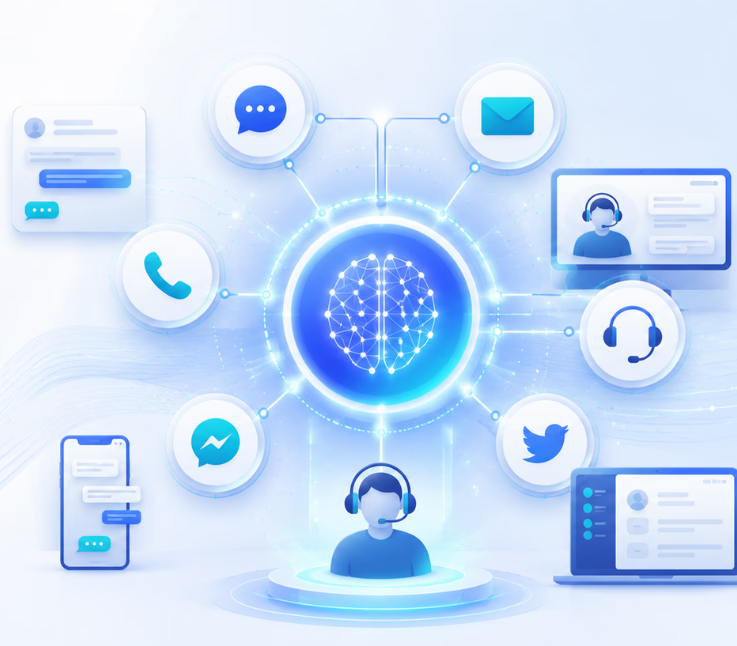
AI is the backbone of a modern omnichannel support strategy. It connects all customer touchpoints—calls, chat, SMS, email, social—so interactions flow with context, not chaos.
As businesses add channels, context often gets lost. AI bridges these silos by tracking every customer conversation, remembering each detail, and routing requests to the right person or automation. In my experience, this reduces handoff errors and lets agents focus where their empathy is needed most—while AI automates routine work.
This means lower workload, higher CSAT, and better cost control. For executives, AI unlocks faster ROI on CX tech investments while helping teams scale support quality, not just headcount. But the real win is delivering service that feels unified and personal at every turn.
The 5 Pillars of AI-Powered Omnichannel Support
An effective AI omnichannel support strategy rests on five key pillars. Each one solves a critical piece of the support puzzle—transforming scattered channels into a unified experience.
1. Unified Data and Conversation Fabric
Pulling all channels into one conversation inbox means your agents and AI see the complete customer story. Every call, SMS, chat, email, or WhatsApp message links to a single customer record.
This matters because customers switch channels mid-journey. Without a unified fabric, key details get lost. I’ve seen agents struggle to resolve issues because half the context lived in an old email, while the customer had moved to chat or SMS.
With a true omnichannel platform, the AI instantly recalls each step—so nothing is repeated, every handoff is informed, and personalization becomes second nature.
2. Contextual AI Agent Layer
Not all AI agents are created equal. The smartest approach is to configure AI agents for each channel and use case. I have watched companies gain compliance and CX wins by giving their voice agent a different knowledge base and escalation logic than their SMS bot or email triage agent.
Each AI agent gets a clear persona, up-to-date knowledge, and precise rules for when to ask for human help. In regulated industries, binding the right knowledge to the right channel is critical for security and accuracy.
This approach means your AI support matches the channel’s tone, audience, and business rules—keeping service compliant and personal without bloating the system.
3. Omnichannel Workflow Automation
It’s rare to see teams thriving without strong workflow automation. AI-driven tools let you map event triggers—like a missed inbound call or a new web chat—and automate smart follow-ups across any channel.
For example, last year our support team set up no-code flows so every missed call triggered an automatic SMS callback. Other businesses I’ve worked with use automation to gather post-chat CSAT feedback, route unresolved tickets from email to outbound voice, or instantly escalate compliance flags.
A good rule of thumb: any routine, cross-channel process can be automated—saving time and ensuring nothing falls through the cracks.
4. Voice Intelligence Beyond Chatbots
Voice often gets neglected in “omnichannel” setups. But most CX leaders I know can’t risk mishandling calls—voice is where high-value, high-emotion cases come through.
A strong voice intelligence pipeline offers live transcription, missed call detection with instant SMS follow-up, sentiment analysis, and voice-to-chat escalation. It’s not just about AI-powered chatbots—it’s about handling real calls, real customers, in real time.
In my POV, support teams that manage voice with AI—while centrally logging the conversation context—see the fewest repeats, fastest call resolution, and higher CSAT.
5. Analytics, Reporting, and Governance
If you can’t measure every channel and workflow, you can’t improve. Unified analytics dashboards let CX leaders track how AI and agents share workload, compare CSAT across channels, and spot pain points in escalation trends.
I have seen real transformation when teams use these insights to refine workflow triggers, retrain bots, or adjust escalation logic by department. For BPOs or enterprise teams, role-based access and audit trails ensure compliant oversight and safe data handling.
This data-driven approach turns guesswork into continuous optimization—a must for anyone serious about scaling great CX.
How to Implement an AI Omnichannel Strategy: A Roadmap
Implementation is more than plugging in new tools. In my experience, successful teams start with clear phases—and a focus on operational readiness.
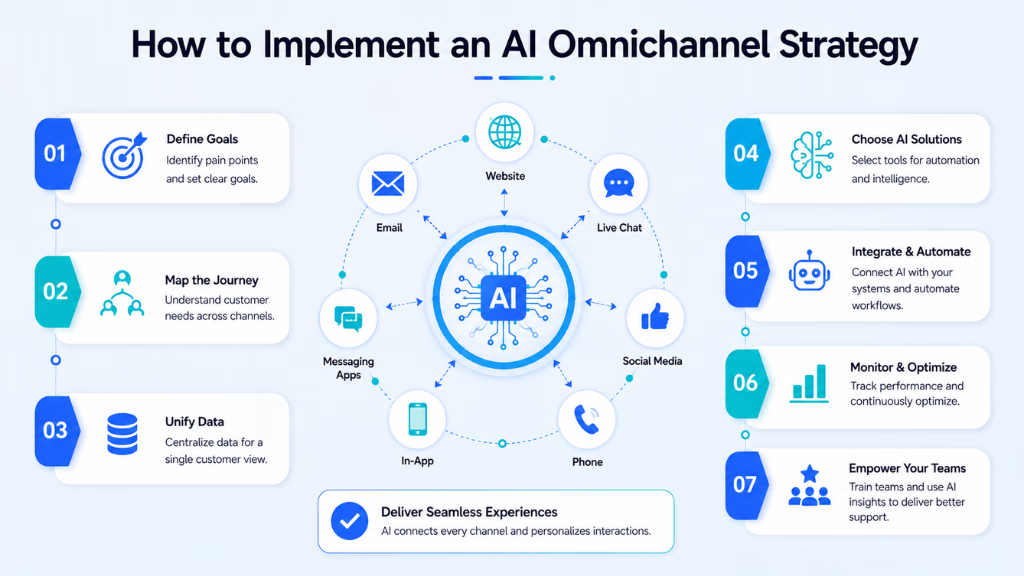
First, unify all customer data. This means connecting every channel to your AI support fabric, mapping out journey touchpoints, and making sure data is accessible and clean.
Next, configure your AI agents with channel-specific rules, knowledge, and handoff logic. Bring in frontline agents early—they’ll know where automation helps versus where a human should step in. Provide strong change management: retrain roles, clarify escalation paths, and promote early wins.
Once live, automate simple, repetitive flows. Start with high-volume areas—like missed call follow-up, standard inquiries, or appointment reminders—before moving to more complex, cross-department automations.
Finally, use unified analytics to watch KPIs: track CSAT, first contact resolution, AI-to-human handoff rates, and cost to serve. Address gaps as you see them—AI support is a journey, not a one-time launch.
Metrics & Business Impact: What To Track and Why
AI-powered omnichannel support only succeeds when measured with the right metrics. Key indicators tell you where to focus and how much value you gain.
- CSAT (Customer Satisfaction Score)
- FCR (First Contact Resolution)
- Cost to serve, per channel and per inquiry
- Agent productivity (cases handled, AI assist rate)
- AI deflection rate (how many issues AI resolves without escalation)
- Escalation patterns (root causes, channel mix)
- Conversation abandonment rates
A unified dashboard—like the one I used last quarter—helps tie these numbers together. You see which channels need more AI training, which workflows deliver savings, and where human support is still vital.
Common Challenges — and How To Avoid Them
AI-driven omnichannel projects often stumble for the same reasons I’ve seen in many teams. The real issue is not technology—it’s operations.
- Data silos between departments and channels
- Agents resisting automation or unclear about new roles
- Workflows that over-automate and frustrate customers
- Lack of compliance controls in regulated sectors
- Piecemeal analytics making optimization impossible
A better approach is strong change management, realistic pilot projects, clear privacy policies, and building your support around unified conversation fabric from the start.
How Commplify Solves Omnichannel Support Challenges
In my experience, platforms like Commplify make operationalizing an AI omnichannel support strategy much easier. The unified conversation inbox means every interaction—voice, chat, SMS, email, WhatsApp—carries its full context, so agents and AI never lose the customer thread.
For example, a healthcare contact center using Commplify configures a dedicated voice AI agent with HIPAA-compliant knowledge for appointment triage, while its web chat bot handles general FAQs. All conversations route through one platform—ensuring context is preserved for handoffs, compliance rules are enforced, and analytics covers every channel.
The real benefit is clear: context transfers, compliance stays tight, and you can measure and adjust—from missed call recovery to outbound follow-ups—without juggling disconnected tools.
Conclusion
Omnichannel support is no longer a luxury. Customers expect fast, familiar help—on the channel they choose, at any moment. AI is what makes true omnichannel service possible—unifying context, powering automation, and connecting every touchpoint.
The most important business takeaway is this: you need both unified conversation management and context-aware AI agents to deliver efficient and personal support at scale. A platform like Commplify brings these essentials together, so you can focus on serving customers, not patching channels.
AI-driven CX is still evolving, but the path is clear. Teams who invest in unified, intelligent orchestration now will set the standard for customer support in the years ahead.
FAQs
What is an omnichannel support strategy?
An omnichannel support strategy connects all customer channels—voice, chat, SMS, email, social—into one unified system, so each interaction is context-aware and no conversation gets lost or repeated.
How does AI connect different customer service channels?
AI connects channels by linking conversations to a single customer profile, maintaining context, routing inquiries, automating simple tasks, and alerting agents when human help is required—no matter where the conversation started.
What’s the difference between omnichannel and multichannel support?
Multichannel means having many support channels. Omnichannel means all channels are integrated, share data, and maintain context for the customer across their journey.
What benefits does AI-powered omnichannel support offer?
AI-powered omnichannel support lowers workload, increases customer satisfaction, reduces costs, delivers faster help, and ensures every customer interaction feels connected and personal on any channel.
How do you get started with AI in omnichannel support?
Start by unifying customer data, mapping support journeys, configuring channel-specific AI agents, training your team, setting up workflow automation, and using analytics to track and improve service.
What KPIs should be tracked for AI-driven omnichannel support?
Common challenges include data silos, agent resistance, over-automation, compliance risks, and lack of integrated analytics for optimization.
How does workflow automation help in omnichannel support?
Workflow automation helps by using triggers—like missed calls or new leads—to launch follow-up actions or escalate cases across channels, saving time and improving customer experience.
What’s required for data privacy and compliance in AI CX?
You need access controls, audit logs, data isolation, and channel-specific compliance protocols to ensure AI-driven support meets privacy and regulatory standards.
Will AI replace human agents in omnichannel customer service?
No, AI will not replace human agents. AI handles routine tasks and context transfer, while humans focus on complex, sensitive, or high-value conversations. Both work together for better customer support.
This page was last edited on 17 August 2026, at 6:12 am