What if every B2B support interaction strengthened client loyalty? Effective customer service in B2B combines personalized support, omnichannel AI, and smart automation to resolve issues faster, reduce churn, and protect valuable business relationships.
Your biggest B2B client has contacted support three times about the same issue. Three different agents. Three repeated explanations. Still no solution. Now, they’re questioning whether to renew their contract.
Sounds like a support nightmare, right? But for many B2B businesses, disconnected channels, slow responses, and missed SLAs make this a real challenge.
And the pressure is real. According to PwC’s 2025 Customer Experience Survey, 70% of executives say customer expectations are changing faster than their companies can adapt.
So, how do you handle growing support demands without frustrating customers or overloading your team?
It starts with connected conversations, smarter workflows, and the right AI automation.
This guide breaks down customer service in B2B, common challenges, and proven best practices. You can also explore how omnichannel AI can help you respond faster, retain clients, and grow with confidence.
What Is Customer Service in B2B?
B2B customer service (business-to-business customer service) is the support a company provides to its business clients throughout the customer lifecycle. It includes onboarding, technical assistance, account management, and issue resolution. Its main purpose is to meet business needs, improve customer satisfaction, and build long-term client relationships.
Unlike B2C support, B2B customer service often involves multiple stakeholders, complex requirements, and Service Level Agreements (SLAs). Customer Success Managers (CSMs) and support teams work together to deliver personalized, account-based support.
For example, a SaaS company can use an omnichannel AI customer service platform to manage inquiries across phone, email, and live chat. AI handles routine requests, while human agents resolve complex issues.
Types of B2B Customer Service
Customer service in B2B includes different types of support based on client needs, business goals, and service complexity. Some businesses need dedicated account managers. Others rely on AI automation and self-service tools for faster responses.
Here are the main types of B2B customer service:
1. Technical Customer Support
Technical support helps business clients resolve software errors, system failures, and integration issues. IT specialists use ticketing systems and escalation protocols to manage complex problems. Service Level Agreements (SLAs) help teams prioritize urgent requests.
Example: A SaaS provider helps an enterprise client’s IT administrator fix a CRM integration error.
2. Account-Based Customer Support
Account-based support provides personalized assistance to business clients. Customer Success Managers (CSMs) and Key Account Managers (KAMs) manage relationships, review client goals, and coordinate support requests. This high-touch support model is common for enterprise accounts.
Example: A dedicated account manager conducts Quarterly Business Reviews (QBRs) to discuss product adoption, service quality, and business goals.
3. Omnichannel Customer Support
Omnichannel support connects customer conversations across phone, email, live chat, and messaging platforms. A centralized CRM or omnichannel hub stores interaction history. This helps agents continue conversations without asking clients to repeat information.
Example: A procurement officer starts an inquiry through email and later calls support. The agent accesses the previous conversation and provides an update.
4. AI-Powered Customer Support
AI-powered support uses conversational AI platforms, virtual agents, and workflow automation to handle routine requests. Intelligent case routing sends complex issues to the right human agents. CRM integrations help maintain customer context.
Example: An AI voice agent answers billing questions and automatically routes payment disputes to the finance team.
5. Self-Service Customer Support
Self-service support allows business clients to find answers without contacting an agent. It includes knowledge bases, FAQs, customer portals, and troubleshooting guides. These resources help reduce repetitive tickets and improve resolution speed.
Example: An IT administrator uses a self-service knowledge base to configure API integrations without waiting for technical support.
6. Proactive Customer Support
Proactive support focuses on preventing issues before they disrupt business operations. Teams use system monitoring, predictive support analytics, and automated alerts to identify potential problems.
Example: An IT service provider detects unusual server activity and alerts its enterprise client before a possible outage.
7. Customer Onboarding and Success Support
Onboarding support helps new business clients set up products, train employees, and complete integrations. Customer success teams create joint success plans and monitor progress throughout the client lifecycle.
Example: A Customer Success Manager guides a new enterprise client through platform setup and schedules follow-ups to review adoption.
How Does B2B Customer Service Differ From B2C?
The main difference between B2B and B2C customer service is the customer relationship, support complexity, and business impact. B2B customer service focuses on long-term business partnerships, multiple stakeholders, and complex issue resolution. B2C support mainly serves individual consumers with personal needs and purchase-related issues.
Here’s a comparison of the key differences:
| Key Factors | B2B Customer Service | B2C Customer Service |
|---|---|---|
| Target Customers | Businesses, enterprise clients, and organizations | Individual consumers |
| Customer Relationships | Long-term partnerships and account-based support | Often transactional or loyalty-based relationships |
| Decision-Makers | Multiple stakeholders, such as procurement officers and IT leads | Usually individual buyers |
| Support Complexity | Technical integrations, contract issues, and custom solutions | Product questions, returns, and general troubleshooting |
| Support Approach | High-touch, personalized, and consultative support | Often standardized, high-volume support |
| Service Agreements | May include contractual SLAs and escalation protocols | Usually follows standard service policies |
| Support Teams | Customer Success Managers (CSMs), account managers, and technical specialists | Customer service agents and support representatives |
| Technology | CRM, ERP, ticketing systems, and omnichannel AI platforms | Chatbots, helpdesks, and self-service portals |
| Success Metrics | SLA adherence, customer retention, MTTR, CSAT, and account lifetime value | CSAT, First Response Time (FRT), resolution rate, and repeat purchases |
Why Is Customer Service Important in B2B Businesses?
Customer service in B2B is essential for building trust, retaining valuable clients, and supporting long-term business growth. A single enterprise account can represent significant revenue. Poor support may lead to contract cancellations, operational disruptions, and lost business opportunities.
Here’s why delivering excellent B2B customer service matters:
- Improves Customer Retention: Fast responses and reliable support keep business clients satisfied. Customer Success Managers (CSMs) can identify issues early and reduce client churn.
- Builds Stronger Business Relationships: Personalized support and regular Quarterly Business Reviews (QBRs) help businesses understand client needs. This builds trust and strengthens long-term partnerships.
- Protects Revenue and Customer Lifetime Value: Quality support encourages contract renewals and account expansion. It also helps protect high-value clients and increase Customer Lifetime Value (CLV).
- Reduces Operational Disruptions: Clear Service Level Agreements (SLAs) and escalation protocols speed up complex issue resolution. This helps reduce downtime and improve SLA adherence.
- Improves Support Efficiency: Omnichannel AI customer service automates routine inquiries and routes complex issues to human agents. This reduces manual workloads and improves First Response Time (FRT).
- Supports Business Growth: CRM insights, customer feedback, and proactive engagement help teams identify new opportunities. Better service also supports customer loyalty and long-term account retention.
8 Best Practices for Effective B2B Customer Service
Effective customer service in B2B requires personalized support, clear communication, and efficient workflows. The right approach helps businesses resolve issues faster, improve customer satisfaction, and build long-term client relationships.
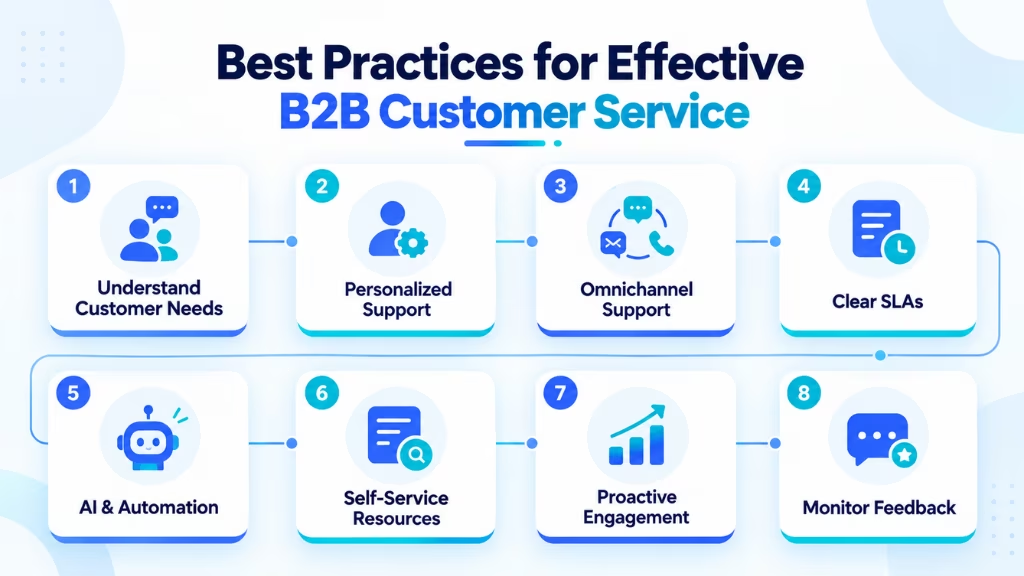
Here are eight proven practices to improve your B2B customer service strategy.
1. Understand Customer Needs and Business Goals
Every B2B client has different goals, challenges, and expectations. Review CRM records, support history, and customer feedback to understand their needs. Work with Customer Success Managers (CSMs) to create a Joint Success Plan. Schedule regular Quarterly Business Reviews (QBRs) to track progress and identify service gaps.
2. Deliver Personalized, Account-Based Support
Business clients expect support that reflects their specific needs. Use account history, contract details, and previous interactions to personalize assistance. Assign Key Account Managers (KAMs) or dedicated support teams to high-value clients. Choose high-touch support for complex accounts and automated assistance for routine requests.
3. Provide Consistent Omnichannel Customer Support
Customers may contact your team through phone, email, live chat, or messaging apps. Connect these channels through an omnichannel hub and CRM integration. Give agents access to previous conversations through a unified agent workspace. This helps customers switch channels without repeating their issues.
4. Set Clear SLAs and Escalation Protocols
Define response times, resolution targets, and support responsibilities in Service Level Agreements (SLAs). Create an escalation matrix based on issue severity and business impact. Use automated alerts to prevent missed deadlines. Monitor SLA Adherence Rate and Mean Time to Resolution (MTTR) to improve service performance.
5. Use AI and Automation for Routine Support
Use conversational AI platforms to automate FAQs, ticket classification, appointment scheduling, and basic troubleshooting. Intelligent case routing can direct complex issues to qualified agents. Connect AI virtual agents with CRM and ticketing systems to maintain customer context. Keep human support available for sensitive or complicated requests.
6. Offer Self-Service Resources for Faster Resolution
Create a self-service knowledge base with FAQs, troubleshooting guides, and technical documentation. Organize resources by common customer problems. Add AI-powered search to help clients find relevant answers quickly. Update articles regularly based on customer feedback and recurring support tickets.
7. Deliver Proactive Customer Engagement
Identify potential issues before clients report them. Use predictive support analytics, system monitoring, and CRM insights to detect service risks. Send automated alerts about outages, maintenance, or account changes. Schedule regular check-ins to understand client concerns and prevent avoidable disruptions.
8. Monitor Customer Feedback and Continuously Improve
Track Customer Satisfaction Score (CSAT), Net Promoter Score (NPS), First Response Time (FRT), and Customer Retention Rate (CRR). Review recurring complaints, unresolved tickets, and customer feedback. Use these findings to improve agent training, support workflows, and AI automation.
By following these practices, businesses can reduce client churn, improve support efficiency, and deliver a more consistent enterprise customer experience.
Real-World Examples of B2B Customer Service
Customer service in B2B looks different across industries. A SaaS company may focus on technical support. An IT provider may prioritize issue resolution. A wholesale business may need faster order updates.
Here are three practical examples.
SaaS Companies
SaaS businesses handle customer requests related to onboarding, subscription plans, API integrations, and technical issues. An omnichannel AI platform can answer routine questions and route complex cases to technical specialists. CRM integration also helps Customer Success Managers (CSMs) track customer issues and account history.
Commplify’s GlobalFin Bank case study shows how similar AI support workflows can improve service efficiency. The bank achieved 89% first-call resolution, up from 68%. It also handled 58% of calls without human intervention. These results come from banking, not a SaaS customer.
IT Service Providers
IT service providers manage technical troubleshooting, service outages, and system maintenance for business clients. Intelligent case routing helps prioritize urgent requests. Automated ticket distribution and clear escalation protocols help teams meet Service Level Agreements (SLAs).
In Commplify’s NetConnect case study, a telecom provider improved technical ticket creation accuracy from 81% to 95%. Its average call handling time also dropped from 7 minutes to 3.8 minutes. This example demonstrates AI-assisted technical support, although the client was a telecom operator rather than a managed IT service provider.
B2B E-commerce and Wholesale
B2B e-commerce and wholesale businesses receive frequent inquiries about bulk orders, inventory, shipping, and invoices. AI voice agents can retrieve order updates through API integrations. More complex requests can be transferred to account managers or logistics teams.
Commplify’s OmniRetail case study reported that 64% of calls were resolved without human intervention. Average answer time fell from 72 seconds to 14 seconds. Cost per support interaction also decreased by 29%. OmniRetail is a retail e-commerce example, but its order-support workflows are relevant to wholesale operations.
How Omnichannel AI Customer Service Works in B2B
Omnichannel AI customer service connects phone, email, live chat, and messaging platforms in one system. It uses conversational AI, CRM integrations, and automated workflows to manage customer inquiries. This helps businesses deliver faster responses, maintain customer context, and improve support efficiency.
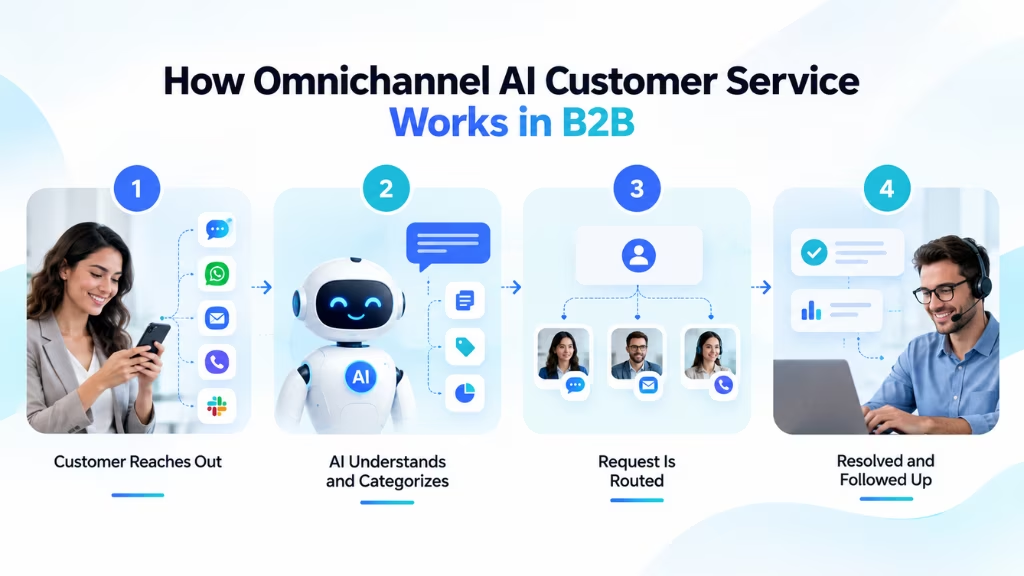
Here’s how it works in five simple steps:
Step 1: Business Client Contacts Support
A business client starts a conversation through phone, email, live chat, or messaging apps. The omnichannel hub captures the inquiry and connects it to the client’s Customer Relationship Management (CRM) record.
For example, an enterprise client’s IT administrator contacts support about a software integration error. The system retrieves the account’s previous interactions and support details.
Step 2: AI Understands the Request
The conversational AI platform analyzes the customer’s message to identify the issue and its urgency. It uses intent recognition and available CRM data to understand the request. Contextual sentiment analysis may also help detect customer frustration.
For example, the AI recognizes an API integration failure and checks relevant troubleshooting information in the knowledge base.
Step 3: Intelligent Case Routing
Intelligent case routing determines the next action based on issue type, priority, and Service Level Agreement (SLA). Routine requests go to AI virtual agents. Complex issues are assigned to qualified human specialists through automated ticket distribution.
For example, a critical integration failure is routed to the technical support team. The system also alerts the assigned Customer Success Manager (CSM).
Step 4: AI or Human Resolves the Issue
AI agents resolve routine inquiries using approved knowledge-base content and connected business systems. Complex cases move to human agents through a unified agent workspace. The agent receives the conversation history, ticket details, and troubleshooting steps.
For example, a technical specialist investigates the integration error without asking the client to repeat the problem.
Step 5: Follow-Up and Performance Tracking
After resolution, the system updates the CRM and ticketing records. AI-driven workflow automation can send confirmation messages and customer satisfaction surveys. Support leaders track First Response Time (FRT), Mean Time to Resolution (MTTR), SLA Adherence Rate, and Customer Satisfaction Score (CSAT).
These insights help teams identify recurring issues, improve workflows, and deliver proactive customer engagement.
With this connected approach, customer service in B2B becomes faster, more organized, and easier to scale. Businesses can reduce repetitive tasks, improve complex issue resolution, and strengthen long-term client relationships.
How to Improve B2B Customer Service
Improving customer service in B2B starts with identifying support gaps, understanding client expectations, and simplifying workflows. A clear improvement plan helps businesses reduce response times, resolve issues faster, and improve customer retention.
Here are six practical steps to improve B2B customer service:
- Evaluate Support Performance: Review customer complaints, unresolved tickets, and recurring issues. Track First Response Time (FRT), Mean Time to Resolution (MTTR), and SLA Adherence Rate to identify service gaps.
- Map the Customer Journey: Analyze each stage of the client lifecycle, from onboarding to renewal. Work with Customer Success Managers (CSMs) to identify customer pain points and improve the overall experience.
- Connect Support Channels: Integrate phone, email, live chat, and messaging platforms through an omnichannel hub. Sync customer conversations with CRM and ticketing systems to maintain context across channels.
- Automate Routine Tasks: Use conversational AI and intelligent case routing to handle FAQs, classify tickets, and assign requests to the right agents. Keep human support available for complex issues.
- Improve Agent Training and Escalation: Train agents on product knowledge, communication skills, and technical troubleshooting. Establish clear Service Level Agreements (SLAs) and escalation protocols for urgent requests.
- Monitor Feedback and Optimize: Collect Customer Satisfaction Score (CSAT) and Net Promoter Score (NPS) feedback. Review support metrics regularly to improve workflows, reduce client churn, and strengthen customer relationships.
These improvements help businesses deliver faster resolutions, reduce support costs, and scale B2B customer service without compromising service quality.
Common Challenges in B2B Customer Service
Customer service in B2B can be challenging due to complex client needs, multiple stakeholders, and high service expectations. Slow responses and disconnected systems can affect customer satisfaction and long-term account retention.
Here are the most common B2B customer service challenges and how to overcome them:
- Managing Multiple Stakeholders creates communication gaps between teams. A centralized CRM helps maintain clear customer records.
- Handling Complex Technical Issues delays resolution. Clear escalation protocols and technical support teams help resolve problems faster.
- Disconnected Support Channels cause missed messages and repeated questions. Omnichannel AI connects conversations across platforms.
- Meeting SLA Requirements becomes difficult with different client priorities. Automated SLA tracking and intelligent case routing improve compliance.
- Scaling Support Operations increases workloads and costs. AI virtual agents and self-service tools automate routine inquiries.
- Preventing Customer Churn requires consistent service. Proactive engagement, QBRs, and CSAT tracking help identify at-risk accounts.
Addressing these challenges helps businesses improve service efficiency, reduce client churn, and strengthen long-term relationships.
How to Choose the Right B2B Customer Service Platform
Choosing the right platform for customer service in B2B depends on your business needs, support volume, and client expectations. A good platform should connect communication channels, automate routine tasks, and simplify complex issue resolution.
Here are the key features to consider before making a decision:
- Omnichannel Support: Choose a platform that connects phone, email, live chat, and messaging apps. An omnichannel hub helps agents deliver consistent support across channels.
- CRM and Business Integrations: Look for seamless integration with CRM, ERP, and ticketing systems. Real-time CRM synchronization helps agents access customer history and account details.
- AI and Workflow Automation: Prioritize conversational AI, virtual agents, and intelligent case routing. These features automate repetitive inquiries and direct complex issues to human specialists.
- SLA and Escalation Management: Ensure the platform supports SLA monitoring, priority-based ticket distribution, and clear escalation protocols for enterprise clients.
- Self-Service Capabilities: Look for an AI-powered knowledge base, FAQs, and customer portals. These tools help clients resolve common issues without waiting for agents.
- Reporting and Analytics: Choose a platform that tracks First Response Time (FRT), Mean Time to Resolution (MTTR), SLA Adherence Rate, and Customer Satisfaction Score (CSAT).
- Security and Scalability: Check data protection, role-based access controls, API integrations, and the ability to handle growing support volumes.
The right B2B customer service platform should improve agent productivity, reduce client churn, and support long-term account retention without adding unnecessary complexity.
Upgrade Your B2B Support Strategy with AI
Managing customer service in B2B becomes harder as client inquiries, support channels, and service expectations grow. Disconnected conversations and repetitive tasks can slow down your team. This is where omnichannel AI can make a difference.
Commplify is an omnichannel AI platform designed to help businesses manage customer conversations across multiple channels. It brings AI-powered communication and automation into a connected support workflow.
With the right setup, businesses can automate routine inquiries, use intelligent case routing, and transfer complex issues to human agents. CRM integrations can also help teams maintain customer context and deliver more personalized support.
For SaaS companies, enterprise support teams, and contact centers, this approach can reduce manual workloads and improve response times without losing the human touch.
The goal isn’t to replace your support team. It’s to give them more time to solve meaningful problems and build stronger client relationships.
Final Thoughts
Great customer service in B2B is about more than resolving issues. It’s about understanding client needs, building trust, and creating long-term business relationships.
Personalized support, clear SLAs, and connected communication channels help businesses deliver better customer experiences. With omnichannel AI and automation, support teams can handle routine inquiries faster and focus on complex issues that need human attention.
Start by identifying your biggest support challenges. Improve your workflows, connect your channels, and introduce AI where it adds real value.
The right B2B customer service strategy can help you reduce client churn, improve support efficiency, and build lasting customer relationships.
Frequently Asked Questions
What is an example of B2B customer service?
A SaaS company helping an enterprise client troubleshoot an API integration is an example of B2B customer service. It may involve technical support, account management, and follow-up assistance.
What is an SLA in B2B customer service?
A Service Level Agreement (SLA) is a formal agreement defining service commitments, such as response times, availability, support hours, and resolution targets.
What is a good response time for B2B customer support?
It depends on issue severity and contractual SLAs. Critical incidents may require responses within 15–60 minutes, while routine inquiries may allow several business hours.
What KPIs measure B2B customer service success?
Common KPIs include CSAT, NPS, First Contact Resolution (FCR), First Response Time (FRT), Customer Effort Score (CES), SLA compliance, and average resolution time.
Which B2B customer service tasks can AI automate?
AI can automate FAQs, ticket classification, appointment scheduling, routine order inquiries, conversation summaries, initial troubleshooting, and support routing.
Can AI customer service integrate with CRM software?
Yes. AI customer service platforms can integrate with CRM systems through native connectors, APIs, or middleware. Integration capabilities depend on the platforms and their configurations.
This page was last edited on 28 October 2026, at 7:50 am