Quick Answer
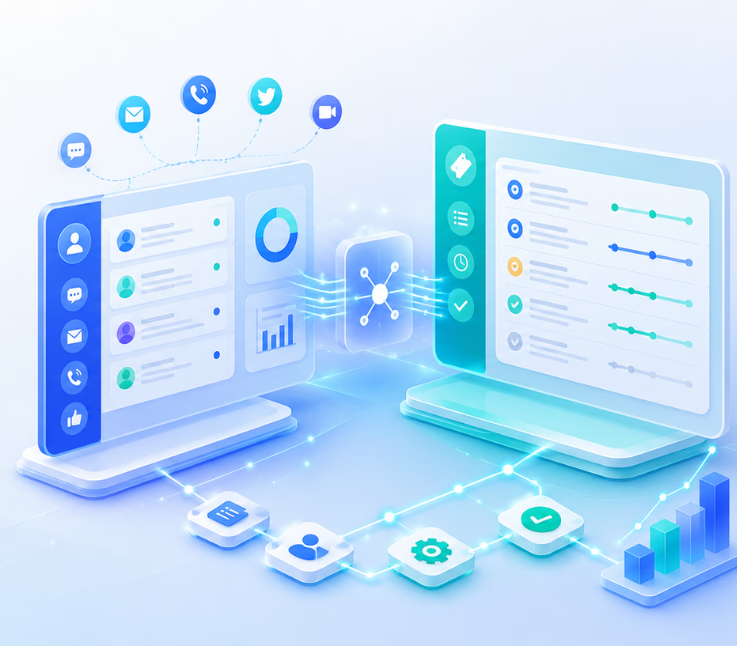
Integrating CX platforms with resolution tracking systems automates tracking, case assignment, and feedback across all channels. This reduces manual effort, bridges silos, delivers real-time visibility, and connects analytics to every customer resolution for improved satisfaction and accountability.
Support teams waste hours manually tracking issues when tools do not talk to each other. I have seen this create reporting headaches, slow down case resolution, and bury vital customer insights. Information falls through the cracks, and leaders struggle to prove ROI on CX investment.
The real issue is not just disconnected systems but missed opportunities to close the loop with customers at scale. CX leaders want a unified process, not confusion.
This guide explains exactly how CX platforms integration with resolution tracking systems, using workflow automation, removes these pain points. You will see practical approaches, learn what matters most, and discover proven steps for smarter, faster customer resolution.
Why CX Platforms Integration with Resolution Tracking Systems Is Critical
Disconnected CX platforms and resolution tracking tools force teams into fragmented workflows. Tickets get lost, data is duplicated, and insights never fully align. Integration fixes this by connecting every customer interaction to real-time resolution tracking.
When you unify these systems, issue assignment, case updates, and feedback collection work together. The result is faster case closure, fewer missed follow-ups, and a clear view of all support activities. In my experience, this shift helps teams move from outdated guesswork to true operational control and measurable outcomes.
How CX Platforms Integration with Resolution Tracking Systems Works
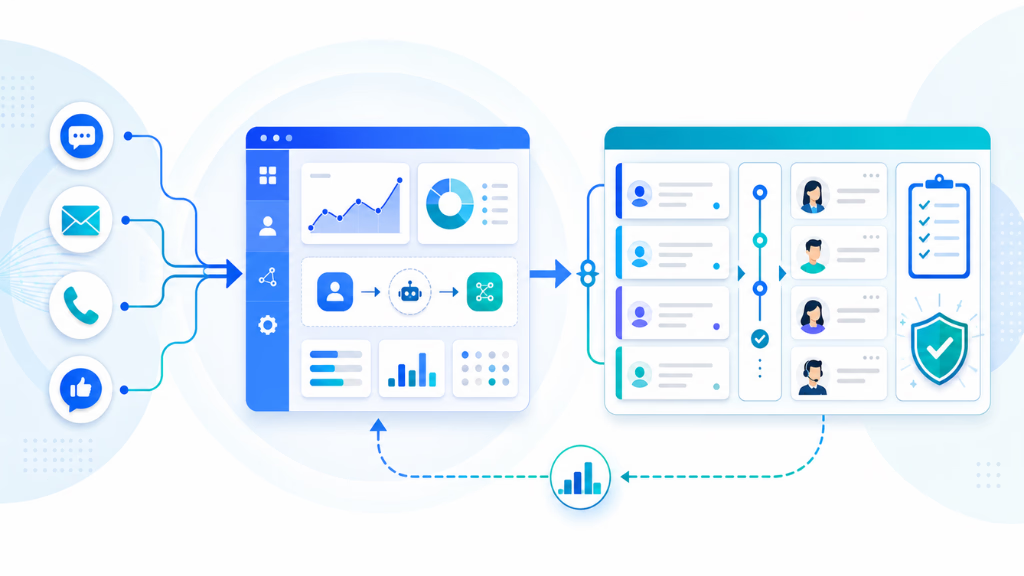
Integrating CX and resolution tracking connects every support touchpoint—voice, chat, email, SMS, WhatsApp—through automation. Instead of siloed tools, you get a single workflow. This process gives businesses end-to-end visibility over all customer issues and outcomes.
Defining the Key Components
Every integration involves a few essential systems. A CX platform manages all incoming customer interactions across different channels. A resolution tracking system (like a ticket or case manager) records issue progress and ownership. APIs or connectors enable data flow, while workflow automation moves each case from first contact to closure—without constant manual steps.
For most teams, the best results come from platforms that natively support workflow triggers, conditional logic, and integration to all case management tools. Visual builders and no-code tools shorten setup time and allow operations teams to iterate fast.
Integration Architectures
There are several technical routes. Direct APIs push and pull data between systems. Middleware tools—like iPaaS or low-code automation platforms—can bridge more complex environments. Some CX platforms offer off-the-shelf connectors to common ticketing and case tools. A modern, workflow-driven platform with APIs and event triggers provides maximum control.
Here is how a typical integration might look in action:
- A customer sends a WhatsApp message asking for support.
- The CX automation platform recognizes intent and opens a new ticket in the case manager.
- Automated workflow assigns the case to the right team, tracks all updates, and triggers follow-up actions like status updates or escalations.
- All interaction history and status remain visible in a united dashboard until the issue is closed.
Real-World Workflow Automation Examples
Workflow automation lets teams create practical processes without complex coding. Some common examples I have used to speed up resolution:
- Assigning urgent issues to senior agents and notifying managers on Slack.
- Triggering automatic CSAT surveys after each resolved ticket.
- Monitoring case aging and escalating overdue issues.
- Closing the loop by updating CRM records once a case is closed.
Automating these repetitive tasks saves hours and reduces mistakes.
Omnichannel Resolution Tracking Across Every Customer Touchpoint
In my POV, true omnichannel support is more than handling messages everywhere—it means tracking resolution across all those channels in one place. Single-reference conversation IDs, linked to tickets, allow every update, comment, and case status change to surface in a central dashboard. This is what lets leaders follow customer journeys from start to finish, whether the issue arrived by phone, chat, or email.
Unified conversation management is essential. It keeps every stakeholder informed and ensures nothing is missed. Analytics can then measure not only what was resolved, but how, where, and by whom.
Building Closed-Loop Feedback and Analytics
The mistake I see often is collecting feedback only through isolated surveys, disconnected from real resolution data. Closing the loop links CSAT or NPS feedback requests to actual case closure events. When each survey is tied to a specific ticket, you see exactly which types of resolutions drive satisfaction (or not).
Automated feedback workflows can trigger surveys only when cases reach confirmed closure, and advanced analytics can report on time-to-resolution, first contact resolution (FCR), agent effectiveness, and deeper patterns—across the full customer journey.
AI and Automation Trends in CX + Resolution Integration
AI-driven bots and workflow builders are now handling a larger segment of case triage, routing, and response. Generative AI can summarize interactions, extract key details, and update tickets. In the field, I have seen automated escalation workflows direct complex cases to the right experts before customers ever notice a delay.
These automation layers minimize manual handling and create consistency. Workflow automation builders allow support leaders to design, test, and deploy these flows fast—no code needed.
Key Considerations and Challenges in CX Platform Integration
While integration brings clear benefits, it is not plug-and-play. I have seen integrations fail when data mapping is inconsistent or contextual information gets lost between tools. Security and compliance must be considered at every turn, especially in regulated industries.
Key factors to plan for include:
- Data silos from manual mapping or limited APIs
- Ensuring context is not lost in case handoffs
- Handling large volumes and complex routing for enterprises
- Secure, compliant data exchange across every connected system
- Building workflows to support growth, multi-brand, or multi-tenant operations
A targeted integration checklist, with input from IT, support ops, and CX leadership, helps avoid the most common pitfalls.
How Modern Workflow Automation Empowers End-to-End CX Resolution
A visual workflow automation builder does more than bridge system gaps: it puts operations leaders in control of their resolution journey. With unified conversation tracking, every customer touchpoint—be it voice, SMS, chat, email, or WhatsApp—automatically feeds into a living case record.
I have seen teams benefit from a single inbox where each conversation has a unique reference ID and an always-updated case status. Commplify, for example, supports these unifying inboxes with AI-driven triggers. You can assign cases, add notes, escalate when needed, and automate CSAT triggers post-resolution—all in one dashboard.
In healthcare, resolving appointment reschedules via chat can launch a linked support case, with workflow updates, status alerts, and a feedback survey upon closure. In B2B SaaS, unresolved product inquiries on any channel start a tracked ticket, auto-escalate if not resolved, and capture feedback. The insight is consistent: workflow automation connects people, platforms, and process and brings end-to-end transparency.
Last year, when our support team shifted to workflow-based automation with unified tracking, resolution times dropped by 30 percent, and first-contact resolution improved—a direct path to higher customer satisfaction.
Conclusion
Integrating CX platforms with resolution tracking systems is not just a technical step. It creates a foundation for measurable, scalable customer experience. When workflows automate, conversation management unifies, and feedback analytics close the loop, everyone benefits.
The real business payoff is in faster resolution, fewer manual steps, and a single view of the customer. In my experience, the workflow automation capabilities found in modern platforms, like Commplify, give leaders the tools they need to make this shift practical.
Investing in unified, AI-driven resolution management is the way forward. It means not only improving KPIs but building an operation that adapts, learns, and delivers better service over time.
FAQs
What is a customer experience platform?
A customer experience platform is a unified software solution that manages, automates, and tracks all customer interactions across channels like chat, voice, SMS, email, and more.
What is a resolution tracking system?
A resolution tracking system (like ticketing or case management) records, assigns, monitors, and closes customer support issues, providing visibility into issue status and outcomes.
Why do CX platforms integrate with ticketing or resolution systems?
Integration ensures all customer issues are tracked from start to finish, prevents manual data entry, unifies reporting, and improves support team efficiency and customer satisfaction.
What are the key benefits of integrating CX with resolution workflows?
Integration reduces manual effort, eliminates silos, speeds up resolutions, links feedback to outcomes, and gives teams full visibility into every customer case and interaction.
Which CX platforms have the best integration with resolution tracking tools?
Leading platforms include Commplify, Zendesk, NICE CXone, Salesforce Service Cloud, and Freshdesk—each offering various API and workflow automation options.
What technical methods are used for integration (APIs, connectors, etc.)?
Integrations work through direct APIs, middleware platforms, webhooks, or pre-built connectors, allowing real-time data and workflow synchronization between CX and ticketing systems.
How does closed-loop feedback work in a CX + resolution setup?
Closed-loop feedback triggers customer surveys (like CSAT) automatically after a case is resolved, connecting customer ratings directly to support outcomes in reporting.
What customer journey metrics improve when these systems are integrated?
Metrics like CSAT, NPS, time-to-resolution, first-contact resolution, and case closure rates improve with integrated CX plus ticketing and feedback workflows.
How is data synchronized securely between CX and resolution systems?
Data sync uses encrypted APIs, secure authentication, role-based permissions, and audit logs to ensure information stays accurate and compliant with security standards.
What are the most common integration challenges?
The most common challenges are data mapping differences, loss of context, manual mapping, API limitations, security concerns, and scaling to support volume and complexity.
How do I set up integration between my CX platform and resolution tracking system?
You typically configure API connections, define workflow triggers, and map fields between platforms, ideally using visual automation builders or prebuilt connectors when available.
How can I track issue resolution status inside my CX dashboard?
With integration, each conversation thread or ticket in your CX dashboard shows real-time status, notes, owner, and resolution milestones, keeping all context in one place.
What best practices should I follow to ensure seamless integration?
Plan for consistent data mapping, maintain security, involve IT and business users, test workflows in stages, and document processes for future-proof scaling.
How do I use automation/workflows to bridge CX and support tickets?
Create trigger-based workflows—such as auto-opening tickets for specified issues, escalating unresolved cases, or triggering feedback requests—using drag-and-drop workflow tools.
How do I link CSAT/NPS feedback directly to case resolution data?
Automate feedback requests to send after case closure, then connect ratings back to specific cases in analytics. This lets you measure satisfaction by resolution type, channel, or team.
This page was last edited on 29 June 2026, at 1:53 am