Quick Answer
CX automation improves resolution speed and accuracy by automating triage, enabling self-service, optimizing workflows, and using smart knowledge bases. These tools cut wait times, reduce errors, and ensure customers get consistent, precise help across all support channels.
The pressure to deliver fast, accurate resolutions has never been greater. Missed responses, long waits, or inconsistent answers can frustrate customers, hurt your reputation, and drive up costs.
I have seen contact center teams spend hours firefighting due to gaps between channels, manual routing, or knowledge problems. The real issue is that today, customers expect both instant and correct help—without excuses.
This guide shows you, step-by-step, how CX automation improves resolution speed and accuracy and directly fixes these problems. You will see proven mechanisms, pitfalls to avoid, and real examples for enterprise-scale CX. Readers will leave with a practical understanding of how to build a faster, more accurate support operation that wins customer trust.
Why Speed and Accuracy in CX Automation Matter
Resolution speed and accuracy are at the heart of customer experience automation. They impact core operational metrics like CSAT, first-contact resolution, error rate, and agent efficiency.
In my experience, speed matters because customers judge brands on first impressions—delays quickly turn trust into irritation or churn. At the same time, accuracy cannot be sacrificed; a fast wrong answer only adds to the frustration. The real challenge for modern enterprises is meeting these high expectations without burning out teams or breaking budgets. That’s why understanding how CX automation platforms address both dimensions is now a core CX leadership skill.
How CX Automation Improves Resolution Speed and Accuracy
Unified omnichannel automation, AI-driven workflows, and real-time analytics enable fast and accurate resolutions for even the most complex support environments. Below, I break down the exact mechanisms that move the needle, drawn from real enterprise deployments.
Automating Triage and Routing to Reduce Wait Times
Automated triage and intelligent routing are the backbone of fast support. Instead of agents spending time sorting through emails, chats, or calls, AI engines categorize and prioritize every conversation instantly.
I have seen this in action in BPO and enterprise environments where an AI agent assigns urgent cases directly to skilled agents and sends routine queries to automated self-service. This sharp drop in manual handling means customers no longer wait in queues and critical tickets never get lost during high-volume spikes.
When triage is handled by automation, teams spend less time on basic sorting and more time resolving actual issues. The result is lower average response time and a much higher rate of first-contact resolutions.
Enabling Instant, Accurate Self-Service
Modern customers are often more than willing to help themselves, provided they receive precise and reliable answers. AI-powered chatbots, dynamic FAQs, and guided flows turn this expectation into a reality.
A well-built knowledge intelligence system ensures every self-service answer is current, accurate, and tailored. In my POV, one common mistake is treating the knowledge base as a set-it-and-forget-it asset. The real value comes from using tools that combine real-time updates and smart retrieval. For instance, in healthcare or finance, self-service automation can share policy details or scheduling steps with near-zero error.
By deflecting routine queries to automated, accurate channels, live agents are freed up to handle unique or complex cases—speeding up the whole operation.
Unified Omnichannel Communication for Context-Driven Speed
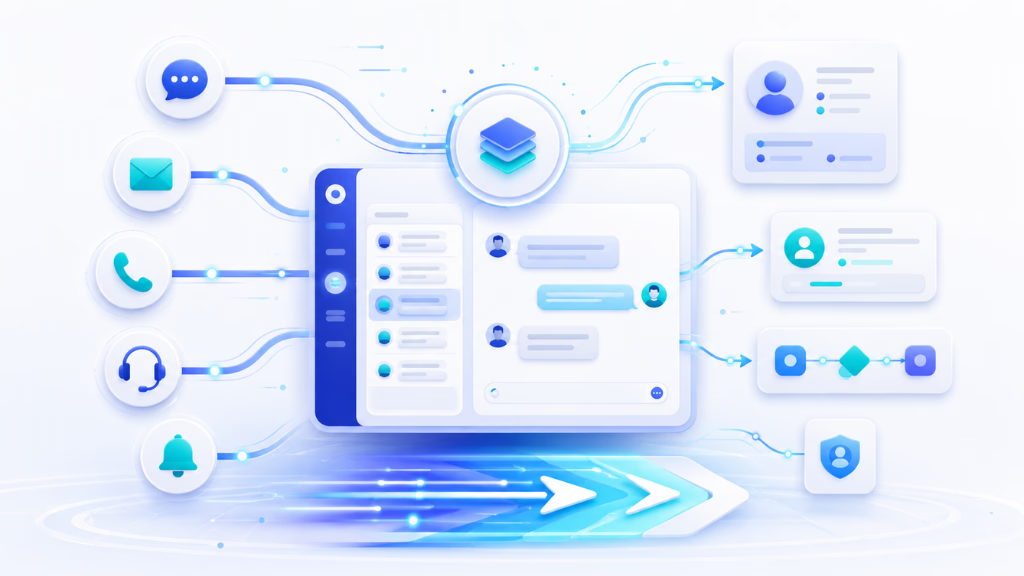
Customers switch between channels—voice, chat, SMS, email, WhatsApp—without worrying about your backend systems. Each switch creates risk of lost context or duplicated effort. In my experience, teams struggle most when conversation data is fragmented across platforms.
A unified omnichannel platform consolidates all channels into one conversation inbox. Agents or AI always see the complete customer CX journey, including conversation history and handoffs.
This continuity eliminates repeated questions (“can you tell me your tracking number again?”), reduces the time needed to understand a case, and leads to faster, more accurate answers. Tools like Commplify are built around this principle—every message, call, or email feeds into a shared workflow, breaking down channel silos.
Workflow Automation: Accelerating Every Stage of Resolution
Most CX environments include repetitive, predictable tasks: status updates, follow-ups, data entry into CRMs. Workflow automation removes these bottlenecks.
No-code builders give managers power to map out and automate steps in the support journey without waiting for IT. For example, when a missed call is detected, a trigger can automatically send an SMS follow-up or assign the conversation to an outbound agent.
From my experience, automating these touchpoints cuts down average resolution time and eliminates a huge source of human error—no more missed callbacks or forgotten follow-ups.
Real-Time Analytics and Quality Assurance
You cannot improve what you do not measure. Real-time analytics ensure automation does not just run, but actually delivers on the speed and accuracy goals you set.
I have seen some teams watch dashboards for response time, CSAT, and error rates hour by hour. But the real breakthrough comes from automation that monitors itself—flagging potential mistakes for review, measuring how many queries were resolved on the first contact, and alerting leaders to downturns in quality.
Continuous quality assurance allows support teams to correct problems before they snowball—improving both the customer experience and operational results.
Practical Examples and Use Cases
- Healthcare: Automated patient triage quickly identifies routine questions and escalates sensitive cases to humans. This reduces patient wait times and ensures correct handling of compliance issues.
- Financial Services: Knowledge engines power instant, policy-aware FAQs. Automation reduces compliance errors by surfacing relevant rules and escalation paths.
- E-commerce: Chatbots handle common order inquiries, enabling lightning-fast responses and freeing agents for complex complaints or refunds.
- BPO/Contact Centers: High-volume environments use automated routing, reply templates, and no-code workflow automation to handle spikes without sacrificing accuracy.
Last year when our support team rolled out automated triage and self-service, response times halved and accuracy scores improved noticeably—proof that these mechanisms deliver when tailored to real support operations.
Key Considerations and Common Pitfalls
While CX automation can transform operations, several mistakes can limit success or cause new problems.
A better approach is to design automation with clear escalation paths, invest in high-quality knowledge, and ensure IT can support integration.
- Over-reliance on automation with no human escalation for exceptions
- Poor or outdated knowledge bases leading to incorrect answers
- Fragmented systems causing data silos and broken context
- Not balancing automation efficiency with human empathy when needed
Review process maps, test workflows, and invite regular feedback from both agents and customers to catch these issues early.
Building Fast, Accurate CX Automation with Commplify
Commplify solves real-world speed and accuracy challenges by unifying conversations across all major channels—voice, chat, SMS, email, WhatsApp—into a single inbox.
In my experience, this centralized view eliminates confusion and loss of context when customers switch channels. Workflow automation ensures every step from triage to follow-up happens without delay or errors. Knowledge intelligence means AI agents or humans always work with current, precise information, cutting mistakes and boosting first-contact resolution.
Gartner forecasts that by 2029, agentic AI will independently handle up to 80% of routine customer service inquiries, helping organizations cut operational costs by approximately 30%.
For CX leaders, Commplify’s real-time analytics dashboard makes it easy to track performance and spot improvement areas. This combination of unified omnichannel communication, automation, and dynamic knowledge management creates the foundation for a responsive, quality-focused support operation.
Conclusion
CX automation lets enterprises achieve both high speed and accuracy in customer support—without tradeoffs. By automating triage, powering self-service, and integrating real-time analytics, teams can move faster while maintaining or even raising their quality bar.
The main business takeaway: you can scale support, reduce wait times, and improve customer satisfaction by focusing on unified automation and workflow best practices.
Platforms like Commplify offer practical, proven ways to bring these principles to life for both large and growing teams. They ensure you keep accuracy high, even as you reduce manual work.
Looking ahead, the next wave of AI-driven CX will further raise the bar. Companies that adopt the right automation approaches now will be ready to meet higher customer expectations and deliver stand-out experiences at scale.
FAQs
What is customer experience automation?
Customer experience automation uses AI and workflows to handle and route customer interactions, respond automatically, and help agents solve issues faster across all channels.
How does CX automation speed up customer issue resolution?
It cuts wait times by automating triage, routing cases instantly, allowing instant self-service, and removing repetitive manual steps from the agent workflow.
How does automation improve the accuracy of support responses?
Automation uses up-to-date knowledge bases, real-time analytics, and context-aware routing to ensure customers get the right answers and quick escalations when needed.
What are common examples of CX automation in contact centers?
These include AI chatbots, automated call routing, knowledge-based self-service FAQs, workflow triggers for follow-ups, and real-time analytics for quality.
What KPIs prove the impact of CX automation on resolution speed and accuracy?
Time to resolution (TTR), first-contact resolution (FCR), customer satisfaction (CSAT), error rate, and escalation rates are key metrics.
What’s the difference between automation and the human touch in CX?
Automation handles routine queries for speed and accuracy, while human agents manage complex, sensitive, or emotional issues needing empathy.
How do I start automating CX in my organization?
Map your most common support journeys, identify repetitive tasks to automate, select a unified automation platform, and set up clear human escalation paths.
Are there risks to automating support (like losing accuracy)?
Yes. Risks include errors from outdated knowledge, poor escalation, or over-relying on bots. Mitigate them by using quality knowledge bases and monitoring results with analytics.
This page was last edited on 25 June 2026, at 1:38 am