Real-time AI agent handoff is when an AI system instantly transfers an active customer conversation—along with its full context—to a human or specialist agent across any channel, ensuring no information is lost and customer experience stays smooth.
Every modern CX leader faces a core dilemma: automate at scale, but keep support experiences human when it counts. Dropped threads, repeated questions, and channel silos leave both agents and customers frustrated.
In my experience, the weakest link is usually what happens when automation ends. That critical moment—AI to human handoff—often defines whether a customer leaves satisfied or starts over somewhere else.
This guide lays out what real-time AI agent handoff really means, how it works across channels, practical workflow tips, pitfalls to avoid, and where unified platforms can help. Read on, and you’ll learn how to deliver transitions that earn trust, protect context, and scale with your business.
What Is Real-Time AI Agent Handoff?
Real-time AI agent handoff is the process of transferring a customer conversation from an AI-powered virtual agent to a human support agent while the interaction is still in progress. The goal is not simply to move the customer to another channel. A good handoff transfers the conversation context, customer details, intent, and relevant history so the human agent can continue from where the AI stopped.
This matters because AI agents are effective at handling repetitive and predictable requests, but not every customer issue should remain automated. A billing dispute, complicated account problem, emotionally sensitive complaint, unusual technical issue, or high-value sales inquiry may require human judgment.
Without a proper handoff mechanism, customers may have to repeat their question, identity, account information, and everything they already explained to the AI. That creates friction and defeats much of the convenience automation is supposed to provide.
A properly designed real-time AI-to-human handoff makes the transition feel like one continuous conversation rather than two disconnected support experiences.
How Real-Time AI Agent Handoff Works
An effective handoff usually happens through a combination of intent detection, conversation analysis, predefined business rules, and routing logic.
The AI agent first handles the conversation normally. As the interaction progresses, the system continuously evaluates whether the AI can resolve the request confidently or whether human assistance is becoming necessary.
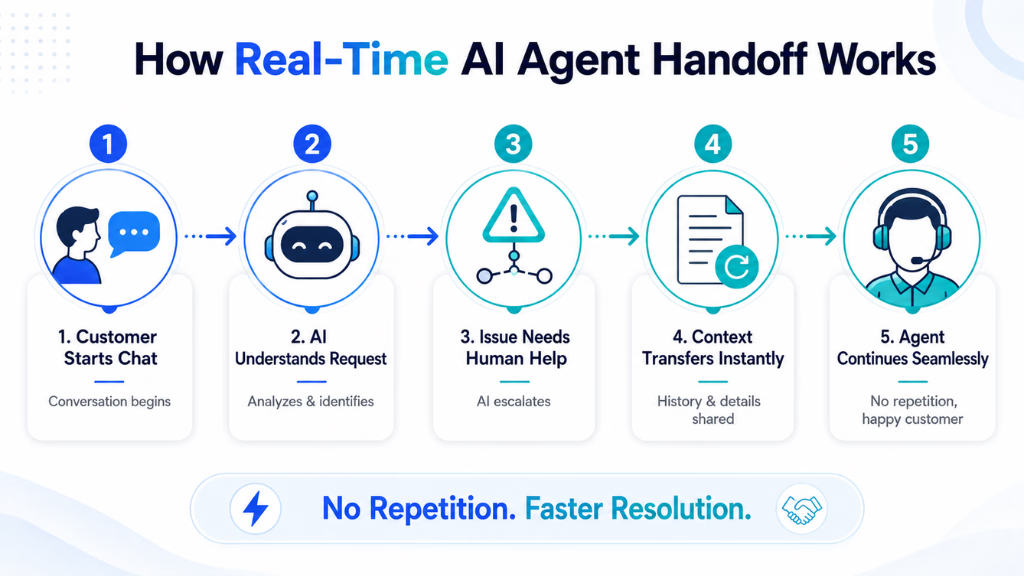
Once a handoff condition is detected, the system can follow a workflow like this:
1. AI identifies the need for escalation
The AI recognizes that the conversation has reached a point where human involvement would provide a better outcome. This may happen because the request is outside the AI’s supported knowledge, the customer explicitly asks for an agent, or the conversation meets an escalation rule.
2. The conversation is summarized
Instead of forwarding an unstructured chat transcript, the system can prepare a concise summary containing important information such as:
- Customer intent
- Problem already discussed
- Troubleshooting steps completed
- Products or services involved
- Relevant account information
- Customer sentiment
- Reason for escalation
This helps the human agent understand the situation immediately.
3. The customer is routed to the right agent
Routing should consider more than agent availability. Depending on the organization, the system may route conversations based on department, skill, customer language, product expertise, issue severity, account tier, or sales opportunity.
4. The human agent receives the context
The support agent receives the conversation along with the AI-generated summary and relevant customer data. Ideally, the agent can review this information before joining the conversation.
5. The conversation continues without restarting
The customer should not need to explain the entire situation again. The human agent can acknowledge what has already happened and move directly toward resolving the issue.
That final step is what separates a real-time handoff from a simple chatbot escalation.
When Should an AI Agent Hand Off to a Human?
Businesses should avoid treating human handoff as something that only happens when the AI completely fails. In many cases, escalation should occur before the customer becomes frustrated.
Customer Explicitly Requests a Human
If a customer clearly asks to speak with an agent, forcing them through several additional automated steps can create unnecessary friction.
The AI can still collect basic information or clarify the issue before transferring the conversation, but it should not intentionally make human assistance difficult to reach.
AI Confidence Is Too Low
AI systems can use confidence thresholds to determine whether they have enough information to respond reliably.
When confidence falls below an acceptable level, escalation may be safer than generating uncertain answers. This is particularly important when inaccurate information could affect payments, accounts, contracts, technical systems, or other important decisions.
The Issue Becomes Too Complex
Some problems require multiple decisions, exceptions, or information that is not available through the AI system.
For example, an AI agent might handle a standard refund request automatically but escalate a case involving conflicting transactions, multiple orders, or an exception to company policy.
Customer Sentiment Deteriorates
Repeated questions, negative language, or signs that the interaction is going in circles can indicate that automation is no longer helping.
Sentiment analysis can be combined with conversation signals such as repeated intent, multiple failed responses, or unusually long interactions to initiate an earlier handoff.
High-Value Opportunities Appear
Handoff is not limited to customer support.
An AI sales agent might answer product questions and qualify visitors but transfer a conversation when someone requests enterprise pricing, discusses a large purchase, wants a product demonstration, or shows strong buying intent.
In those cases, real-time handoff can help a sales representative engage while the prospect is still interested.
Sensitive or Policy-Restricted Requests Occur
Organizations should define categories of conversations where human review is required. Instead of allowing automation to make decisions beyond its authorized scope, the AI can collect relevant information and send the situation to the appropriate employee.
Key Components of an Effective AI-to-Human Handoff
Simply adding a “Talk to an Agent” button does not create an effective handoff strategy. Several systems need to work together.
1. Intelligent Escalation Rules
Businesses need clear rules that determine when conversations remain automated and when they require human intervention.
Triggers may include:
- Low AI confidence
- Specific customer intents
- Explicit escalation requests
- Failed authentication
- Repeated unsuccessful answers
- Negative customer sentiment
- High-value sales opportunities
- Account-specific exceptions
- Compliance requirements
These rules should be reviewed regularly using actual conversation data rather than being treated as permanent settings.
2. Full Conversation Context
Context is one of the most important parts of real-time AI agent handoff.
Human agents should be able to see what the customer asked, what the AI answered, what information was collected, and why the conversation was escalated.
Without that context, the agent has to investigate the conversation from the beginning while the customer waits.
3. AI-Generated Conversation Summaries
Long transcripts can also slow agents down. An AI-generated handoff summary can extract the information an agent needs before joining.
For example, instead of reviewing twenty messages, an agent might receive:
Intent: Customer cannot update payment information.
Actions completed: Identity verified and standard troubleshooting completed.
Current issue: Payment method continues to return an error.
Handoff reason: Automated troubleshooting unsuccessful.
A summary like this gives the human agent a useful starting point while the full transcript remains available when additional detail is needed.
4. Skill-Based Routing
Every escalation should not go into the same queue.
A technical integration issue may need an engineer or specialized support representative, while an upgrade request should go to sales.
Real-time routing can consider factors such as:
- Agent expertise
- Department
- Language
- Customer location
- Product
- Issue category
- Priority
- Customer tier
- Current workload
Better routing reduces internal transfers after the customer has already been escalated once.
5. CRM and Customer Data Integration
The most useful handoff systems connect conversational AI with CRM, help desk, contact center, or customer data platforms.
That allows the human agent to see information such as previous interactions, subscriptions, tickets, purchases, account status, and customer preferences without manually switching between multiple systems.
The AI can also use that information before escalation to collect only what is actually missing.
How to Implement Real-Time AI Agent Handoff
A successful implementation should start with the customer journey rather than the AI model itself.
Step 1: Identify Conversations AI Should Handle
Review existing customer conversations and divide common requests into categories.
For example:
| Conversation Type | Recommended Handling |
|---|---|
| FAQs | AI |
| Order or ticket status | AI |
| Basic troubleshooting | AI |
| Appointment scheduling | AI |
| Complex technical problem | AI first, human when needed |
| Account exception | Human escalation |
| Serious complaint | Human escalation |
| Qualified sales opportunity | Sales handoff |
The objective is not to maximize automation percentage. It is to automate conversations where automation creates a faster or easier customer experience.
Step 2: Define Escalation Triggers
Create specific conditions that activate handoff.
A company might escalate when the AI fails to answer the same intent twice, detects a restricted topic, reaches a confidence threshold, receives an explicit human-agent request, or identifies a qualified sales lead.
Triggers should be measurable so the business can later determine which escalation rules are working.
Step 3: Define What Context Gets Transferred
Decide exactly what the human agent needs.
A handoff payload might contain:
- Customer name or ID
- Conversation transcript
- AI conversation summary
- Detected intent
- Products involved
- Previous support cases
- Authentication status
- Actions already completed
- Sentiment signals
- Escalation reason
Avoid making agents search manually for information that the AI already collected.
Step 4: Connect AI With Your Agent Workspace
The AI system needs to integrate with the platform where employees actually manage conversations.
Depending on the organization, this could be a contact center, CRM, live chat platform, ticketing system, or custom agent dashboard.
The handoff integration should create the appropriate conversation or support record and deliver the context alongside it.
Step 5: Build Routing and Queue Logic
Determine which team should receive each type of escalation and what happens if that team is unavailable.
For example:
Billing issue → Billing support queue
Technical integration → Technical support
Enterprise pricing → Sales representative
Existing enterprise customer → Dedicated account team
You should also define fallback behavior outside working hours. The AI might continue collecting information, create a priority case, offer a callback, or schedule follow-up instead of pretending that a live agent is immediately available.
Step 6: Make the Transition Clear to the Customer
Customers should know when automation ends and a human takes over.
A simple transition message can explain that the conversation is being transferred and that the agent will receive the information already provided.
This manages expectations while reassuring the customer that they will not need to restart the conversation.
Step 7: Continuously Optimize the Handoff
After launch, analyze why customers are being escalated.
Some handoffs will reveal knowledge gaps that the AI can eventually handle. Others will confirm that certain situations should always receive human attention.
This creates a continuous improvement cycle:
Conversation → AI interaction → escalation → human resolution → analysis → improved AI and routing rules.
Real-Time Handoff vs. Traditional Chatbot Escalation
Traditional chatbot escalation frequently behaves like a fallback. The chatbot cannot solve something, so it sends the user to another queue.
Real-time AI handoff is designed more like collaboration between automation and human employees.
| Traditional Escalation | Real-Time AI Agent Handoff |
|---|---|
| Transfers after chatbot failure | Transfers based on intelligent signals |
| Limited customer context | Detailed context transferred |
| Customer may repeat information | Conversation continues from existing context |
| Basic queue assignment | Skill- and intent-based routing |
| Transcript-focused | AI-generated summary plus transcript |
| AI and agents operate separately | AI and agents work within one workflow |
The difference is important. Businesses should not think of handoff as the point where AI stops working. AI can continue helping behind the scenes by summarizing conversations, retrieving knowledge, suggesting responses, and updating records for the human agent.
Benefits of Real-Time AI Agent Handoff
Real-time AI agent handoff improves customer service by combining the speed of automation with the judgment and expertise of human agents. When implemented properly, it reduces customer effort, shortens resolution times, improves agent productivity, and ensures complex or high-value conversations receive the right level of human support without disrupting the customer journey.
Faster Resolution
Agents spend less time discovering what happened before escalation because the AI transfers the necessary background information.
That allows them to focus immediately on the unresolved part of the conversation.
Less Customer Repetition
Few things make an automated support experience feel more disconnected than asking customers to explain the same problem again after being transferred.
Context-preserving handoff removes much of that repetition.
Better Use of Human Agents
AI can manage routine interactions while employees focus on situations requiring reasoning, negotiation, empathy, expertise, or decision-making authority.
This does not mean humans disappear from the customer journey. Their time is simply directed toward conversations where they add greater value.
More Consistent Customer Experience
A well-integrated handoff makes AI and human support feel like parts of the same service.
The customer does not need to understand how the underlying support organization is structured.
Higher Conversion Potential
Real-time handoff can also improve sales journeys.
When an AI agent detects strong purchase intent, it can transfer the prospect to an available salesperson before the opportunity cools down. The salesperson enters the conversation knowing which product the prospect viewed, what questions they asked, and what requirements they mentioned.
Common Problems With AI Agent Handoff
Implementing escalation technology alone does not guarantee a good experience.
Escalating Too Late
If the AI continues attempting answers after it is clear that the conversation is failing, customers may already be frustrated before a person joins.
Track failed intents, repeated questions, sentiment signals, and conversation duration to identify when escalation should happen earlier.
Escalating Too Often
The opposite problem is also common.
If confidence thresholds are overly cautious, agents may receive large numbers of conversations that the AI could have resolved safely.
Regularly analyze escalated interactions and identify which ones can become new automated workflows.
Losing Context During Transfer
An AI system may technically transfer a customer while failing to send the useful parts of the conversation.
Make context transfer a core technical requirement, not an optional feature.
Sending Customers to the Wrong Team
Poor routing creates multiple transfers.
Intent classification and customer data should be used to determine the appropriate destination before initiating the handoff.
Making Human Support Difficult to Reach
Businesses sometimes design automation primarily around containment rates—the percentage of conversations completed without human involvement.
That metric should not override customer experience. If a situation clearly requires human assistance, making customers fight the AI to reach someone can damage trust.
Best Practices for Seamless Real-Time AI-to-Human Handoff
For the best results, businesses should design AI and human support as a connected system rather than two separate channels.
- Preserve context at every stage. Agents should receive the conversation history, summary, customer information, and escalation reason.
- Use multiple escalation signals. Do not depend on a single keyword. Combine intent, confidence, sentiment, previous failures, customer value, and business rules where appropriate.
- Give customers control. Customers should have a reasonable way to request human assistance when they believe it is necessary.
- Route by expertise, not just availability. The fastest available agent is not always the right agent.
- Prepare agents before they join. Present the most important conversation information clearly so employees can understand the issue quickly.
- Design after-hours workflows. When no agent is available, set accurate expectations and offer an appropriate next step rather than creating a dead-end transfer.
- Measure the outcome after handoff. An escalation is not successful simply because the transfer occurred. The real measure is whether the issue was resolved efficiently and the customer received a better experience.
Metrics to Measure AI Agent Handoff Performance
Businesses should monitor both AI performance and what happens after escalation.
Useful metrics include:
- Handoff rate: Percentage of AI conversations transferred to humans.
- First-contact resolution: Percentage of escalated cases resolved without another interaction.
- Time to human connection: How long customers wait after escalation begins.
- Average handle time after handoff: How much agent time is required once the conversation is transferred.
- Repeat-information rate: How often customers must provide information again.
- Incorrect routing rate: Percentage of escalations transferred to the wrong team.
- Customer satisfaction: Satisfaction specifically for AI-to-human journeys.
- Escalation reason: The most common reasons the AI required assistance.
- Conversion rate after sales handoff: Percentage of qualified AI conversations that produce the desired sales outcome.
These metrics reveal more than whether the AI is successfully containing conversations. They show whether automation and human support are working effectively together.
The Goal Is Collaboration, Not Maximum Automation
Real-time AI agent handoff works best when AI and human agents have clearly defined roles.
AI can handle repetitive requests, retrieve information, collect customer details, qualify intent, summarize conversations, and automate routine actions. Human agents can step in when the situation requires deeper judgment, creativity, negotiation, empathy, or authorization.
The most effective customer experience therefore is not necessarily AI-only or human-only.
It is a connected workflow in which AI handles what it can efficiently, recognizes when human expertise will produce a better outcome, and transfers the conversation with enough context for the customer journey to continue without starting over.
Conclusion
Real-time AI agent handoff is the backbone of scalable, reliable omnichannel CX. It links automation and human support in a way that feels natural to the customer and efficient to the business. Going forward, teams that preserve context, automate smartly, and centralize their conversation management will win on both CSAT and cost.
In my view, platforms like Commplify—offering unified, omnichannel conversation management—make high-quality handoffs possible by centralizing interaction data and automating complex routing and triggers.
Teams ready to rethink their agent handoff flows and unify their inboxes will be ready for the next era of AI-driven CX. The future favors those who build for agility, context, and real conversation continuity.
FAQs
What is a real-time AI agent handoff?
It is when an AI system instantly transfers a live customer conversation, with its full history and context, to a human or another agent across any channel.
How do you implement agent handoff in customer service?
Set up workflow rules that trigger a handoff when AI reaches its limit, package the conversation context, and transfer to the right agent or specialist via your CX platform.
What are the best practices for AI-to-human handoff?
Preserve conversation context, use clear handoff triggers, monitor handoff speed, allow customer requests, and train agents to pick up without repeat questions.
What’s the difference between warm transfer and cold transfer?
Warm transfer passes full interaction history and context to the next agent; cold transfer sends the customer without prior details, often causing them to repeat information.
How do you ensure context is preserved during handoff?
Use unified conversation management tools that attach transcripts, summaries, intent, and unique IDs to every conversation as it moves between agents and channels.
What triggers an AI handoff to a human?
Common triggers include complex intent, detected frustration, compliance needs, a direct customer request, or low AI confidence in handling the case.
How does agent handoff differ in voice vs. chat?
Voice handoffs focus on live call switching and real-time summaries, while chat handoffs transfer message threads and history, but the goal—no context loss—is the same.
What are the benefits of real-time handoff in CX?
It prevents context loss, reduces customer repeats, improves efficiency, supports compliance, and boosts CSAT with faster, more personalized problem resolution.
How to handle handoffs in omnichannel environments?
Centralize all channel conversations into a single inbox, standardize context packaging, and use workflow automation to trigger the right handoff for each channel.
What are common pitfalls with agent handoffs?
Issues include delayed transfers, missing context, channel silos, weak escalation logic, manual steps, and lack of testing for complete end-to-end workflows.
This page was last edited on 7 August 2026, at 6:46 am