An automated call center uses AI and workflow automation to handle customer interactions across channels like voice, chat, SMS, email, and WhatsApp, resolving routine tasks and smartly involving human agents for complex cases to improve efficiency and CX.
You have more customers reaching out across more channels than ever. But every channel adds complexity for your team, slows response times, and stresses budgets. I have seen this happen when businesses try to scale manually and fall short on both speed and quality.
The real issue is that traditional call centers simply cannot keep pace with today’s service demands. Channel silos, manual handoffs, and repetitive work frustrate frontline staff and customers alike.
This guide cuts through the noise. You will learn how automated call centers unify every channel, use workflows that actually work, keep humans in the loop, and unlock operational clarity. If you want practical steps—not futuristic hype—to upgrade your customer experience, you are in the right place.
Why Automated Call Centers Are Transforming CX
Automated call centers matter now because the volume, variety, and expectation of customer interactions far outpace what manual teams can handle. Companies need to scale help without scaling headcount—or sacrificing service quality.
An automated call center blends AI agents, workflow automation, omnichannel integration, and analytics to route, manage, and resolve interactions faster and more reliably. This means costs are controlled, 24/7 support is possible, and agents spend less time on repetitive tasks and more time solving for empathy and complex needs.
In my experience, teams that rethink automation and process orchestration early see not just happier customers but a visible lift in agent satisfaction and loyalty. A better approach balances AI efficiency with the irreplaceable value of human expertise where it matters.
Key Features of an Automated Call Center
Modern automated call centers go well beyond legacy IVR or simple chatbots. They connect every channel in a unified experience, drive efficiency through workflow automation, and empower agents to focus where human judgment is needed.
Core Automation Technologies
Today’s automation starts with conversational AI and virtual agents, now powered by large language models and refined NLP. These agents do more than follow scripts—they understand context, intent, and sentiment. They also improve by learning from every interaction.
AI voice automation, for instance, now includes live speech recognition, smart call routing, and intuitive responses. The old-school IVR is gone. Instead, RPA handles background tasks, knowledge engines feed the right info at the right time, and escalation logic ensures no customer gets stuck with the bot when they are frustrated.
When I worked with a financial services firm, we saw that AI-driven intent detection cut misrouted calls by more than 30 percent. That freed up senior agents for high-value work they actually enjoyed.
Omnichannel Coverage in Practice
Many teams struggle because their “automation” only works on the website or phone. True omnichannel automation covers chat, SMS, WhatsApp, email, and voice. I have seen customer journeys that begin on web chat, move to WhatsApp, switch to email for paperwork, and end with a voice confirmation. Without a unified system, context is lost and customers repeat themselves.
Proper omnichannel automation means conversation history and context travel with the customer—not siloed in each channel. That continuity keeps experiences smooth, even as customers jump between channels.
Workflow Automation and Process Orchestration
The biggest impact of automation comes from orchestrating end-to-end workflows. Visual, no-code workflow builders let business teams automate multi-step tasks: for example, sending a follow-up SMS after a missed call, routing leads to the right department, or triggering appointment reminders automatically.
In my POV, the power lies in configuring event-based triggers and conditional logic—without engineers. This is where many teams finally see cross-channel consistency and reduced manual work.
Analytics and Real-Time Reporting
Automation is not set-and-forget. Real-time analytics reveal what’s working and where friction points stay hidden. Key KPIs include first-contact resolution, escalation rates, CSAT, and average handle time. AI-driven insights track which processes need improvement and where human involvement leads to better outcomes.
I recommend a weekly review of these analytics with both support and ops leaders. That ensures your automation keeps evolving with customer expectations.
Human-in-the-Loop for Empathy and Quality
No system is perfect, and not every customer wants a bot. Modern platforms use intent and sentiment signals to escalate sensitive, complex, or high-value cases to skilled agents—fast, and with full context shared. This human-in-loop approach protects brand experience and trust.
The mistake I see often is assuming you can automate your way out of every scenario. The real win is giving humans better tools for judgment calls, not replacing them entirely.
Implementation Blueprint for Automated Call Centers
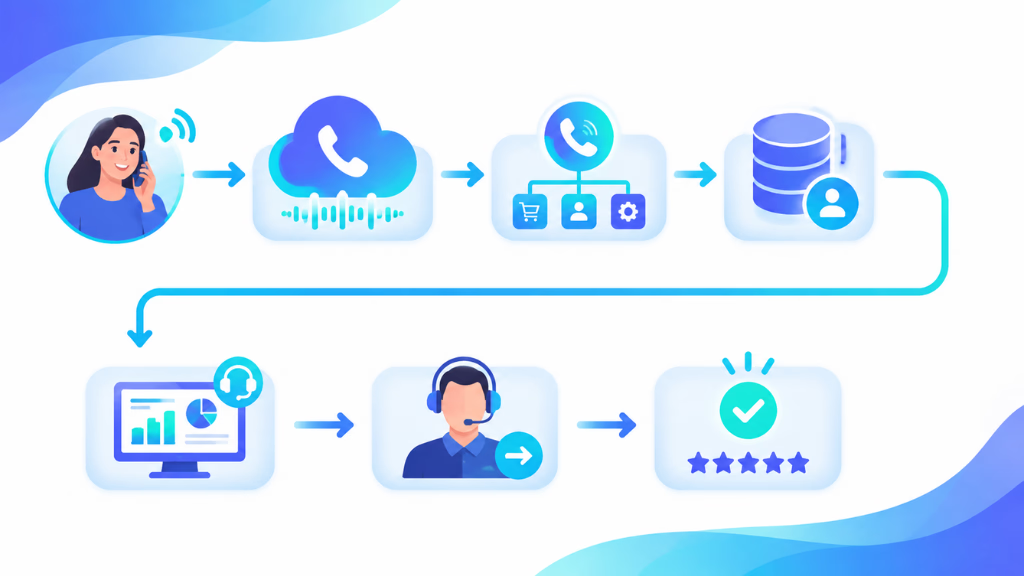
Building a modern automated call center means more than flipping on some bots. It requires thoughtful alignment of people, process, and technology. Here’s a practical blueprint:
Start with discovery. Map your most common customer journeys and identify pain points for both customers and agents. Ask: Where do calls get routed wrong? Where do handoffs break?
Then, select which channels (voice, chat, SMS, WhatsApp, email) matter most to your business and which workflows are priority for automation. This might be lead qualification, appointment scheduling, missed-call recovery, or simple FAQs.
Next, configure your AI agents and build escalation rules. Define which cases bots should handle—and at what point a human steps in. Integrate your systems (CRMs, calendars, email, knowledge bases).
Train your team. Change is hard. Let agents know when and how they’ll interact with automation and what new skills they might need.
Finally, roll out in phases. Monitor analytics, solicit feedback from both customers and staff, iterate workflows, and keep optimizing.
Discovery and Readiness Assessment
Start by documenting key processes, volumes, pain points, and customer journeys. Only automate what makes sense—some manual tasks might remain high-touch by choice.
Selecting Channels and Priority Workflows
Focus your first automation wins on high-volume, low-complexity queries across channels where you see the most interaction. For many, that means starting with missed-call SMS follow-up, new lead routing, or automated status checks.
Configuring AI Agents and Escalation
Set up role-based, context-aware AI agents with escalation logic for edge cases and high-risk scenarios. In my experience, using separate personas for sales vs. support prevents confusion and improves outcomes.
Integrating with CRM, Knowledge, and Tools
Seamless integration keeps data flowing cleanly. Connect the center with your CRM, calendars, and knowledge bases so agents can see the full picture when they receive an escalation.
Training and Change Management
Train agents early—focus on how automation helps, not replaces. Share clear scenarios when human judgment is still critical.
Continuous Optimization and Analytics
Review metrics weekly and adjust workflows as needed. Look for spikes in escalations, growing NPS/CSAT gaps, or new customer behaviors.
Benefits of an Automated Call Center
An automated call center helps businesses handle customer interactions faster, reduce operational costs, and deliver consistent support experiences. By combining AI voice technology, automation workflows, and intelligent call routing, businesses can manage high call volumes while improving both customer satisfaction and agent productivity.
24/7 Customer Support Availability
One of the biggest advantages of an automated call center is the ability to provide customer support around the clock. Unlike traditional call centers that depend on agent availability and business hours, automated systems can answer calls, provide information, and complete routine requests at any time.
Customers can get immediate assistance during evenings, weekends, and holidays without waiting for a support representative. This improves accessibility and ensures businesses never miss important customer interactions.
Reduced Customer Waiting Time
Long hold times are one of the most common reasons for poor customer experiences. Automated call centers can handle multiple customer calls simultaneously, reducing queues and improving response speed.
AI-powered voice agents can instantly answer common questions, collect customer information, and route calls to the right department when human assistance is needed. This allows customers to reach solutions faster without navigating complicated phone menus.
Lower Operational Costs
Managing a traditional call center requires significant investment in hiring, training, salaries, infrastructure, and ongoing management. An automated call center reduces these expenses by handling repetitive interactions without requiring additional human resources.
Businesses can automate tasks such as appointment scheduling, order tracking, payment inquiries, FAQs, and customer verification while allowing human agents to focus on complex issues that require personal attention.
Improved Agent Productivity
Automated call centers do not replace human agents; they help them work more efficiently. By handling repetitive and time-consuming requests, AI systems reduce the workload placed on support teams.
When a call requires human assistance, the AI can provide the agent with customer details, conversation history, and the reason for the call. This helps agents resolve issues faster and deliver more personalized support.
Consistent Customer Experience
Customer service quality can vary depending on agent availability, experience, and workload. Automated call centers provide consistent responses by using centralized knowledge bases, predefined workflows, and AI-driven decision-making.
Every customer receives accurate information based on the latest business policies, helping maintain a reliable and professional support experience across all interactions.
Better Call Routing and Management
Traditional phone systems often require customers to navigate multiple options before reaching the right department. Automated call centers use intelligent call routing to understand customer intent and direct calls to the most suitable resource.
AI-based systems can analyze customer requests, identify urgency, prioritize important cases, and connect callers with the appropriate team or specialist.
Faster Issue Resolution
Automated call centers can resolve many customer requests without human involvement. Customers can complete actions such as checking order status, updating account information, confirming appointments, or receiving product details through automated conversations.
For more complicated problems, AI can gather relevant information before transferring the call, reducing resolution time and eliminating repeated explanations.
Scalability During High Call Volumes
Businesses often experience sudden increases in call volume during product launches, seasonal demand, marketing campaigns, or service disruptions. Traditional call centers may struggle to handle these spikes without hiring additional staff.
Automated call centers can scale instantly by managing thousands of conversations simultaneously. This allows businesses to maintain service quality even during peak periods.
Valuable Customer Insights and Analytics
Modern automated call centers collect valuable data from customer conversations. Businesses can analyze call patterns, customer questions, satisfaction levels, and common issues to improve their services.
AI-powered analytics can identify trends such as frequently reported problems, customer sentiment, and areas where support processes need improvement.
Enhanced Customer Satisfaction
Faster responses, shorter wait times, personalized interactions, and easier access to support all contribute to a better customer experience.
When customers can quickly get answers or complete tasks without unnecessary delays, they are more likely to remain satisfied and continue their relationship with the business.
Seamless Integration With Business Systems
Automated call centers can integrate with CRM platforms, help desk tools, payment systems, scheduling software, and customer databases. These integrations allow AI systems to access relevant information and provide more personalized assistance.
For example, an AI voice agent can identify a customer, retrieve their account details, check order information, and provide a solution within the same conversation.
Improved Business Efficiency
By automating repetitive processes and optimizing customer interactions, automated call centers help businesses create more efficient support operations. Companies can serve more customers, reduce workload pressure on employees, and improve service quality without increasing operational complexity.
As AI technology continues to advance, automated call centers are becoming an essential solution for businesses looking to build faster, smarter, and more customer-focused communication systems.
Common Mistakes and Key Considerations for Call Center Automation
Teams often jump into automation without mapping the full flow or managing change among staff. The biggest risks include:
- Over-automating—forcing bots on customers that expect a person
- Siloed automation—different scripts or bots per channel, leading to loss of context
- Poor integration with backend systems
- Insufficient training for support teams on new workflows
- Ignoring analytics and failing to iterate quickly
A better approach is to start small, focus on the highest-value workflows, and expand as confidence and skill grow, always keeping human escalation paths clear.
How Commplify Solves Omnichannel and Workflow Automation Challenges
Many platforms promise omnichannel support, but I have seen Commplify stand out by unifying every customer conversation—voice, chat, SMS, email, WhatsApp—in a single inbox. This reduces silos fast.
Commplify’s visual no-code workflow builder allows any business team (not just IT) to automate missed-call follow-ups, lead assignments, and post-interaction surveys. The AI agents can be tuned by channel, department, or use case, ensuring the right tone and logic. Analytics dashboards track not just volumes, but also handoff rates, sentiment, CSAT, and automation ROI.
Crucially, Commplify makes human escalation safe and simple: agents always get the full conversation history and context, minimizing customer frustration. In my experience, this approach helps large enterprises and BPOs deliver consistent, efficient service while letting experts handle what cannot be automated.
Conclusion
Automated call centers are not about replacing humans—they are about refocusing talent on the moments that matter. By synchronizing AI agents, omnichannel coverage, workflow automation, and actionable analytics, support teams can meet rising digital expectations and control costs.
The main takeaway is that the right automation strategy goes beyond channel coverage. It also means well-designed escalation paths, tight process integration, and ongoing measurement. Commplify’s native approach to omnichannel workflow automation is, in my view, a strong next step for organizations ready to modernize CX.
As customer needs keep shifting, the future belongs to teams that pair AI efficiency with human empathy. Adopt these practices—and you will help your support operation stay relevant and resilient.
FAQs
What is an automated call center?
An automated call center uses AI and workflow automation to handle and route customer requests across channels, resolving routine tasks and escalating complex ones to human agents.
How does automated call center technology work?
It uses AI virtual agents, workflow automation, and channel integration to manage inquiries, trigger actions, and escalate to humans as needed—often with analytics tracking every step.
What are the main benefits of call center automation?
Key benefits include reduced costs, faster response times, 24/7 support, improved agent satisfaction, higher first-contact resolution, and easier scalability.
Which processes can be automated in a call center?
Common automations include call routing, missed-call follow-up, lead capture, appointment scheduling, routine FAQs, ticket creation, and post-interaction surveys.
How does AI-powered automation differ from traditional IVR systems?
AI automation uses natural language understanding and context. It adapts to conversations, while IVR uses fixed scripts and menus, often frustrating customers.
What are the challenges or drawbacks of automating call centers?
Challenges include integration with old systems, loss of human touch, customer resistance to bots, channel silos, and the risk of over-automation.
Will automation replace human call center agents?
No. Automation handles routine tasks, but complex, high-empathy or escalated cases still need skilled human agents.
How do you successfully implement automation in a call center?
Map processes, select priority workflows, configure AI agents, integrate with key systems, train teams, monitor analytics, and iterate as you scale.
What should businesses look for in automated call center software?
Look for omnichannel coverage, configurable AI, visual workflow builders, integration options, analytics, easy human escalation, data security, and support for continuous improvement.
How do you measure the success of call center automation?
Metrics include first-contact resolution, CSAT, average handle time, escalation rates, automation completion rates, and cost savings over manual processing.
This page was last edited on 11 August 2026, at 5:18 am