Yes, you can get a reliable AI receptionist under $100 per month that answers calls, schedules appointments, and manages chat, SMS, email, and WhatsApp in one inbox—freeing your team from missed leads and manual follow-ups.
Most business owners know the pain of juggling calls, messages, and appointments—only to lose leads when no one answers. Overworked small teams face missed revenue every month, all while budgets remain tight.
In my experience, many cost-aware businesses feel stuck between handling everything themselves or overpaying for traditional virtual receptionist services that barely meet the mark.
Today’s guide shows how AI receptionists under $100 per month finally allow smarter, omnichannel coverage, helping you recover lost leads and build real customer trust. I will break down what to expect, what to avoid, and how to pick a solution that fits your workflow.
Why an AI Receptionist Under $100 per Month Matters for Modern SMBs
AI receptionist services have evolved from a nice-to-have to business-critical tools. For under $100 each month, small and growing businesses can now offer customers 24/7, professional first-contact—without hiring, training, or micromanaging staff.
The real value? You capture more leads, clients, and appointments at a fraction of the wage cost. AI voice and chat tech used to be expensive, clunky, or unavailable to small teams. Now market maturity and cloud infrastructure have made robust, reliable AI reception affordable.
For many of the businesses I’ve worked with, missed calls meant lost revenue and reputation risk. Today’s solutions recover those lost chances, improve CSAT, and let your staff focus on value—not call-handling panic.
Features, Benefits, and Realities of AI Receptionist Services Under $100 per Month
AI receptionist services under $100 per month can be a practical option for small businesses that want to handle calls, answer basic customer questions, capture leads, and reduce missed opportunities without hiring a full-time receptionist.
However, while these tools offer affordability, automation, and 24/7 availability, they may also come with limits in customization, call volume, integrations, and advanced conversation handling. Understanding the real features, benefits, and limitations helps businesses choose a solution that fits their budget and customer service needs.
What Features Should You Expect at This Price Point?
At under $100 per month, you should expect your AI receptionist to handle the basics reliably. Most services offer:
- 24/7 call answering (with custom greeting and basic scripts)
- Appointment scheduling and calendar links (Google Calendar, Calendly)
- Basic CRM integration or webhook support
- Call routing to different staff or departments
- Multi-language or at least bilingual support
- Call logs and conversation history
Most entry plans include 1 main phone number and controlled minutes or call caps. Voice quality is generally strong but may lag in complex caller intent or local accent nuance.
The mistake I see often is expecting enterprise-level customization at this price. Most basic plans focus on call answering and scheduling, with limited cross-channel options unless stated.
Multi-Channel vs. Single-Channel Reception
Most “AI receptionist under $100” solutions support only phones. This is where many teams struggle, especially as more leads use chat, SMS, or WhatsApp.
Modern SMBs often see inbound messages scattered across channels, which leads to:
- Missed WhatsApp or chat inquiries are never captured in CRM
- Slow follow-up on after-hours SMS
- Unanswered emails are hidden from the front desk view
A unified inbox brings all channels—calls, chats, SMS, email, WhatsApp—into a single workflow. This prevents silent channel silos and gives staff one place to manage every customer conversation.
From my experience, platforms like Commplify give you that all-in-one coverage, even on entry plans. This means fewer missed leads, faster follow-up, and less context-switching for your team.
Billing Models Explained: Per-Minute, Per-Call, or Unlimited?
Billing math is notorious for tripping up buyers. Plans under $100 come in three flavors:
- Per-minute: You pay for talk time (ex: $0.05/minute after a set included amount).
- Per-call: One price for each answered call (good for short interactions, but can spike).
- Unlimited (with quotes): Usually capped by “fair use” or features.
The real issue is hidden overages. I have seen teams sign up for “unlimited,” only to hit hidden limits and get surprise bills. Always ask what happens when you exceed your included volume—does service pause, auto-upgrade, or charge premium rates?
Integrations and CRM/Calendar Sync
The best AI receptionists integrate with your tools so no leads slip through the cracks. At this price, expect:
- Google Calendar and Calendly sync
- Simple CRM or intake form pushes (Zoho, Salesforce, or CSV export)
- Webhooks or API access on higher tiers
If your workflow uses unique or more advanced scheduling, double-check if the receptionist can trigger actions, send follow-ups, or integrate with your systems. Weak integrations lead to manual work and missed handoffs.
Industry-Specific Features and Limitations
Not all AI receptionists under $100 are suitable for every industry. Some only offer generic scripts, while regulated fields (like healthcare, legal, or real estate) may need:
- Secure data handling and HIPAA support
- Legal disclaimers or consent checks
- Specialized intake scripts or escalation
A better approach is to view the entry plan as “first layer” coverage, relying on handoff for sensitive or regulated parts. I’ve seen some businesses try to use basic AI reception for clinical appointment management without audit logs or compliance features—that’s a risk not worth taking.
Key Considerations Before Choosing an AI Receptionist Under $100
Before committing, step back and map exactly where your team loses the most time or revenue. Are calls going unanswered? Are chat or WhatsApp leads ignored overnight? Does manual follow-up delay response to prospects?
Workflow automation and missed-call recovery are two features that, in my experience, separate decent platforms from real performers:
- Missed call automation: Top solutions send an instant SMS or email to the missed caller, offering to resume the conversation. This alone wins back 10 to 20 percent of missed opportunities.
- Onboarding ease: Look for “port your own number,” drop-in call forwarding, and clear roll-out steps for solo or small team.
- Reporting: Useful analytics (not just counts, but call outcomes or CSAT) signal a more mature platform.
- Hidden fees: Watch for extra charges for more numbers, SMS, integrations, languages, or API access.
Think through:
- Where do you lose leads today?
- What’s the real monthly cost at your expected volume?
- Who on your team actually uses the system?
- Is onboarding fast, or will it burn hours you do not have?
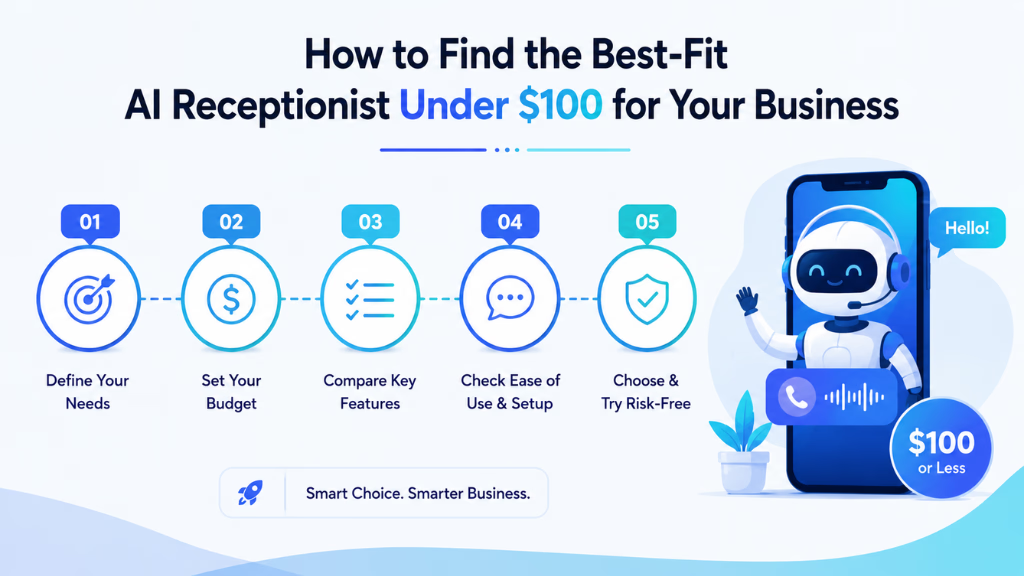
How to Find the Best-Fit AI Receptionist Under $100 for Your Business
Finding the right match means knowing your volume, peak channels, and exact needs. In my experience, asking the right questions up front speeds up the decision and avoids costly misfits.
Decision framework:
- Size and volume: Estimate monthly call/minutes and number of simultaneous channels (calls, chat, SMS, WhatsApp).
- Industry requirements: Do you have compliance, script, or special escalation needs?
- Desired features: Appointment scheduling, lead intake, missed call follow-up, CRM sync, multi-language?
- Budget tolerance: Any room for mild overage, or is $100 a hard ceiling?
- Support expectation: Do you want “set and forget,” hands-on support, or self-serve?
Sample checklist before you buy:
- What’s included for my channel mix? (phone only, or omnichannel?)
- What happens when I hit limits? Are there warnings, pauses, or surprise bills?
- Which integrations are built-in vs. add-on?
- Is local number support included for my region?
- What is the real onboarding time and required steps?
Day-in-the-life scenarios help narrow down:
- Solo operation: Needs fast intake and SMS follow-up, low volume, flexible setup.
- Small team: Handles moderate call/chat, needs unified inbox, basic calendar sync, missed-call automation.
- High-volume setting: Needs robust routing, workflow automation, actionable reporting for optimization.
Why Omnichannel Matters: Unlocking More Value With a Unified Receptionist Solution
Every missed chat or WhatsApp is a missed lead, just like phone calls. Single-channel receptionists let these slip away—often with no record left behind.
With an omnichannel AI receptionist, every call, SMS, chat, email, and WhatsApp comes into one inbox. From my experience, this means:
- No dropped web inquiries while you’re on another call.
- Automated SMS to follow up on missed calls, especially after-hours.
- Context-aware routing—so the right team member can pick up where the conversation left off, no matter the channel.
Platforms like Commplify give cost-smart businesses the ability to track, respond, and recover every conversation for the same monthly spend. When you unify channels, you improve both operational reliability and CX, without juggling disparate tools.
Conclusion
AI receptionists costing under $100 per month are now credible options for serious SMBs. In my experience, the right platform can shift your team’s daily workflow from reactive to proactive—capturing leads you used to lose and reducing repetitive manual work.
A unified, omnichannel system brings more than call answering. It integrates calls, chat, SMS, email, and WhatsApp into one workflow, manages follow-ups, and improves team focus. This is where solutions like Commplify set a new standard, turning frontline communication into a strategic asset instead of just an expense.
By asking the right questions and focusing on unified inboxes, smart automation, and transparent billing, you can empower your business without overextending your budget.
The future of customer interaction is not just about handling calls. It’s about orchestrating every customer touchpoint, with AI helping you capture, manage, and convert every lead—no matter where they start the conversation.
FAQs
How much does an AI receptionist cost per month?
Most AI receptionist services range from $40 to $200 per month. Reliable options for small businesses are available under $100, with advanced features and usage at higher tiers.
Are there any AI receptionist services under $100/month?
Yes, several providers offer AI receptionist plans under $100 per month for small businesses, covering core features like call answering, appointment booking, and basic integrations.
What features do affordable AI receptionists include?
Affordable AI receptionists usually offer 24/7 call answering, appointment scheduling, SMS or chat support, simple CRM/calendar links, basic workflow automation, and call logs.
How does an AI receptionist differ from a human or virtual receptionist?
AI receptionists use automated voice and chat bots to handle routine tasks, while human or virtual receptionists involve live agents. AI offers scalability, 24/7 coverage, and lower costs, but with less personal touch.
Are there hidden fees in low-cost AI receptionist plans?
Some plans have hidden fees for extra minutes, calls, integrations, or additional channels. Always check overage pricing, add-on features, and support costs before committing.
What do you miss out on with sub-$100 plans?
Sub-$100 plans often lack advanced integrations, deep customization, compliance features, unlimited usage, or dedicated onboarding support. Channel support may be limited to voice or SMS.
Which industries benefit most from these affordable solutions?
Industries like healthcare, real estate, legal, field services, and B2B SaaS with predictable call/chat needs benefit most. Regulated industries may need higher-priced plans for compliance.
Can I keep my existing phone number?
Most AI receptionist platforms let you port or forward your existing number to their service so you do not lose business continuity.
Is it easy to set up an AI receptionist for my small business?
Setup is usually fast, often taking less than an hour, requiring call forwarding, greeting recording, and calendar or CRM connection.
Are AI receptionist services available internationally?
Yes, but coverage and local number availability vary. Always confirm international support for your country and channel.
What’s better: per-minute or per-call billing?
Per-minute works best for longer calls, while per-call favors short interactions. Calculate your average call length and volume to choose the more cost-effective option.
Will using an AI receptionist actually save me money every month?
Yes, most businesses see savings compared to hiring or contracting live receptionists, especially when factoring in fewer missed leads and recovered revenue from fast follow-up.
This page was last edited on 7 July 2026, at 4:17 am