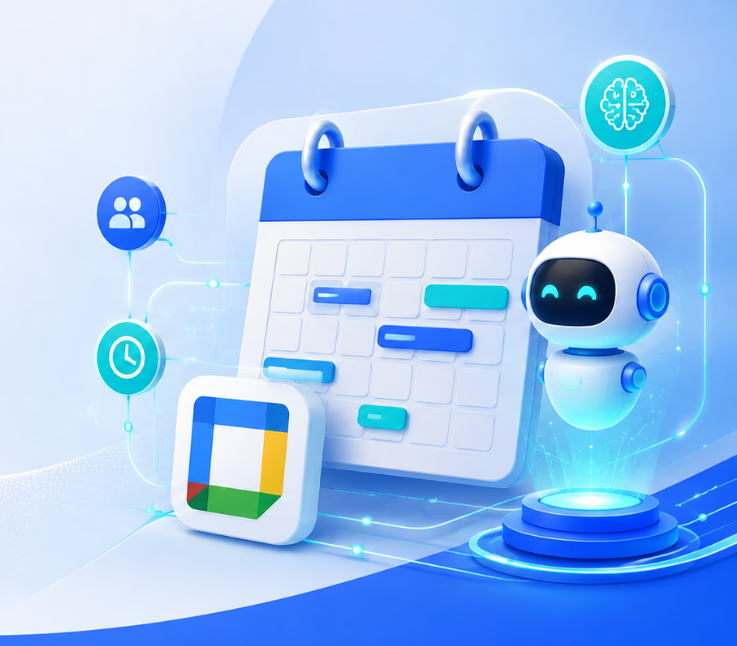
Google Calendar AI integration connects AI tools or automation platforms with Google Calendar, automating bookings, reminders, and workflows across channels. This reduces manual admin, speeds up scheduling, and enables smarter, secure time management for modern teams.
Getting your team on the same calendar should be simple. In my experience, it’s anything but—especially as volume and coordination demands grow. CX leaders and operations managers often deal with manual scheduling, clashing appointments, and missed follow-ups, costing time and trust.
The real issue is not just the time wasted but the lack of context-aware, responsive support in meeting workflows. Double bookings should be rare. Chasing reminders should not eat up hours every week. Yet, most solutions fail to handle these hidden inefficiencies.
In this guide, you’ll see how AI integrations with Google Calendar turn the chaos into a managed, intelligent process—cutting admin, boosting productivity, and meeting both customer and internal expectations. You’ll get expert advice for smarter scheduling, real-world integration methods, and clear next steps.
What Is Google Calendar AI Integration?
Google Calendar AI integration refers to connecting Google Calendar with artificial intelligence tools that can automate scheduling, understand calendar data, recommend meeting times, create or modify events, and support more intelligent time management.
Instead of manually checking schedules, comparing available time slots, creating events, or reorganizing meetings, AI can handle many of these repetitive calendar-management tasks automatically.
Google itself is increasingly adding AI capabilities through Gemini. For example, Gemini Apps can connect with Google Workspace and allow users to create, find, and edit Google Calendar events using natural-language requests. Google Calendar also offers Gemini-powered suggested meeting times for eligible Google Workspace users.
Beyond Google’s native AI capabilities, businesses can also connect Google Calendar with AI scheduling platforms, automation tools, CRM systems, customer-support platforms, and custom applications through integrations and APIs.
How Does Google Calendar AI Integration Work?
A Google Calendar AI integration typically works by allowing an AI system to access specific calendar information after the user grants permission.
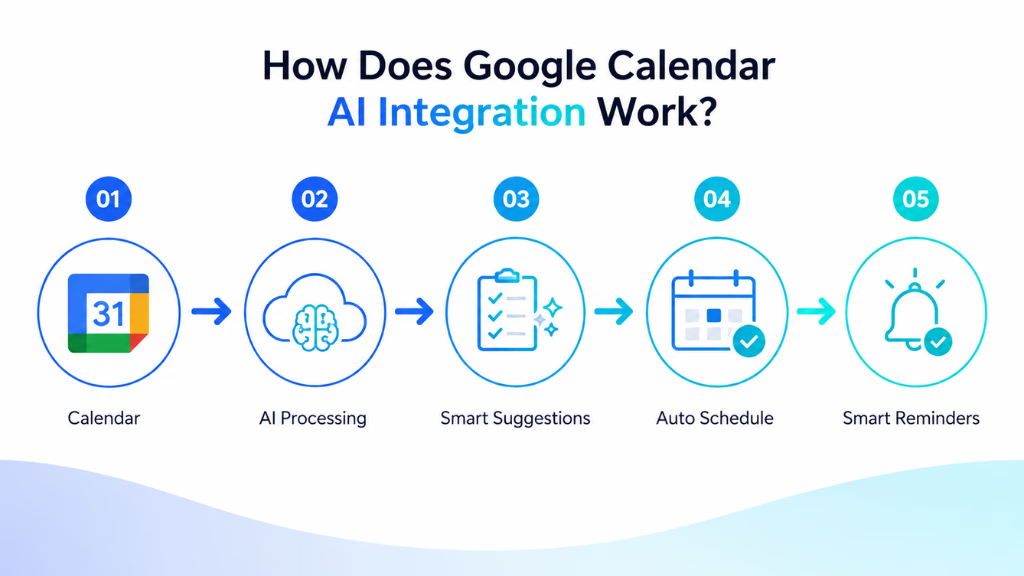
The AI can then analyze information such as:
- Existing meetings and appointments
- Available time slots
- Working hours
- Meeting duration
- Scheduling conflicts
- Multiple calendars
- Team availability
- Event priorities
- Rescheduling requirements
Based on this information, the AI determines the most appropriate action.
For example, instead of manually opening your calendar and creating an event, you could give an AI assistant a request such as:
“Schedule a 30-minute project review tomorrow afternoon.”
The AI can interpret the request, identify the appropriate date and time, and create the event according to the available calendar information.
Google’s current Gemini integration can create, retrieve, and edit Calendar events through conversational prompts. It can also work with secondary and shared calendars when properly connected.
For more advanced business workflows, organizations can combine Google Calendar APIs with AI models and automation systems. This makes it possible to build scheduling workflows based on CRM activity, website bookings, customer conversations, sales pipelines, support requests, or internal business processes.
Key Ways AI Can Improve Google Calendar
AI can make Google Calendar more useful by reducing repetitive scheduling tasks, improving time management, and helping users manage meetings more efficiently. From finding available time slots to detecting conflicts and automating appointment booking, AI allows individuals and teams to spend less time managing calendars and more time focusing on important work.
1. AI-Powered Meeting Scheduling
Finding a meeting time can become complicated when several people are involved.
Traditional scheduling often requires someone to:
- Check their own calendar.
- Ask other participants about availability.
- Compare available times.
- Select a suitable slot.
- Create the meeting.
- Reschedule everything if someone becomes unavailable.
AI can reduce much of this manual work.
Google Calendar’s Gemini-powered scheduling capabilities can analyze participant availability and suggest suitable meeting times when creating or rescheduling events. This feature is available with eligible Google Workspace plans.
This becomes particularly useful for:
- Sales teams
- Recruiters
- Project managers
- Customer success teams
- Consultants
- Remote teams
- Agencies
Instead of spending several minutes coordinating every meeting, employees can focus more time on the actual conversation.
2. Create Calendar Events Using Natural Language
One of the most useful applications of Google Calendar AI integration is natural-language scheduling.
Instead of manually filling out event fields, users can describe what they want.
For example:
“Add a marketing planning meeting to my calendar for Monday at 11 AM.”
Or:
“Move my product review meeting to Wednesday afternoon.”
AI analyzes the request and performs the relevant calendar action.
With Google Workspace connected to Gemini Apps, users can ask Gemini to create, retrieve, and edit Google Calendar events. Users can also specify Google Calendar directly in a Gemini prompt when necessary.
Natural-language scheduling can make calendar management significantly easier, particularly for users who manage a large number of appointments.
3. Find Available Meeting Times Automatically
Searching manually through a crowded calendar can take longer than expected.
AI scheduling systems can examine existing calendar events and identify open time slots automatically.
For example, someone could request:
“Find a free 45-minute slot this Thursday afternoon.”
An AI scheduling assistant can check the relevant calendar and identify possible openings without requiring the user to review every event manually.
For team meetings, AI becomes even more useful because it can compare multiple schedules and recommend times when participants are available.
This capability can help reduce one of the most common productivity problems associated with workplace meetings: spending too much time organizing the meeting itself.
4. Automatically Detect Scheduling Conflicts
Double bookings are easy to create when employees manage appointments across several calendars or scheduling systems.
An AI integration can check availability before scheduling an event and identify potential conflicts.
For example, imagine that a sales representative already has a customer demo scheduled between 2:00 PM and 3:00 PM.
If another system attempts to schedule a meeting during the same period, the integration could:
- Detect the conflict
- Suggest another available time
- Prevent the booking
- Request confirmation
- Trigger an automated rescheduling process
This is especially valuable when Google Calendar is connected with external booking systems, CRM platforms, or customer-facing scheduling applications.
5. Automate Meeting Rescheduling
Scheduling becomes even more complicated when plans change.
A cancelled meeting may create an available time slot, while an urgent meeting can require several existing appointments to be adjusted.
AI-powered scheduling tools can help automate parts of this process.
Depending on the integration, AI may be able to:
- Identify alternative meeting times
- Compare attendee availability
- Recommend new slots
- Update calendar events
- Trigger notifications
- Update connected business systems
Google Calendar itself can provide suggested times when users reschedule certain events with Gemini-powered scheduling features.
This can significantly simplify calendar management for teams with frequently changing schedules.
6. Connect Email and Calendar Workflows
Many meetings begin with an email conversation.
For example, a customer might email:
“Can we discuss the proposal next Tuesday?”
Normally, an employee would need to read the email, open Google Calendar, check availability, and manually create the appointment.
AI can connect these steps.
Google’s Workspace integration allows Gemini to work with information across services such as Gmail and Calendar. Google provides an example where Gemini can retrieve information from an email and use it when adding something to Calendar.
Google Workspace smart features can also automatically bring certain information from Gmail into Calendar, such as flight itineraries and invitations.
For businesses, similar workflows can be extended further by connecting email, AI, Google Calendar, CRM systems, and automation platforms.
7. Automate Appointment Booking
Google Calendar AI integration can also support customer-facing appointment scheduling.
Consider a customer communicating with an AI assistant on a website.
The conversation could work like this:
Customer: “I’d like to schedule a product demo.”
AI Assistant: “Sure. We have availability Tuesday at 10 AM, 1 PM, or 3:30 PM. Which works best?”
Customer: “1 PM.”
The AI-powered system could then check calendar availability and send the selected information into the connected scheduling workflow.
Depending on how the business builds its integration, the workflow can automatically:
- Check representative availability
- Identify suitable appointment slots
- Create calendar events
- Update CRM records
- Trigger confirmation emails
- Send reminders
- Update customer information
This type of AI Google Calendar integration can be particularly useful for organizations receiving large volumes of appointment requests.
8. Use AI to Manage Multiple Calendars
Professionals frequently manage more than one calendar.
For example, someone might have:
- A personal calendar
- A company calendar
- A department calendar
- A project calendar
- A shared team calendar
Checking each calendar individually can become inconvenient.
AI assistants can make this easier by providing a conversational interface for retrieving and managing calendar information.
Gemini currently supports creating and managing events on secondary and shared Google Calendars in addition to the default calendar, provided the relevant account and permissions are available.
This can provide employees with a more centralized way to understand their schedule.
How to Integrate AI With Google Calendar
Integrating AI with Google Calendar can be done in several ways, depending on your needs and technical setup. You can use Google’s native Gemini features, connect a third-party AI scheduling platform, or build a custom integration with the Google Calendar API.
Each approach helps automate tasks such as finding available time slots, creating events, managing appointments, and reducing manual scheduling work. There are several approaches to implementing Google Calendar AI integration.
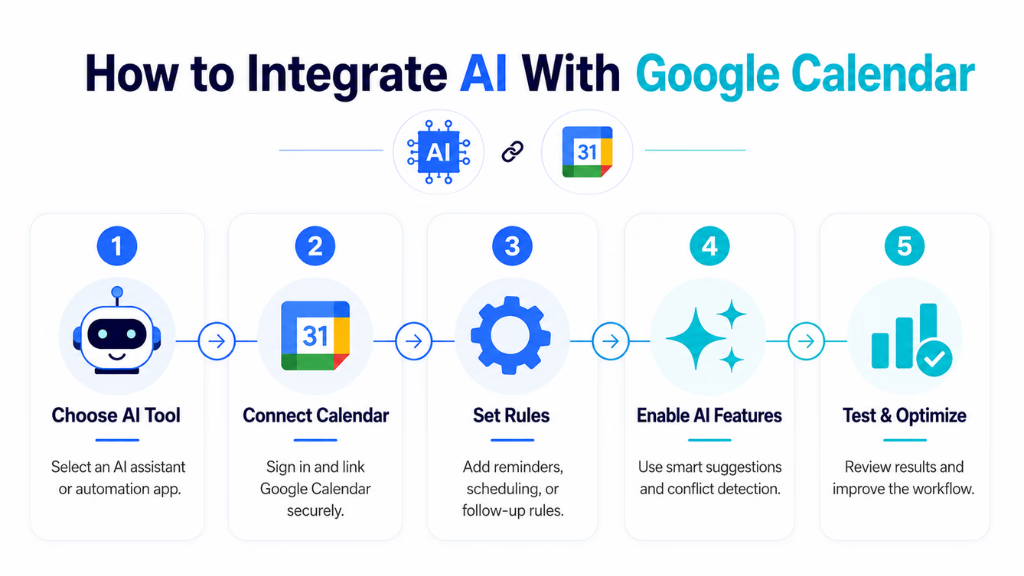
Method 1: Connect Google Calendar With Gemini
The simplest option for many Google users is Google’s own Gemini ecosystem.
To use Google Calendar through Gemini:
- Sign in to Gemini using the Google account associated with your Workspace.
- Ask Gemini to retrieve or create something in Google Calendar.
- If Google Workspace has not yet been connected, Gemini will provide an option to connect it.
- Complete the authorization process.
- Start using natural-language prompts to interact with your calendar.
You can also specify Google Calendar directly when prompting Gemini.
Google notes that requirements such as activity settings, Workspace permissions, account type, and administrator settings can affect whether the integration is available.
Method 2: Connect an AI Scheduling Platform
Businesses can also use third-party AI scheduling or productivity software that connects with Google Calendar.
The general process usually looks like this:
Google Calendar → AI Scheduling Platform → Automated Scheduling Action
After the user authorizes calendar access, the AI platform can analyze relevant availability and perform supported scheduling actions.
The exact capabilities depend on the software being used.
Before connecting a third-party platform, organizations should review:
- Requested permissions
- Data-handling policies
- Security controls
- Integration capabilities
- Calendar access levels
- Administrative requirements
This is particularly important when calendar events contain confidential business or customer information.
Method 3: Build a Custom Google Calendar AI Integration
Businesses with more specialized requirements can build their own integration.
A typical architecture might look like:
Customer Request → AI System → Business Logic → Google Calendar API → Calendar Event
Suppose a company operates an AI customer service assistant.
When a customer says:
“Book a consultation with your technical team next week.”
The system could:
- Use AI to understand the customer’s intention.
- Determine the required meeting type and duration.
- Check available calendar slots.
- Apply business rules.
- Present suitable options.
- Create the selected appointment.
- Save appointment information in the CRM.
- Send confirmation to the customer.
This approach provides organizations with considerably more flexibility than relying only on standard calendar functionality.
Google Calendar AI Integration Use Cases
Google Calendar AI integration can support a wide range of business workflows by reducing manual scheduling, improving availability management, and connecting calendar actions with other digital systems.
From sales and recruitment to customer support and professional services, AI can help teams schedule appointments faster, minimize conflicts, and create smoother experiences for both employees and customers. Google Calendar AI integration can support numerous departments and industries.
| Business Area | Example AI Calendar Use Case |
|---|---|
| Sales | Automatically schedule product demonstrations |
| Customer Support | Book calls with support specialists |
| Recruitment | Coordinate candidate interviews |
| Healthcare Administration | Manage permitted appointment scheduling workflows |
| Real Estate | Schedule property consultations |
| Professional Services | Book client consultations |
| Customer Success | Schedule onboarding and follow-up meetings |
| HR | Coordinate employee meetings and interviews |
| Education Administration | Organize meetings and consultation sessions |
| Remote Teams | Find suitable meeting times across teams |
The biggest benefit appears when calendar scheduling becomes part of a larger automated workflow rather than an isolated task.
Benefits of Integrating AI With Google Calendar
Integrating AI with Google Calendar can make scheduling faster, smarter, and more efficient by reducing repetitive manual tasks. From finding available time slots to preventing conflicts and supporting automated booking workflows, AI helps individuals and teams manage their calendars with less effort while improving productivity and response time.
Reduce Manual Scheduling
Employees spend less time checking calendars, comparing schedules, creating events, and coordinating meetings.
Prevent Scheduling Conflicts
AI can evaluate calendar availability before recommending or booking certain time slots.
Improve Response Time
Customers or employees can receive available scheduling options without waiting for someone to manually check a calendar.
Improve Employee Productivity
Reducing repetitive administrative work gives employees more time for customer conversations, strategic work, and other high-value activities.
Provide 24/7 Scheduling
When connected with an AI customer-facing system, appointment requests can potentially be processed outside normal business hours without requiring an employee to respond immediately.
Improve Calendar Accuracy
Automated workflows can reduce some of the mistakes associated with transferring meeting information manually between different systems.
Create Connected Business Workflows
Google Calendar can become part of a larger workflow involving:
AI + Calendar + CRM + Email + Customer Communication + Automation
This can be considerably more useful than using Calendar simply as a digital appointment book.
Important Limitations of Google Calendar AI Integration
AI scheduling can simplify calendar management, but it should not be treated as completely autonomous or error-free.
AI Can Make Mistakes
Google specifically warns that Gemini can sometimes produce inaccurate or outdated responses. Important scheduling information should therefore be reviewed when necessary.
Some Actions Are Still Limited
As of August 2026, Google states that Gemini Apps cannot perform certain Calendar actions, including inviting people to events or adding or updating the location or description of an existing event through this particular Gemini experience.
Capabilities can also differ depending on the account, Workspace plan, device, location, administrator settings, and feature rollout.
Permissions Must Be Managed Carefully
AI applications may need access to calendar information to perform scheduling tasks.
Organizations should follow the principle of least privilege and provide integrations only with the permissions required for the workflow.
Complex Scheduling May Still Need Human Review
AI works well for repetitive scheduling, but situations involving executive calendars, confidential meetings, unusual availability requirements, or complex business rules may still require human approval.
Best Practices for Google Calendar AI Integration
To get better results from an AI-powered calendar workflow, businesses should follow several practical principles:
- Define clear scheduling rules – Establish working hours, meeting durations, buffer periods, and availability requirements.
- Limit unnecessary permissions – Give the integration only the calendar access required to perform its intended tasks.
- Keep human approval for sensitive meetings – Important or confidential meetings should have an appropriate review process.
- Connect scheduling with existing workflows – Integrate calendars with CRM, customer support, sales, or other relevant systems instead of creating isolated automation.
- Test conflict scenarios – Check what happens when calendars are fully booked, appointments overlap, participants become unavailable, or events are cancelled.
- Use clear event information – Consistent meeting names and scheduling rules help both employees and automated systems understand calendar activity.
- Review AI-generated actions – Users should verify important dates, times, participants, and other information before relying on AI-generated scheduling decisions.
Is Google Calendar AI Integration Worth Using?
For businesses that schedule only a few meetings each week, traditional Google Calendar functionality may already be sufficient.
The value of AI increases as scheduling becomes more complicated.
A Google Calendar AI integration can be particularly useful when an organization:
- Handles a high volume of appointments
- Coordinates meetings across multiple employees
- Frequently reschedules meetings
- Books appointments through customer conversations
- Uses a CRM or customer support platform
- Wants to automate repetitive administrative work
- Operates across multiple teams or calendars
- Needs faster responses to scheduling requests
The goal should not simply be to add AI to Google Calendar. The real opportunity is to remove unnecessary scheduling work.
When implemented properly, AI can transform Google Calendar from a basic scheduling application into a connected part of an intelligent business workflow—helping teams spend less time organizing meetings and more time actually completing the work those meetings are meant to support.
How Commplify Enables Seamless Google Calendar AI Integration in Omnichannel CX
For organizations where every customer interaction counts, connecting Google Calendar with all support channels is essential. Here’s where Commplify excels.
Imagine a workflow where a customer reaches out on WhatsApp, asks to book an appointment, and an AI agent handles everything—gathering preferences, checking staff availability in Google Calendar, creating the event, and sending the invite back via WhatsApp and SMS. If a slot needs to change or gets canceled, the same AI agent manages the update, triggers reminders, or seamlessly escalates complex rescheduling requests to a human agent.
I have seen service-driven teams reduce no-shows and reclaim hours per week with this approach. The unified conversation record is a real difference-maker for tracking, reporting, and compliance. For regulated sectors, Commplify includes granular access control and audit logs, so only the right agents access calendar data.
Getting started requires connecting your Google Calendar, mapping triggers in Commplify’s no-code builder, and defining your escalation logic. This puts control back in the hands of your ops or CX leaders—no developer bottlenecks, no siloed calendars, just one seamless workflow.
Conclusion
Google Calendar AI integration is no longer just about convenience—it is now business-critical for any team where time, customer commitments, or operational alignment matter. As I see it, the shift is toward workflow intelligence: predictive scheduling, smart automation across channels, and systems that learn from each event.
The takeaway is clear. Smarter, AI-powered scheduling saves hours, reduces errors, and makes support teams far more effective. Platforms like Commplify now make it realistic to bring all customer conversations and calendar activity into one controlled, automated environment—without sacrificing compliance or human oversight.
If you’re just starting to explore Google Calendar AI integration, begin small: map a manual process, test an automation, then scale as your workflow grows. The future belongs to those who let intelligent systems handle the admin—freeing people to focus on work that matters.
AI-driven scheduling is here to stay, and teams who master integration today will set the bar for responsive, connected customer experience tomorrow.
FAQs
What is Google Calendar AI integration?
Google Calendar AI integration means using AI or automation to manage calendar events—booking, updating, reminding, or analyzing—without manual input, across different channels.
How can I automate scheduling in Google Calendar using AI?
You can automate scheduling by connecting Google Calendar with AI tools or workflow platforms. Triggers from voice, chat, or forms can auto-create, update, or reschedule events.
What tools offer Google Calendar AI integration today?
Tools like Zapier, Reclaim.ai, Make, and CX platforms such as Commplify all offer Google Calendar AI integration for automation, reminders, and multi-channel scheduling.
Are there AI-powered assistants for Google Calendar?
Yes. AI-based chatbots and voice agents can schedule, reschedule, or cancel meetings in Google Calendar using natural language across chat or phone channels.
How secure is AI integration with Google Calendar?
Security depends on the platform. Always use solutions with strong access controls, role-based permissions, and audit trails, especially in enterprise or regulated settings.
Can AI summarize, reschedule, and optimize Google Calendar events?
Yes. AI assistants can summarize meetings, suggest better times, and reschedule events by analyzing availability, priorities, and historical patterns.
Is there a way to connect Google Calendar to omnichannel workflows?
Yes. Platforms like Commplify connect Google Calendar with voice, chat, SMS, and WhatsApp, managing bookings and reminders from one unified workflow.
What challenges or risks should organizations consider?
Common risks include over-automation, weak permission controls, notification overload, conflicting triggers, and not maintaining transparency or audit logs.
How do I get started with workflow automation for Google Calendar?
Start by mapping your desired workflow. Choose a no-code or CX platform, connect Google Calendar, define your triggers and actions, then monitor results and adjust as needed.
This page was last edited on 5 August 2026, at 1:57 am