AI chat tools make enterprise communication faster and easier. They answer routine questions. They connect channels and business systems. They also help human agents and route complex issues with the right context.
A customer starts a conversation on web chat. Later, they send a message on WhatsApp. Then they call your support team. The problem is simple. They have to explain the same issue again.
Your agents face a similar problem. They move between CRM records, help desk tickets, knowledge bases, and messaging tools. This slows down response time. It also makes communication less consistent.
AI chat tools can help solve this gap. They can connect conversations across channels. They can understand user intent. They can find answers from enterprise knowledge. They can also automate routine tasks and pass complex cases to the right human.
A study of 5,179 support agents found that generative AI assistance increased issues resolved per hour by about 14% on average.
So, how do AI chat tools support enterprise communication in practice? This guide explains the use cases, architecture, KPIs, ROI, and key capabilities you should know.
10 Ways AI Chat Tools Support Enterprise Communication
AI chat tools make enterprise communication faster and easier. They help users get quick answers. They also keep conversations connected across different channels.
Modern platforms use conversational AI, NLP, NLU, LLMs, RAG, intent recognition, and sentiment analysis. These technologies help AI understand user questions. They also help the system find the right information and give more relevant answers.
AI chat tools can also connect with business systems. These may include CRM, ERP, ITSM, CCaaS, UCaaS, Microsoft Teams, Slack, and enterprise knowledge bases.
The following sections explain the main ways AI chat tools support enterprise communication.
1. Unify Conversations Across Enterprise Communication Channels
Enterprise communication often happens across many channels.
Customers may use web chat, WhatsApp, SMS, email, social messaging, or voice. Employees may use Microsoft Teams, Slack, or internal portals.
The problem starts when these channels operate separately.
A customer may explain an issue on web chat. Later, the same customer may contact the company on WhatsApp. Without a shared conversation history, the next agent may have no idea what happened earlier.
An omnichannel architecture helps solve this problem.
It brings conversations from different touchpoints into one connected communication flow. The AI can use previous interactions and customer context when responding.
This creates better conversation continuity.
It also reduces repeated questions. Agents get more context. Customers get a more consistent experience.
For enterprises, this is important because communication should feel connected even when the channel changes.
2. Provide 24/7 Automated Responses for Routine Communication
Many enterprise conversations are repetitive. Customers ask about order status, pricing, account access, refunds, or basic product information.
Employees ask about leave policies, payroll, IT support, onboarding, or internal procedures. AI chat tools can handle many of these routine requests automatically.
This gives customers and employees access to support outside normal business hours. It also reduces the number of simple requests reaching human teams.
The goal is not to automate every conversation.
The AI should handle predictable requests. More complex issues should move to a human. This approach helps customer support teams reduce manual workload. It also improves response time during peak hours.
For contact centers and BPO teams, this can make service more scalable without increasing headcount at the same rate.
3. Understand User Intent Instead of Relying Only on Keywords
Traditional chatbots often depend on fixed keywords. That approach can fail when users ask the same question in different ways.
For example:
“Where is my order?”
“My package has not arrived.”
“Can you check my delivery?”
The wording is different. The intent is the same. Modern AI chat tools use NLP, NLU, and intent recognition to understand what the user is trying to achieve. This makes communication more flexible.
The AI can also use conversation context to interpret follow-up questions.
For example, a customer may ask:
“Where is my order?”
Then ask:
“When will it arrive?”
The second message makes sense because the system remembers the earlier context. Some systems also use sentiment analysis to detect frustration, urgency, or dissatisfaction. This can help the platform decide when a conversation should be escalated to a human agent.
4. Turn Enterprise Knowledge into Conversational Answers
Enterprises already have large amounts of information. The challenge is finding the right information quickly.
Policies may sit in internal documents. Product information may be stored in a knowledge base. Support instructions may be spread across different systems.
AI chat tools can make this information easier to access. Many enterprise systems use Retrieval-Augmented Generation (RAG) for this purpose.
RAG allows an AI system to retrieve relevant information from approved enterprise sources before creating an answer. For example, an employee may ask:
“Can I carry unused leave into next year?”
The AI can search the company policy and provide an answer based on that document.
This is more useful than giving a generic response. It also helps reduce the risk of answers that are unrelated to the company’s actual policies.
For enterprise communication, the quality of the knowledge source matters as much as the quality of the AI model.
5. Connect Conversations with CRM, ERP, and ITSM Systems
AI chat becomes more useful when it can access business systems. A standalone chatbot can answer questions.
An integrated AI chat tool can also retrieve customer data, check service records, create tickets, and update workflows. Common integrations include:
- Customer Relationship Management (CRM) systems
- Enterprise Resource Planning (ERP) platforms
- IT Service Management (ITSM) systems
- Customer Data Platforms (CDPs)
- CCaaS and UCaaS platforms
- Knowledge management systems
- Ticketing tools
- Collaboration platforms
Suppose a customer asks:
“What is the status of my refund?”
The AI may need to identify the customer first. It can then check the order or payment record. After that, it can provide the current status.
The same principle applies to internal communication. An employee may ask about an IT issue. The AI can check an existing ITSM ticket or create a new one. This turns AI chat into a communication layer between users and enterprise systems.
6. Automate Actions, Not Just Answers
Enterprise users often want a task completed. They do not always want instructions. For example, a customer may say:
“Please change my delivery date.”
A basic chatbot may explain how to do it. A more advanced AI agent can complete the action through an approved workflow. Depending on the system, AI can:
- Create support tickets
- Update CRM records
- Schedule appointments
- Check order status
- Qualify sales leads
- Reset passwords
- Send follow-up information
- Trigger internal workflows
This is where AI agents and workflow automation become important. AI is no longer only answering questions. It is helping users complete tasks.
Enterprises still need controls. Sensitive actions may require authentication, permission checks, or human approval. The right approach is controlled automation, not unrestricted automation.
7. Route Complex Conversations to the Right Human
AI should not try to handle every interaction. Some issues require judgment, negotiation, empathy, or specialist knowledge. A good enterprise AI chat platform should recognize these cases.
It can then route the conversation to the right human agent. Routing can use factors such as:
- Customer intent
- Issue type
- Language
- Sentiment
- Priority
- Customer segment
- Agent skill
- Availability
The most important part is context. The human agent should receive the conversation history and relevant user information. This avoids a common frustration. The customer does not have to explain the entire issue again.
For contact centers, this can improve the transition between AI self-service and live support.
8. Help Human Agents Communicate Faster with Agent Assist
AI can also support employees during live conversations. This is known as AI Agent Assist. Instead of replacing the agent, the system works beside them. It can suggest useful information during the conversation.
For example, Agent Assist may:
- Recommend replies
- Find knowledge articles
- Summarize the conversation
- Show relevant customer information
- Suggest the next action
- Generate case notes
- Reduce after-call work
This can be useful for new agents. They may not know every policy, product, or process yet. AI can surface the right information when they need it.
Moreover, it can also help experienced agents spend less time searching across multiple systems. For enterprise communication, the value is simple. Agents can focus more on the customer and less on finding information.
9. Maintain Consistent Communication Across Teams and Locations
Large enterprises often have distributed teams.
Different regions may use different processes. BPO partners may follow separate workflows. Agents may explain the same policy in different ways.
This creates inconsistency. AI chat tools can help standardize access to approved information. They can use the same knowledge base, policy rules, and response guidelines across teams. This does not mean every response must sound identical.
The AI can still adapt to language, channel, customer context, and communication style. The important part is that the underlying information remains consistent. This is useful for multinational enterprises, contact centers, and BPO operations.
It can also make onboarding easier because new employees have faster access to trusted information.
10. Analyze Conversations for Operational Insights
Enterprise conversations contain valuable business information. Customers reveal what confuses them. Prospects explain why they hesitate. Employees expose broken internal processes. Support conversations show which issues happen most often.
AI-powered conversation analytics can identify these patterns at scale. Teams can monitor:
- Common customer intents
- Recurring complaints
- Sentiment trends
- Escalation reasons
- Product issues
- Sales objections
- Knowledge gaps
- Agent performance patterns
- Unresolved questions
For customer support leaders, this can reveal why people contact support repeatedly. For Sales and SDR teams, it can highlight common objections. For product teams, it can uncover recurring usability problems.
For enterprise leaders, it provides a clearer view of what customers and employees are actually asking for. This is one of the biggest advantages of AI chat tools. They do not only support individual conversations. They also turn those conversations into useful operational insights.
How AI Chat Fits Into an Enterprise Communication Architecture
AI chat works best when it is connected to the wider enterprise communication architecture. It should not sit as a separate chatbot on one channel. Instead, it should connect users, business systems, knowledge sources, workflows, and human agents.
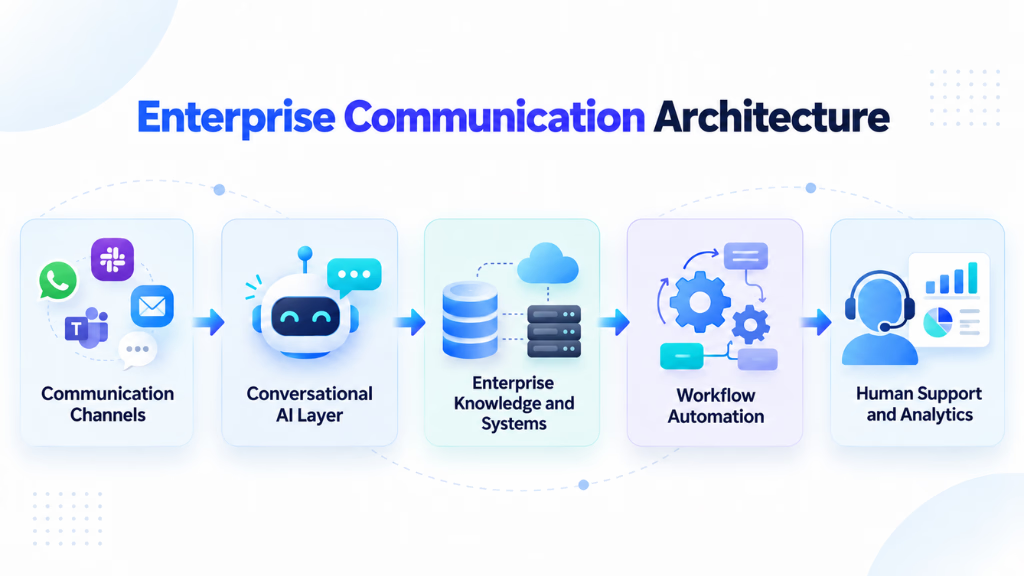
A simple enterprise architecture can look like this:
Communication Channels → Conversational AI Layer → Enterprise Knowledge and Systems → Workflow Automation → Human Support and Analytics
- At the channel layer, interactions may come from web chat, messaging, mobile applications, email, voice, or collaboration platforms.
- The conversational layer handles capabilities such as NLP, NLU, LLM reasoning, intent recognition, context management, and sentiment analysis.
- The knowledge layer may use RAG to retrieve approved information from knowledge bases, documents, product documentation, or other enterprise repositories.
- Integration APIs then connect the AI with CRM, ERP, ITSM, CDP, and other operational systems.
- The workflow layer allows approved actions to be executed.
- Finally, human agents operate through an agent workspace, contact center platform, CCaaS, UCaaS, CRM, or service management environment.
Security and governance should span every layer rather than being added at the end. These five steps show how AI chat tools support enterprise communication from the first message to the final outcome.
Where Do Enterprises Use AI Chat Tools?
Enterprises use AI chat tools in many areas. The main goal is to reduce repetitive work and improve response speed.
These tools can support both customers and employees. They can also connect with CRM, ITSM, knowledge bases, CCaaS, collaboration platforms, and workflow systems.
Here are the most common use cases.
Customer Service and Contact Centers
Customer service is one of the most common use cases for AI chat tools.
AI can answer routine questions about orders, refunds, billing, account access, and product information. It can also provide 24/7 support across web chat, WhatsApp, SMS, and other channels.
In a contact center, AI can work with CCaaS platforms and customer data systems. It can use intent recognition to understand the reason for contact. It can also use sentiment analysis to detect frustration.
For example, a customer may ask about a delayed order. The AI can check the order status and provide an update. If the issue is complex, it can route the conversation to a human agent.
This helps reduce repetitive support work. It also improves response time and conversation continuity.
IT Help Desk
IT teams often receive the same requests every day. Employees ask about password resets, VPN access, software problems, device setup, and ticket status.
AI chat tools can handle many of these requests through IT Service Management (ITSM) systems.
For example, an employee may report a VPN issue. The AI can provide basic troubleshooting steps. It can also check an existing IT ticket. If needed, it can create a new incident.
This reduces pressure on the IT help desk. It also gives employees faster access to support. AI can also use RAG to retrieve answers from approved technical documentation and internal knowledge bases.
HR and Employee Communication
HR teams also deal with many repetitive questions.
Employees often ask about leave policies, payroll, benefits, onboarding, and company procedures. An AI assistant can provide quick answers from approved HR documents.
For example, an employee may ask about annual leave rules. The AI can retrieve the correct policy from the enterprise knowledge base. It can then explain the answer in simple language.
AI chat tools can also work inside Microsoft Teams, Slack, and other collaboration platforms. This makes internal information easier to access. It also reduces the time HR teams spend answering routine questions.
Access control is important in this use case. HR data can be sensitive. Enterprises should use proper authentication and role-based permissions.
Sales and Lead Communication
Sales and SDR teams can also use AI chat tools.
AI can answer product questions, qualify leads, collect contact details, and schedule meetings. It can also connect with CRM platforms such as Salesforce or HubSpot.
For example, a website visitor may ask about pricing or integrations. The AI can provide approved information. It can then ask a few qualification questions.
If the prospect matches the target profile, the AI can send the lead to the sales team. It can also add the conversation details to the CRM. This helps sales teams respond faster. It also reduces manual lead qualification.
For enterprises, this means AI chat tools can support more than customer service. They can improve communication across support, IT, HR, and sales.
Which KPIs Should Enterprises Use to Measure AI Chat Performance?
Enterprises should measure AI chat performance with more than one metric. The goal is to understand speed, resolution quality, customer experience, automation efficiency, and business impact.
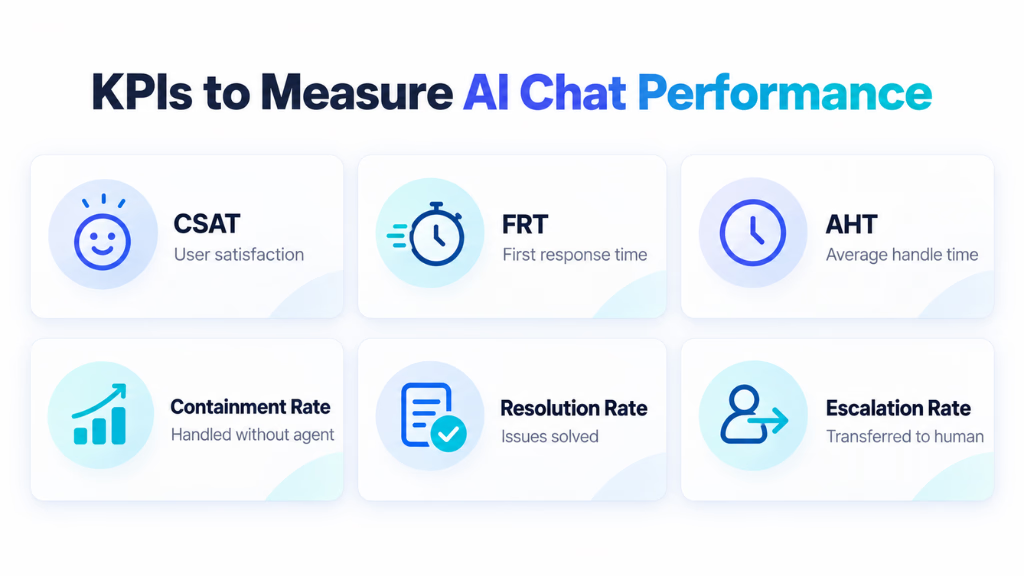
- Customer Satisfaction Score (CSAT): Measures how satisfied users are after an AI or human-assisted interaction. Track AI-only and human-assisted conversations separately.
- First Response Time (FRT): Measures how quickly users receive the first reply. AI chat tools can reduce FRT because they can respond instantly.
- Average Handle Time (AHT): Measures how long it takes to complete an interaction. Agent Assist can lower AHT by finding knowledge, suggesting replies, and creating summaries.
- Bot Containment Rate: Shows how many conversations are handled without a human agent. This is useful for contact center containment rate optimization.
- Resolution Rate: Measures how many conversations are actually solved. This is more meaningful than simple deflection.
- Deflection Rate: Shows how many conversations avoid human support. Enterprises should compare resolution rate vs. deflection rate because a deflected conversation is not always a resolved conversation.
- Escalation Rate: Measures how often the AI sends a conversation to a human agent. Review whether intelligent escalation with full transcript context transfer works properly.
- Cost Per Interaction: Measures the average cost of handling one conversation. This helps track cost per interaction reduction in enterprise support and build an enterprise chatbot ROI baseline.
- Agent Productivity: Measures how much AI helps employees work faster. Useful metrics include issues resolved per hour, knowledge search time, after-call work, and conversations handled.
The best approach is to track these KPIs together. This gives a clearer view of how AI chat tools support enterprise communication and whether they improve both efficiency and user experience.
How to Calculate the ROI of Enterprise AI Chat
Enterprise AI ROI should compare the measurable value created by the system with its total cost.
A simple starting formula is:
ROI (%) = [(Total Measurable Benefits − Total AI Costs) ÷ Total AI Costs] × 100
Benefits can include:
- Reduced cost per resolved conversation
- Lower repetitive support workload
- Reduced average handling time
- Increased agent capacity
- Reduced after-call work
- Faster employee support
- Higher lead conversion
- Reduced ticket volume
- Increased service availability
Costs should include more than software licensing.
For example, suppose a support operation handles 100,000 conversations per month.
If an AI implementation successfully resolves 30,000 suitable conversations without human intervention, the financial value should be calculated from the actual cost avoided or capacity created, not simply from the number of automated conversations.
Then add any measurable productivity gains from agent assist. Finally, subtract the complete cost of operating the AI environment. This creates a more defensible ROI estimate than assuming every automated conversation equals a fixed saving.
“In an internal analysis of 10,000 customer support conversations, we found that approximately 58% of incoming requests were repetitive or knowledge-based and suitable for some level of automation. After connecting the AI assistant with the CRM, knowledge base, and ticketing system, automated resolution reached around 42%. Average first-response time also decreased from 3 minutes 40 seconds to under 20 seconds. Complex and low-confidence requests continued to be routed to human agents with the conversation context attached.”
How to Choose an Enterprise AI Chat Platform
Choosing the right enterprise AI chat platform starts with your business needs. Do not choose a platform only because it has advanced AI features.
First, define the problems you want to solve. Then check whether the platform can support your communication channels, workflows, systems, security needs, and performance goals. Here are the main areas to evaluate.
- Omnichannel support: Check whether the platform supports web chat, WhatsApp, email, SMS, voice, Microsoft Teams, Slack, and other channels you use. An omnichannel architecture should keep conversation context across these touchpoints.
- AI understanding: Look for strong Conversational AI, NLP, NLU, intent recognition, and multi-turn natural language processing. The platform should understand different ways users ask the same question.
- Enterprise knowledge access: Check whether the platform supports Retrieval-Augmented Generation (RAG). RAG can help the AI retrieve information from approved knowledge bases, policies, documents, and internal content.
- CRM, ERP, and ITSM integration: The platform should connect with systems such as Salesforce, HubSpot, SAP, Oracle, and ServiceNow. Look for REST APIs, webhooks, and native integrations.
- Workflow automation: Check whether the AI can complete tasks. Useful actions may include ticket creation, credential reset, CRM updates, appointment booking, and HR requests. This supports AI agent workflow automation and self-service automation for internal workflows.
- Human handoff: The platform should support Agent Assist and Human-in-the-Loop (HITL) workflows. Complex cases should move to a human with the full transcript and user context.
- Security and compliance: Review GDPR, HIPAA, SOC 2 Type II, Role-Based Access Control (RBAC), encryption, and data retention policies. Also check how the platform manages sensitive enterprise data.
- Analytics and KPIs: The platform should track CSAT, FRT, AHT, Bot Containment Rate, Resolution Rate, and Escalation Rate. These metrics help measure how well AI chat supports enterprise communication.
- Scalability: Make sure the platform can handle higher conversation volumes as the business grows. It should also support multiple teams, regions, languages, and use cases.
- Total cost and ROI: Compare licensing, API usage, integration, maintenance, and support costs. Then compare those costs with expected gains in automation, productivity, and cost per interaction.
The best enterprise AI chat platform is not always the one with the most features. It is the one that fits your existing systems and communication strategy. It should also support secure automation, smooth human escalation, and measurable business outcomes.
The Future of AI-Powered Enterprise Communication
Enterprise communication is moving beyond basic chatbots.
AI agents will answer questions and complete approved tasks. RAG, LLMs, NLP, NLU, intent recognition, and sentiment analysis will make conversations more accurate and context-aware.
Omnichannel communication will also become more important. Customers and employees will expect connected experiences across chat, voice, email, WhatsApp, Microsoft Teams, and Slack.
Platforms such as Commplify reflect this shift by connecting AI conversations, channels, and workflows in one environment.
Human support will still matter. Agent Assist and Human-in-the-Loop (HITL) workflows will help AI handle routine work while people manage complex cases.
The future of enterprise communication is not AI alone. It is better coordination between AI, business systems, and human teams.
Final Thoughts
AI chat tools support enterprise communication by making conversations faster, more connected, and easier to manage.
They help businesses automate routine requests. They also improve access to enterprise knowledge. When connected with CRM, ERP, ITSM, and other business systems, they can support real workflows instead of only answering questions.
The biggest value comes from combining Conversational AI, RAG, automation, omnichannel communication, and human support.
Enterprises should focus on the right use cases first. They should also track KPIs such as resolution rate, CSAT, AHT, and cost per interaction.
The goal is not to replace every human conversation. The goal is to remove unnecessary friction and help people communicate more effectively across the business.
FAQs
What is an enterprise AI chat tool?
An enterprise AI chat tool is a conversational AI system designed to communicate with customers, employees, or business users while connecting with organizational knowledge, applications, and workflows. It may use LLMs, NLP, NLU, RAG, intent recognition, APIs, and automation technologies.
How are AI chat tools different from traditional chatbots?
Traditional chatbots commonly depend on predefined rules, keywords, and decision trees. Modern AI chat tools can use LLMs and natural language understanding to interpret more flexible language, retrieve enterprise knowledge, maintain context, and in appropriately configured systems, execute business workflows.
Can AI chat tools integrate with CRM and ERP systems?
Yes. Enterprise AI platforms can integrate with CRM, ERP, ITSM, ticketing, knowledge management, and other business systems through native integrations, APIs, connectors, or middleware. The exact capabilities depend on the platform and system architecture.
Are enterprise AI chat tools secure?
They can be designed for enterprise security, but security depends on the platform, architecture, configuration, integrations, data handling, and governance practices. Organizations should evaluate encryption, authentication, authorization, data retention, auditability, privacy controls, model governance, and human oversight before deployment.
Can AI chat tools work across multiple communication channels?
Yes. Omnichannel AI platforms can support conversations across combinations of web chat, messaging, mobile applications, social channels, collaboration platforms, and contact center environments. The channels supported vary by platform.
How do AI chat tools improve employee productivity?
AI chat tools can reduce time spent searching for information, drafting responses, summarizing interactions, completing repetitive tasks, and handling routine requests. In one large field study involving 5,179 customer-support agents, generative AI assistance increased issues resolved per hour by roughly 14% on average, although the effects varied considerably by worker experience.
How do enterprises measure the ROI of AI chat tools?
Enterprises can compare measurable benefits, such as reduced handling costs, increased agent capacity, automated resolutions, faster service, reduced ticket volume, or increased conversions with the full cost of implementation and operation. ROI should be evaluated alongside quality metrics such as CSAT, resolution rate, escalation rate, and accuracy rather than automation volume alone.
This page was last edited on 2 October 2026, at 8:24 am