
Quick Answer
To integrate customer support with sales data, align business goals, audit data sources, standardize records, build unified profiles, sync conversations from all channels, automate workflows, and track metrics using role-based dashboards.
If your support and sales teams work from disconnected systems, you feel it in missed handoffs, duplicate work, and customer frustration. You are not alone—most businesses face the same struggle.
I have seen how siloed data blocks growth and ruins even the best customer strategies. Getting support and sales on the same page can turn this around.
This guide shows exactly how to integrate customer support with sales data, step by step, using real examples from across industries. You will learn the practical actions that drive revenue, efficiency, and trust.
Why Integrating Customer Support and Sales Data Matters
Customer support and sales data integration means combining all interaction records, history, and signals from every touchpoint—chat, voice, email, WhatsApp, CRM—into one accessible place.
A single view of each customer helps teams work together, reduces mistakes, and uncovers new growth opportunities. When you connect these data streams, you empower agents and reps to personalize actions, spot risk, and drive higher satisfaction. Business leaders also see clearer revenue impact from support, better health scores, and true account history.
CX trends now demand omnichannel experiences, smart automation, and measurable business outcomes. Integration is no longer optional—it is a foundation for building trust, preventing churn, and supporting every stage of the customer journey.
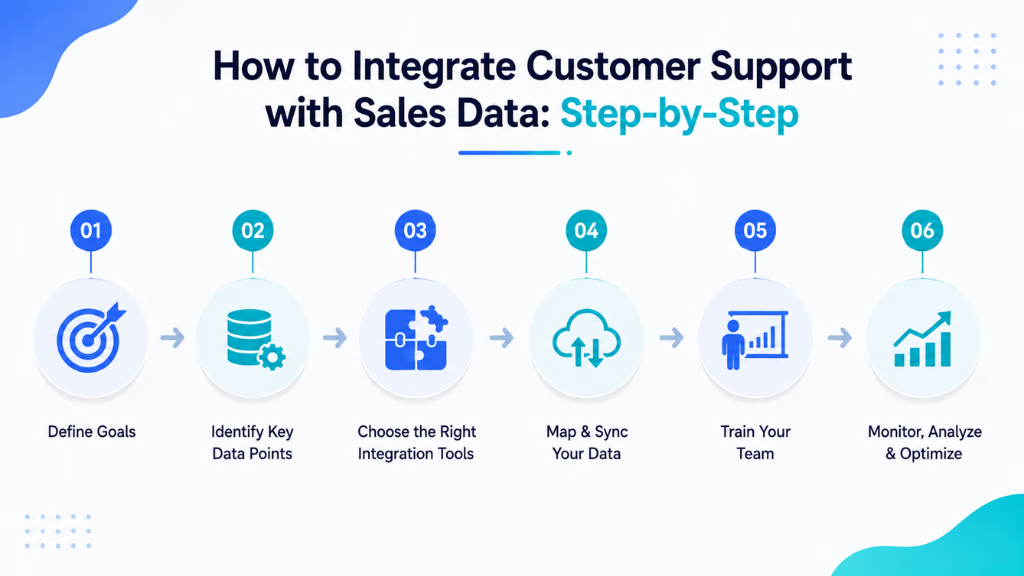
How to Integrate Customer Support with Sales Data: Step-by-Step
Bringing together support and sales data requires careful planning and collaboration. Every team, from IT to the frontline, should know the roadmap and what success will look like. Get ready to break down silos and finally see the whole customer.
What You’ll Need Before You Start
- Buy-in from support, sales, operations, and IT teams
- Access to all systems holding customer data (CRM, helpdesk, chat, telephony, etc.)
- A clear plan for data privacy and permissions
- Internal champions to guide process changes
1. Align on Shared Business Outcomes
Every integration project must start with a common goal. In my experience, teams lose focus when they skip this step. Agree what you want to achieve, such as reducing churn, increasing upsell, improving CSAT, or speeding up response times.
Decide on shared KPIs and examples, such as:
- Churn rate changes after support-to-sales handoff
- Upsell rates triggered by support conversations
- CSAT improvement tied to unified customer records
The real issue is misaligned priorities: make sure everyone points in the same direction before touching any data.
2. Audit and Map Your Data Sources
You cannot unify what you have not mapped. List every system where customer conversation or sales data sits—CRM, helpdesk, chat app, phone logs, email, WhatsApp.
Make a table for the main fields in each system. Map fields like customer ID, email, phone number, account name, ticket ID, and sales status. Check for duplicates and clarify who owns each piece of data.
Example Mapping Table:
| System | Unique ID | Phone | Account | |
|---|---|---|---|---|
| Helpdesk | Ticket ID | Yes | Yes | Yes |
| CRM | Account ID | Yes | Yes | Yes |
| Chat | Conversation | Yes | Sometimes | No |
| Phone | Sometimes | Yes | No |
Addressing duplicates now prevents big problems later.
3. Standardize Customer Records and Fields
Different formats or missing data kill integration projects. Standardize every key field—use the same format for phone numbers, emails, and names. Remove or merge duplicates using rules.
Adopt ongoing data hygiene practices to clean new records as they enter. In my POV, this step never ends; assign owners for data quality.
4. Create a Single Customer View Across All Channels
Connect conversation histories and transactions so every agent sees the full journey. This unified profile enables both teams to respond faster and smarter.
Platforms like Commplify unify all customer conversations—voice, chat, SMS, email, and WhatsApp—into one timeline for support and sales. No more hunting for history across ten tabs or missing context before a critical call.
5. Choose Real-Time vs. Scheduled Sync Logic
Decide how often your systems update. Real-time sync means every update is visible right away—great for active accounts or sales handoffs. Scheduled (batch) syncs work for routine, less urgent updates.
When I worked with teams handling rapid sales cycles, real-time syncs prevented embarrassing mistakes and customer frustration. Consider business impact, not just technical effort.
6. Automate Cross-Team Workflows and Alerts
Manual handoffs or missed signals are the biggest blockers for most companies. Use automation to drive alerts—like flagging new leads, follow-up reminders, or at-risk accounts.
No-code workflow automation, as in Commplify, lets you trigger actions, alerts, or escalations based on customer signals across channels. This reduces errors and helps support and sales work together, not in parallel.
7. Track Metrics and Outcomes with Actionable Dashboards
Integration is pointless if you cannot measure progress. Create dashboards for each role, showing their most relevant KPIs—CSAT, churn, NPS, upsell, revenue influenced by support.
Give frontline staff real-time panels, while leadership gets account health and business trends. In my experience, starting with role-based views speeds up adoption and identifies gaps early.
8. Establish Data Governance and Continuous Improvement
Set clear rules for who owns what data, who can access it, and how changes are tracked. Ongoing audits and feedback keep your integration fresh and compliant.
Most mature CX teams schedule regular quality reviews. The mistake I see often is leaving governance as an afterthought—treat it as a critical process.
Common Mistakes When Integrating Customer Support and Sales Data
The road to unified data is paved with repeated errors. I have seen teams sink time and money by focusing only on technology, or by missing important steps in preparation.
- Skipping field standardization, leading to mismatched or duplicate records
- Treating integration as a one-time IT job instead of a business process change
- Ignoring channels like voice, WhatsApp, or SMS
- Weak data governance and lack of access control
- Not involving frontline staff from the start
- Neglecting ongoing data quality and error reviews
Avoiding these mistakes will save you more pain than any tool or platform.
How Commplify Empowers Unified Support-Sales Integration
Bringing together support and sales data across all channels is complex, especially when every customer uses a different mix of chat, phone, or messaging apps. The real value is in connecting every conversation—voice, chat, SMS, email, WhatsApp—into a single history.
Commplify gives teams one inbox for every channel, so agents and sales reps never miss context. Its visual workflow automation triggers alerts and updates based on what happens in any channel, across any team. Role-based dashboards show each team member what matters most, while deep analytics and continuous data quality controls ensure everything stays clean and actionable.
This approach makes it possible to realize the business value of integration—not just connect more software.
Conclusion
Integrating customer support with sales data is not just about technical connections—it transforms how teams help customers and drive growth. The right process starts with alignment, cleans up the data, and makes sure every interaction is visible.
Platforms like Commplify, with true omnichannel conversation management and workflow automation, remove the hardest barriers. They make it practical for every team member to act on full customer context.
In my experience, those who commit to both technology and process win trust, save effort, and find new growth in every conversation. The future of CX is unified, AI-empowered, and always improving.
FAQs
What is customer support and sales data integration?
It means connecting support and sales data from all channels to create one customer record that both teams can access.
Why is it important to unify support and sales data?
Unified data improves customer experience, prevents duplicate work, and lets teams find churn and upsell opportunities.
What types of data should be integrated between support and sales?
Include contact details, interaction history from all channels, open tickets, sales activity, account health, CSAT, and churn signals.
How does integrating support with sales data improve customer experience?
It gives agents and sales reps a complete view, speeds up responses, and creates more personal and relevant interactions.
Should support data be synced into the CRM?
Yes, syncing support activity into the CRM ensures a full customer view for both support and sales.
How often should you sync data between support and sales?
For active accounts, real-time sync is best. For routine updates, daily or scheduled sync may be enough.
What tools can help integrate customer support and sales data?
Platforms like Commplify unify conversations and automate workflows between support and sales data in one system.
How do you prevent duplicate customer records when integrating systems?
Use unique identifiers, standardize fields, and apply deduplication rules with ongoing data hygiene.
What metrics should be tracked after integrating support and sales data?
Track CSAT, NPS, churn, upsell conversion rates, support-influenced revenue, and resolution speed.
How do you maintain data quality after integration is complete?
Run regular audits, assign data stewardship, and build feedback loops to catch errors and keep records current.
This page was last edited on 2 July 2026, at 6:01 am