Quick Answer
CX automation tools standardize multi-step processes using workflow automation, AI triggers, and omnichannel orchestration. They reduce manual error, increase compliance, and ensure consistent customer service across channels by tracking, routing, and escalating every customer interaction.
Every CX leader has faced the chaos that comes from fragmented workflows. Inconsistent handoffs, missed steps, and channel silos add friction for both agents and customers.
I have seen teams chase after lost tickets, escalate at the wrong time, or break compliance rules—all because processes were not standardized. The stakes are high: rising costs, damaged reputation, and regulatory risk.
This guide walks you through how CX automation tools bring order and reliability to complex, multi-step customer journeys. You’ll get practical definitions, clear benefits, hands-on examples, best practices, and the honest pitfalls to avoid—rooted in real CX experience.
Why Standardizing Multi-Step CX Processes with Automation Tools Matters
Standardizing multi-step processes in CX operations removes ambiguity, reduces manual error, and creates a consistent experience across channels. You can see this play out in daily scenarios—one missed onboarding email or an unchecked complaint step can ripple out to affect CSAT and compliance.
The real issue is not just about efficiency but about delivering accountability and trust at every touchpoint. In my experience, teams relying on manual follow-ups often face:
- Dropped or mishandled requests
- Inconsistent responses to the same query
- Difficulty proving regulatory compliance
- Lost productivity from avoidable double work
Automation, when paired with process standardization, gives you a mapped, repeatable workflow—every customer is treated fairly, every exception gets flagged, and every metric is tracked. This is especially crucial for industries where a mistake can be costly, like healthcare, fintech, and BPOs.
How CX Automation Tools Standardize Multi-Step Processes
Customer experience often involves more than one simple action. A customer may start by asking a question, then need identity verification, ticket creation, order checking, payment support, follow-up messages, and sometimes human assistance. When these steps are handled manually, the experience can become inconsistent. One agent may follow the right process, another may miss a step, and customers may receive different answers depending on who handles the request.
CX automation tools solve this problem by turning repeatable customer service tasks into structured workflows. Instead of relying on memory or manual coordination, the tool follows a predefined process every time. This helps businesses deliver faster, more accurate, and more consistent customer experiences across different channels.
1. Mapping the Customer Journey Into Clear Workflow Steps
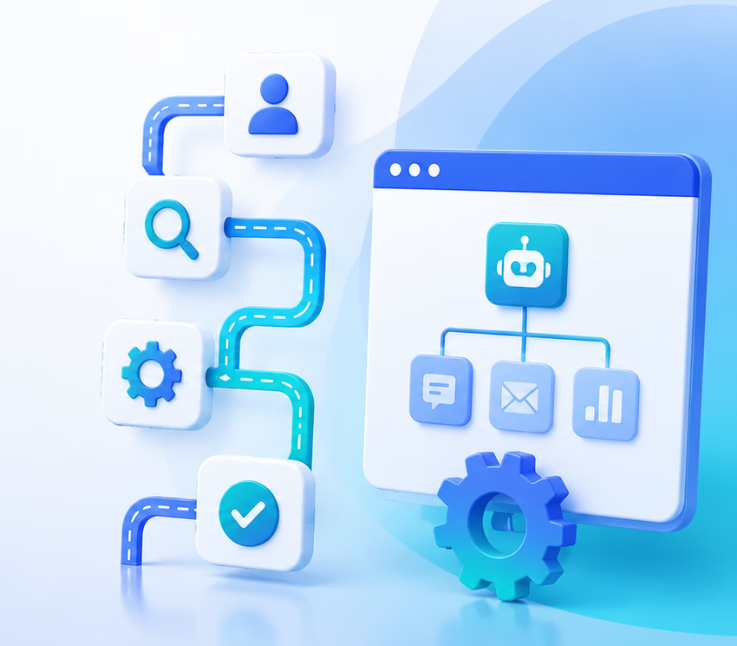
The first way CX automation tools standardize multi-step processes is by mapping the customer journey into clear stages. Every customer request usually follows a pattern. For example, a refund request may include checking the order number, confirming eligibility, asking for a reason, approving or rejecting the request, updating the system, and sending a confirmation message.
Without automation, these steps may be scattered across emails, spreadsheets, CRM notes, support tickets, and internal chats. A CX automation tool brings them together into one structured flow.
For example, a refund workflow may look like this:
Customer asks for a refund → AI collects order details → System checks refund policy → Ticket is created → Customer receives an update → Human agent reviews if needed → Final confirmation is sent.
This structure ensures that the same process is followed every time, regardless of which agent, channel, or department is involved.
2. Using Predefined Rules to Reduce Manual Errors
Manual customer support often depends on individual judgment. While human judgment is useful for complex situations, it can also create inconsistency in routine tasks. CX automation tools reduce this problem by applying predefined rules to common customer interactions.
These rules can decide what happens next based on customer intent, order status, urgency, customer type, location, language, or previous interaction history.
For example:
If a customer asks about order tracking, the system can automatically fetch the tracking link.
If a customer reports a billing issue, the tool can route the request to the finance team.
If a VIP customer submits a complaint, the workflow can prioritize the ticket.
If the customer’s issue is complex, the AI can escalate it to a human agent.
By applying the same rules every time, businesses reduce missed steps, wrong routing, duplicate work, and delayed responses.
3. Standardizing Responses Across Multiple Channels
Customers now contact businesses through phone, live chat, email, social media, website forms, and messaging apps. The problem is that each channel can create a different experience if the process is not standardized.
A customer who sends an email may receive a detailed answer, while someone using live chat may get a short or incomplete response. A phone caller may be told something different from what is written in the help center. These gaps can damage trust.
CX automation tools help standardize responses across every channel. They use approved templates, knowledge bases, AI-generated answers, and workflow rules to make sure customers receive consistent information.
For example, if a business updates its return policy, the automation tool can use that same updated information across chat, email, and voice support. This prevents outdated or conflicting answers from reaching customers.
4. Automating Repetitive Tasks Within the Process
Multi-step customer support often includes many repetitive tasks that do not need full human attention. These tasks slow down agents and increase the chance of errors.
CX automation tools can handle routine actions such as:
Collecting customer details
Verifying account information
Creating support tickets
Assigning requests to the right team
Sending confirmation emails
Updating CRM records
Triggering follow-up reminders
Sharing order or appointment status
Collecting feedback after resolution
When these tasks are automated, agents do not have to manually repeat the same actions for every customer. This keeps the process faster and more reliable.
For example, after a customer submits a support request, the system can automatically create a ticket, tag the issue type, assign it to the correct department, send a confirmation message, and update the customer profile. The agent can then focus on solving the actual issue instead of setting up the process manually.
5. Creating Consistent Handoff Between AI and Human Agents
One of the biggest challenges in CX automation is knowing when the AI should stop and a human agent should take over. Fully automated customer service can frustrate customers if they are stuck with a bot during a complex or emotional issue.
A strong CX automation tool standardizes the handoff process. It can detect when a request needs human support and transfer the conversation with full context.
For example, the system can pass important details such as:
Customer name
Issue summary
Previous conversation history
Order or account details
Urgency level
Suggested next action
Channel used by the customer
This means the customer does not have to repeat everything again when a human agent joins. It also helps the agent understand the issue quickly and continue the conversation smoothly.
This kind of standardized handoff is important because customers want automation to make support easier, not colder or more confusing.
6. Keeping Teams Aligned With One Source of Truth
A multi-step customer process often involves several teams. Sales, support, billing, operations, and technical teams may all touch the same customer journey. If each team uses a different tool or process, information can easily get lost.
CX automation tools help by keeping customer data, workflow status, notes, and next steps in one connected system. This creates a single source of truth for everyone involved.
For example, when a support agent updates a ticket, the sales team can see the customer’s issue before making a follow-up call. When a payment issue is resolved, the customer success team can receive an automatic update. When a customer submits feedback, the product team can review patterns without manually collecting reports.
This reduces internal confusion and helps every department work from the same customer context.
7. Improving Response Speed Without Sacrificing Quality
Speed is one of the biggest reasons businesses adopt CX automation platforms. Customers do not want to wait hours or days for simple answers. However, fast support is only valuable when the answer is accurate and helpful.
CX automation tools standardize multi-step processes by making fast responses part of a controlled workflow. Instead of rushing through tasks manually, the system follows the correct steps quickly.
For example, when a customer asks about delivery status, the tool can instantly identify the customer, find the order, check the shipping update, and send a clear response. This process may take a human agent several minutes, but automation can complete it in seconds.
At the same time, the workflow ensures that the answer is based on approved data, not guesswork.
8. Tracking Every Step for Better Performance
Another benefit of CX automation is visibility. Manual processes are difficult to measure because steps may happen in different tools or private conversations. CX automation tools track each part of the process, making it easier to identify delays, errors, and improvement opportunities.
Businesses can monitor metrics such as:
Average response time
Ticket resolution time
Number of escalations
Common customer questions
Workflow completion rate
Customer satisfaction score
Agent workload
Automation success rate
This data helps teams understand where the process is working and where it needs improvement. For example, if many customers are being escalated during the same step, the business may need to improve its chatbot response, knowledge base, or routing rule.
9. Making Customer Experiences More Predictable
Standardization does not mean making every customer interaction robotic. It means creating a reliable process that customers can trust.
When CX automation tools are used correctly, customers know what to expect. They receive faster replies, clearer updates, fewer repeated questions, and smoother transitions between channels or agents.
For businesses, this creates a more predictable operation. Teams can handle higher support volume without losing control of quality. Managers can identify bottlenecks faster. Agents can spend less time on repetitive admin work and more time solving meaningful customer problems.
Real-World Example: Mapping an End-to-End Omnichannel Workflow
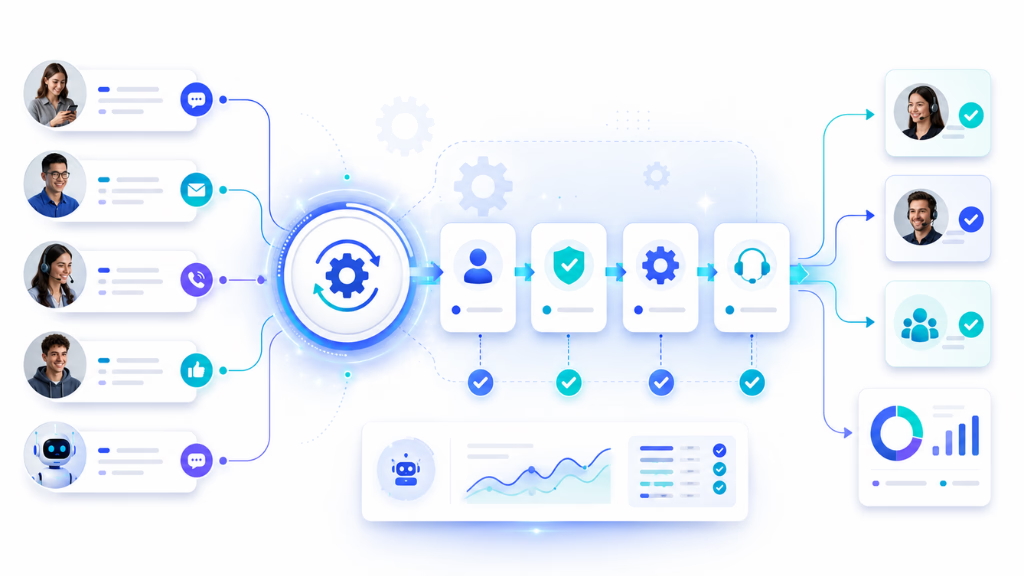
Let’s walk through a typical support scenario:
- A customer raises a complaint on chat.
- The system recognizes urgency with intent detection and triggers triage.
- The AI agent gathers details, checks knowledge base, and responds.
- If the issue is complex, a workflow escalates the case to a human agent—who lands with full conversation history across voice, chat, and email.
- After resolution, the system sends a cross-channel update (SMS/email), logs the interaction, and prompts for CSAT.
Every step is tracked. Compliance flags can trigger automatic reviews. Managers have a complete, searchable history—making audits straightforward.
Commplify’s workflow builder, for example, lets you map out this entire journey visually. Triggers span channels, exception routes are built in, and the conversation history is unified in one inbox. Teams can adjust logic on the fly, supporting both automation and human interventions when needed.
Best Practices for Implementing Standardized CX Process Automation
Automating CX workflows brings huge benefits only if you design, monitor, and refine processes with care. In my experience, I recommend these steps:
- Start by identifying “automation-ready” workflows—look for repetitive, rules-based processes that are prone to error.
- Ensure every channel your customers use—voice, email, chat, SMS, WhatsApp—is covered and integrated to avoid silos.
- Balance automation with human touchpoints—use automation to handle the front lines, but always plan for human review, especially for exceptions or sensitive cases.
- Monitor workflows closely. Use analytics to surface bottlenecks, dropped steps, or negative sentiment, then refine.
- Govern your automation with clear rules: who can update flows, how versions are managed, and how data is secured—especially in regulated industries.
- Scale automation thoughtfully. Pilot, prove, and then standardize processes before applying them organization-wide.
Resist the urge to automate everything at once. The mistake I see often is teams diving in too broadly and losing sight of quality.
Common Pitfalls and How to Avoid Them
Poorly designed automation can introduce new problems while solving old ones. I have seen these traps firsthand:
- Over-automation creates rigid, robotic experiences that frustrate customers.
- Channel-by-channel automation leaves gaps where context is lost and handoffs fail.
- Lack of exception handling causes outlier cases to stall or get mishandled.
- Security and compliance requirements can be overlooked in the rush to automate.
- Teams fail to use analytics to close process gaps, leading to repeated errors.
Checklist of pitfalls to avoid:
- Automate with a process map, not in isolation.
- Build in human review steps for sensitive/complex journeys.
- Keep exception management front and center.
- Ensure all channels feed into a single, unified workflow.
- Regularly audit workflows for compliance and data handling.
How Commplify Enables Standardized, Omnichannel Workflow Automation
According to PwC, nearly 80% of American consumers value speed, convenience, knowledgeable help, and friendly service as the most important parts of a positive customer experience.
Let’s use a practical example from e-commerce to illustrate. Imagine a customer wants to return an order and starts the conversation on chat:
- Trigger: Customer opens a chat and selects “Return an Order.”
- Workflow: The system (via Commplify) gathers the reason, verifies eligibility from CRM, then automatically initiates the return process.
- Cross-Channel Sync: If customer wants, the system sends updates via email and SMS; agents can reply from the same unified inbox if escalation is needed.
- Exception Handling: If certain conditions are met (e.g., high-value return, flagged item), the workflow escalates to a manager—conversation history follows, so nothing is lost.
- Conversation Management: Every step carries a unique reference, and managers can see the interaction trail across every channel, with notes or tags added by agents.
In my experience, this approach means teams avoid the “where is the customer now?” confusion. Omnichannel triggers and visual workflow logic make it easy for operations leaders to adapt, audit, and evolve their processes as needs change.
Conclusion
Standardizing multi-step workflows with CX automation tools is not just a technology upgrade—it is a fundamental shift in how support operations deliver reliability at scale. By mapping out every step, integrating all channels, and layering in intelligent automation, you protect your brand’s promise and keep customers at the center.
Commplify’s visual workflow automation supports this transformation, bringing together triggers, actions, and real-time conversation management in a single platform. It makes standardization achievable—even for complex, cross-channel journeys.
In my POV, the future of CX belongs to those who move beyond manual tracking. Agentic, intelligent workflows are now within reach. The next step is to map your highest-impact processes, pilot thoughtful automation, and measure what matters. Platforms like Commplify can amplify your efforts—if you put process and people first.
FAQs
What are multi-step processes in customer experience?
Multi-step processes involve a series of actions or stages that a customer service issue passes through, such as onboarding, support resolution, or handling returns.
What is workflow automation in CX?
Workflow automation in CX is using software to trigger, route, and track routine customer service tasks, reducing manual steps and increasing consistency.
How do CX automation tools standardize processes across channels?
CX automation tools use triggers, conditional logic, and channel integrations to ensure every step—regardless of channel—follows the same mapped process.
What are the key benefits of automating multi-step workflows in customer service?
The key benefits are fewer errors, faster response times, better compliance, reduced costs, and higher customer satisfaction.
How do automation platforms handle exceptions in multi-step CX workflows?
Platforms handle exceptions with conditional logic, escalating cases to human agents or managers when rules or thresholds are met.
What role does AI play in CX workflow automation?
AI analyzes intent, sentiment, and context to guide routing, triage, and exception management for more adaptive automation.
How do I select a CX automation tool for multi-step workflows?
Select tools that offer visual workflow builders, strong integrations, omnichannel support, robust analytics, and human-in-the-loop capabilities.
What are some examples of automated multi-step workflows in customer experience?
Examples include onboarding, order returns, appointment scheduling, complaint handling, policy updates, and missed-call recovery.
How do I integrate CX automation tools with my current systems?
Integration is done through APIs, direct app connections, and workflow steps that connect to your CRM, helpdesk, or ERP.
How can I measure the impact of workflow automation on CX outcomes?
Track metrics like response time, completion rates, escalation frequency, CSAT, sentiment, and first-contact resolution using analytics dashboards.
This page was last edited on 24 June 2026, at 4:46 am